

Google Ads is Google’s online advertising platform that lets businesses appear in front of users who are actively searching for products, services, or information. These ads can show up in search results, on YouTube, in Gmail, on Google Maps, and across millions of partner websites in the Google Display Network.
But it’s more than just visibility. The platform is powered by intent. Unlike traditional or interruptive ads, Google Ads activates when a person is looking — not when they’re scrolling.
If someone searches “emergency root canal Montreal” or “best email platform with automation” — they’re already motivated. Google Ads is designed to capture and convert that moment of high intent.
How the Google Ads Auction Works
Every time someone searches, Google runs an instant auction behind the scenes. Multiple advertisers may want to show up for that keyword. The system quickly calculates which ad to show, and in which position.
Here are the key factors that influence this decision:
- Your Bid: How much you’re willing to pay for a click
- Ad Relevance: How closely your ad copy matches the search term
- Landing Page Experience: Does your page load fast and deliver on the promise?
- Expected Impact: Click-through rate, ad extensions, and user behavior signals
These factors create what Google calls Ad Rank. A higher Ad Rank usually means better visibility and a lower cost per click. This means you don’t always have to outbid your competitors—you just have to be more relevant and useful.
Why Google Ads Is So Effective
The biggest strength of Google Ads is timing.
When someone searches for something, they’re declaring intent. Whether it’s “buy standing desk online” or “hire a B2B SEO agency,” that person is already halfway down the purchase funnel.
Other major advantages:
- Instant top-of-page visibility
- Control over targeting by device, location, and time
- Transparent performance data (clicks, conversions, revenue)
- Daily budget flexibility ($10/day or $10,000/day)
- Remarketing options to re-engage past visitors
Unlike display or social ads, Google Ads doesn’t just build awareness—it closes the gap between search and solution.
Campaign Types in Google Ads
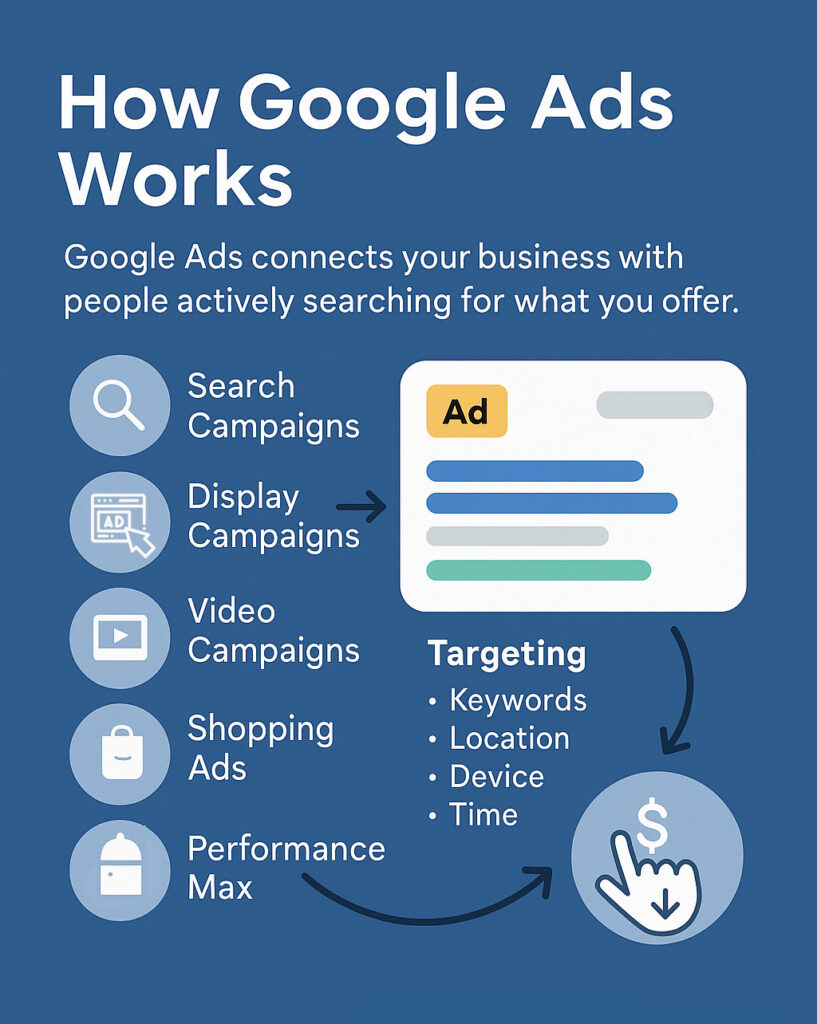
Google Ads provides several distinct campaign formats, each suited to specific marketing goals and stages of the buyer journey. Choosing the right one directly impacts your efficiency, ROI, and visibility.
- Search Campaigns
These are keyword-triggered text ads shown directly in Google Search. They’re intent-driven and ideal for capturing demand from users who are actively looking for a solution. For businesses offering services, Search Campaigns are often the most cost-efficient entry point because they meet users at the moment of decision. - Display Campaigns
Visual banner ads that appear across Google’s Display Network (millions of websites and apps). These are best for top-of-funnel awareness, remarketing, or branding. They offer lower CPCs but also lower intent compared to Search. - Video Campaigns
These run on YouTube and are used for storytelling, brand reinforcement, and pre-roll engagement. Video ads can be highly effective for niche targeting or retargeting, particularly when paired with strong visual hooks. - Shopping Ads
Designed specifically for e-commerce businesses, Shopping Campaigns show product images, titles, and prices directly in search results. They are data-feed-driven and heavily reliant on product quality, pricing, and merchant ratings. - Performance Max Campaigns
A fully automated format that uses machine learning to distribute ads across Search, Display, YouTube, Gmail, and Discover. While it reduces manual control, it offers broad reach and dynamic optimization. Best used after a brand has baseline data and strong creative assets.
Key Takeaway:
Start with Search if you’re targeting leads or service inquiries. Expand into Display or Performance Max once you have data to optimize and budget to scale.
Targeting in Google Ads

One of the core strengths of Google Ads is its ability to deliver ads with precision. The platform lets advertisers reach users based on behavior, location, timing, and search relevance. Proper targeting isn’t just about reach — it’s about relevance.
- Keywords
The foundation of Search Campaigns. You target terms that people type into Google, filtered by match types: broad, phrase, exact. Keywords signal user intent — targeting high-intent keywords often yields better ROI than high-volume ones. - Location
Ads can be shown in entire countries, regions, cities, or within a tight radius around a physical address. Geo-targeting ensures your ads appear only where your business is relevant, helping you avoid wasted impressions and clicks. - Device
You can adjust bids or even exclude specific devices like desktop or mobile, depending on performance. For example, mobile-first campaigns are essential for local services, while desktop may dominate B2B lead gen. - Time of Day (Dayparting)
Ads can run only during certain hours or days of the week. This allows businesses to sync ad delivery with sales hours, support availability, or peak customer engagement periods. - Audiences
Google’s audience targeting allows for more advanced segmentation. You can layer in: - In-market audiences (people actively researching similar solutions)
- Affinity audiences (broad interests)
- Custom segments (based on URLs, search terms, or app usage)
- Remarketing audiences (past site visitors or converters)
- Negative Keywords
Equally important. These prevent your ads from showing for irrelevant searches. For example, a paid SaaS product might add “free,” “open source,” or “torrent” as negative keywords to filter out non-converting clicks.
Key Takeaway:
Good targeting in Google Ads isn’t just about who you reach — it’s about who you avoid. Combining keyword precision with layered audience and location targeting produces cleaner traffic, better engagement, and lower acquisition costs.
How Campaign Structure Works
Google Ads is structured for precision. Each layer defines a different aspect of control:
- Account: This is your base. It holds billing info, user permissions, linked tools like Google Analytics, and conversion tracking configurations. Think of it as your command center.
- Campaigns: Each campaign sets your core strategy. Here you define your daily budget, geographic targeting, bidding strategy, and network placement (Search, Display, Shopping, etc.). You should separate campaigns based on major business goals or product categories.
- Ad Groups: These live inside campaigns and group keywords by intent or theme. An ad group that mixes unrelated keywords leads to lower ad relevance, poor Quality Scores, and wasted budget.
- Ads: This is what the user sees. Multiple ads can live in each ad group. Google rotates and tests them, favoring the ones with stronger performance.
When all three layers — keyword, ad text, and landing page — deliver the same message, you increase Quality Score, reduce cost per click, and improve your ad rank without raising your bid.
Metrics That Matter
Hundreds of metrics can distract. Focus on the ones that reflect business performance:
- Conversions: These are real outcomes — form fills, phone calls, purchases. Everything else feeds into this.
- Conversion Rate (CVR): How well your traffic performs. A high CVR means your ad and landing page are well-matched to user intent.
- Cost Per Conversion: Tells you how much you’re paying for a real result. It’s the number to benchmark ROI.
- Search Terms Report: This shows what people actually searched before clicking. It helps refine keyword targeting and remove irrelevant traffic.
- Impression Share: Reveals how often your ads are showing compared to how often they could. A low share may mean budget caps or weak bids.
CTR and CPC matter, but they’re secondary. If traffic doesn’t convert, those metrics are vanity.
Why Google Ads Fails for Some Businesses

Google Ads is powerful — but only if managed with strategy and discipline. Here’s what commonly goes wrong:
- Overly Broad Keywords: Bidding on single-word or generic phrases leads to irrelevant traffic and low intent.
- Generic Ad Copy: Ads that look like everyone else’s won’t earn attention or trust. Relevance and specificity win.
- Poor Landing Experience: If the page doesn’t load fast, match the ad’s promise, or guide the user to action, you’re burning money.
- No Conversion Tracking: Without tracking, you’re optimizing for clicks, not outcomes. That’s blind spending.
- Lack of Iteration: Google Ads performance shifts weekly. No testing = no improvement. Markets evolve — so must your campaigns.
You’re not paying for visibility. You’re paying for measurable action. When that doesn’t happen, Ads becomes an expense — not an asset.
What We Do at 3MY
We don’t treat Google Ads as a checkbox. It’s a growth engine and we build it like one:
- Keyword Targeting That Matches Intent: We focus on search terms that indicate readiness to buy or act, not just high volume.
- Ad Copy That Converts: Each line is crafted to match user mindset, communicate value, and prompt immediate action.
- Landing Pages That Load and Sell: Mobile-first, conversion-focused, and built to support the promise made in your ad.
- Full-Funnel Tracking: From ad click to CRM entry, we capture and analyze the full path. That means better optimization decisions, faster.
- Weekly Optimization, Not Monthly Reports: We adjust bids, keywords, ads, and audiences continuously — not reactively.
We’re not trying to just lower CPCs. We’re increasing the value of every dollar spent.
Should You Be Using Google Ads?
If your customers are searching on Google — and you’re not there — you’re giving away leads to competitors. But it’s not for every business.
You should consider Google Ads if:
- You offer something that solves an urgent or specific problem.
- You have a site or funnel that can convert paid traffic.
- You want to scale with measurable results, not guesswork.
Even with a modest daily budget, if your offer is aligned, Google Ads can become your most predictable source of growth.
Request a Free Google Ads Audit
We’ll review your account, show you what’s underperforming, and outline the clearest next steps to turn search demand into actual revenue.
Let me know if you’d like to convert this into a Google Doc, export for web, or embed with visuals.