


Setting your Google Ads daily budget isn’t just a financial decision. It’s a strategic one. Spend too little, and your ads barely show. Spend too much, and you burn through budget without results.
The key is alignment: your budget should reflect your conversion goals, cost per lead, and how competitive your industry is.
Let’s break down how to approach it properly.
First: Understand What the Budget Actually Controls
Google Ads daily budget is the average amount you’re willing to spend per day per campaign. It’s not a hard cap — Google can exceed it on any given day by up to 2x, but won’t exceed your monthly limit (daily budget × 30.4).
That means:
- If your budget is too low, your ads may stop showing early in the day
- If it’s too high without proper controls, you may overpay for low-quality clicks
Step 1: Know Your Numbers
Start by answering these four core questions:
1. What’s your average cost per click (CPC)?
Use keyword planner or your past campaigns to estimate.
2. What’s your website’s conversion rate (CVR)?
How many visitors turn into leads or customers?
3. What’s your target cost per acquisition (CPA)?
How much are you willing to pay for a sale or lead?
4. How many conversions do you want per month?
Multiply your goal by CPA — that’s your rough monthly ad budget.
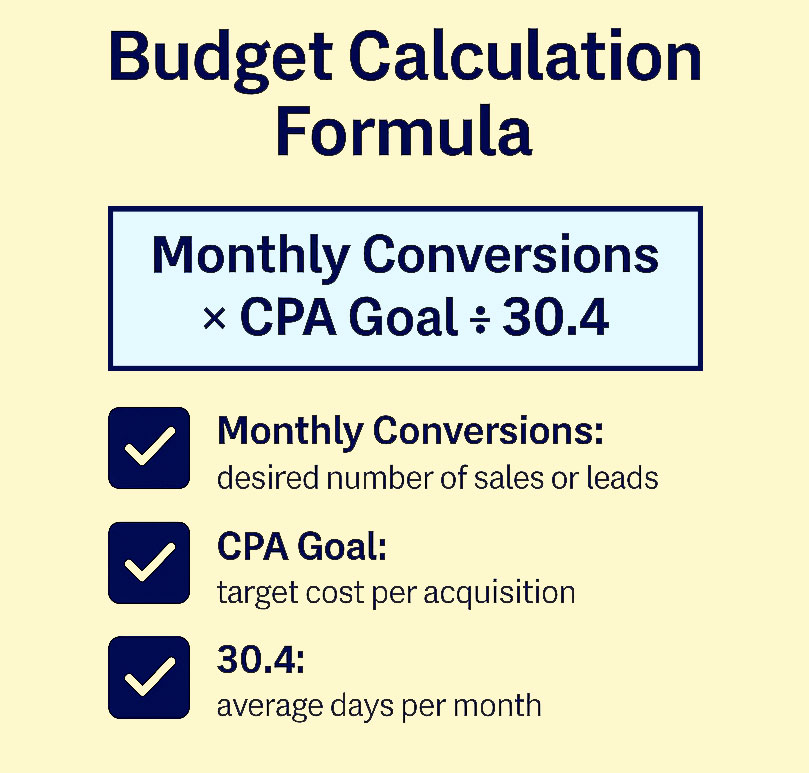
How to calculate your daily Google Ads budget:
Multiply your monthly conversion goal by your target CPA, then divide by 30.4 (average days per month).
Formula: Monthly Conversions × CPA Goal ÷ 30.4
Step 2: Align With Campaign Type and Funnel Stage
Different campaign types demand different budgets:
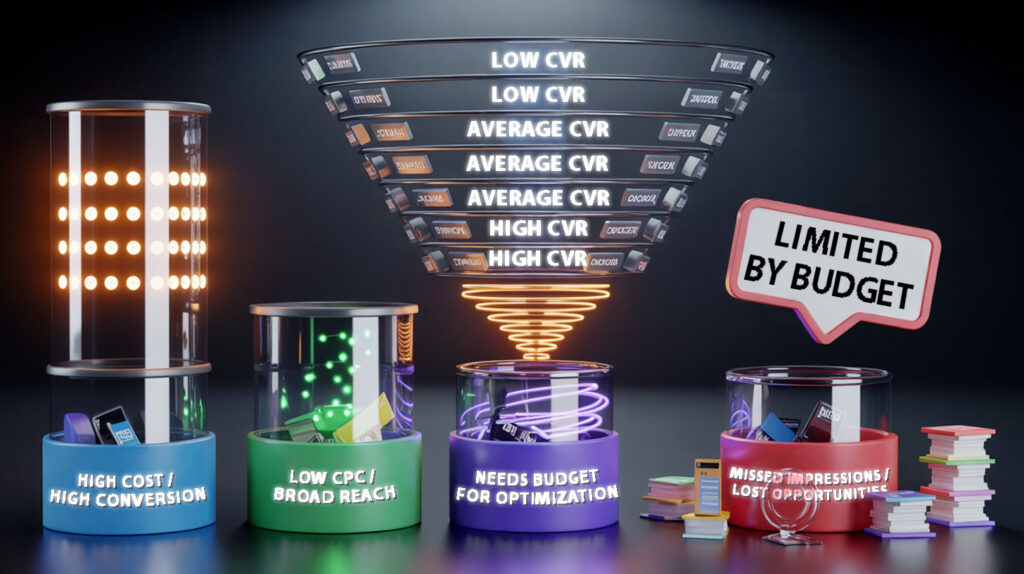
- Search campaigns (intent-driven): tend to be more expensive, higher conversion
- Display campaigns (awareness): lower CPC, broader reach
- Performance Max / Smart campaigns: require enough budget to give Google room to optimize
Also consider where your campaign fits in the funnel:
- Top of funnel: cheaper clicks, but lower CVR
- Bottom of funnel: expensive clicks, but closer to conversion
Balance accordingly.
Step 3: Watch for Budget-Limited Campaigns
Google will flag campaigns as “Limited by budget” when your settings restrict visibility.
Don’t ignore this. It means:
- Your ads aren’t showing as often as they could
- You’re likely missing impressions during high-intent searches
If your campaign is profitable and limited by budget — raise it. That’s the cleanest growth signal Google gives you.
One recent change matters here. As of August 17, 2026, budget-limited campaigns running Target CPA or Target ROAS perform more consistently toward the target you set instead of overshooting it: a campaign that used to beat a $10 target and land at $5 now drifts toward the $10 you asked for. If you have been reading that over-performance as headroom, revisit the target and the budget together.
Step 4: Test and Scale
There’s no perfect number on day one. You need to observe how performance behaves at different levels.
Start with a controlled budget, then expand based on:
- CPA stability
- ROAS trends
- Impression share
- Lost impression share due to budget (visible in reports)
Avoid scaling too fast. Let the algorithm gather data and learn before making large changes.
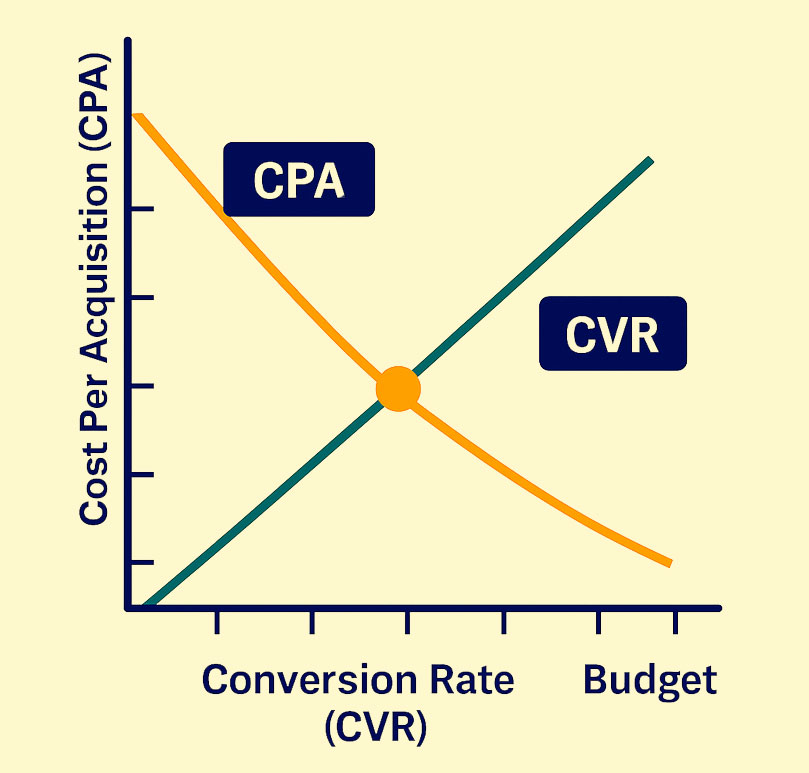
How budget impacts performance:
As your budget increases, Google Ads has more data to optimize delivery. This often leads to a higher conversion rate (CVR) and a lower cost per acquisition (CPA) — up to a certain threshold.
The sweet spot is where both metrics intersect efficiently. Beyond that, returns may diminish.
What We Recommend at 3MY
Here’s how we approach daily budgets for clients:
- Tie budget directly to goals, not guesses
- Start with test campaigns to establish cost baselines
- Segment campaigns by funnel stage, each with its own spend ceiling
- Monitor budget-limited alerts weekly
- Scale gradually, based on conversion cost and volume, not just click data
We also routinely compare spend to search volume — if your keywords only have $5/day of search activity, throwing $50/day at them won’t help.
Final Tip: Don’t Starve Smart Bidding
If you’re using Smart Bidding (like Maximize Conversions or Target CPA), underfunding your campaigns can cause erratic performance.
Give the system enough data to learn from. Google no longer publishes a hard minimum, but the working rule of thumb across the industry is 15–30 conversions per month per campaign before automated bidding has much to go on.
Not Sure If Your Budget Is Helping or Hurting?
If you’re guessing your daily spend — or just going by default settings — chances are you’re either overspending on low-value clicks or missing real opportunities.
We’ll review your spend patterns, benchmark your budget by industry, and give you a clear recommendation on what to change and why.










You want 50 leads/month, each worth $20.
50 × $20 = $1,000/month → ~$33/day