


Dynamic remarketing in Google Ads is an advanced strategy that allows you to show personalized ads to people who have previously visited your website. Instead of generic ads, dynamic remarketing uses your product or service feed to display the exact items or content each visitor viewed, making your ads highly relevant. It’s a powerful technique for eCommerce and other businesses with many products or offerings, because it automatically creates tailored ads for each user based on their browsing history.
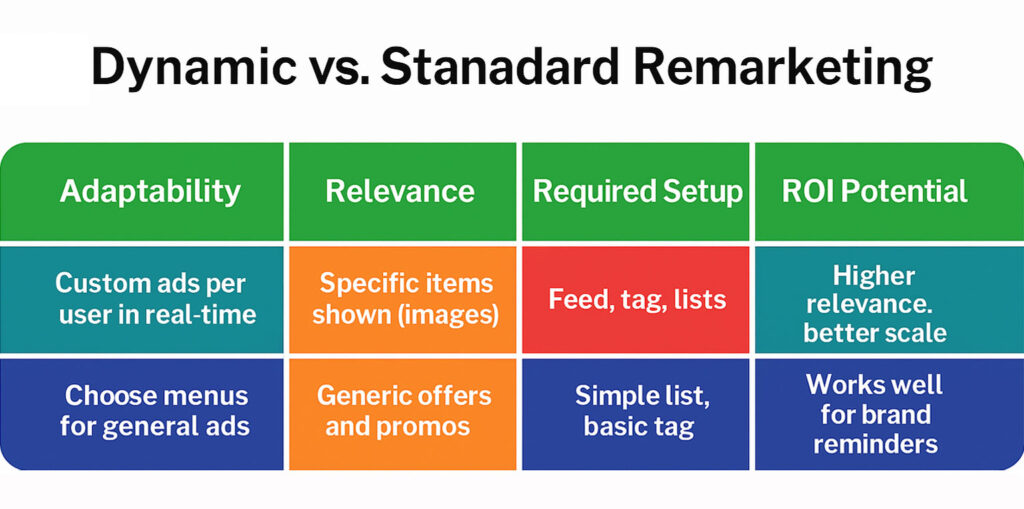
In contrast to standard remarketing (which shows the same ad to all past visitors), dynamic remarketing adapts ad content in real time for each user. For example, if a user looked at three specific products on your site, a dynamic remarketing ad can display those exact products (with their images, names, and prices) later on other sites – a level of personalization standard remarketing cannot achieve.
Standard remarketing is useful for general brand reminders or promotions, but dynamic remarketing excels at highly relevant, product-focused ads that align with each user’s demonstrated interests.
Benefits of Dynamic Remarketing
Dynamic remarketing offers several advantages for advertisers, especially those in retail and travel sectors:
- More relevant content → higher engagement
- Higher click-through and conversion rates
- Better use of the remarketing budget — spend follows people who already looked at a specific product
- Lower cost-per-click and better ROI
- Efficient scaling: generate ads for each product automatically
Once your product feed and templates are set up, Google can automatically assemble optimized ads for every user. It draws on your feed data (images, titles, prices, etc.) to personalize creative and even adjusts layouts and bids using machine learning. The result: personalized advertising at scale.
One caveat on the claim you will find in most articles on this topic: Quality Score is a Search-network diagnostic and does not apply to Display campaigns, which is exactly where dynamic remarketing runs. What relevance buys you here is a better click-through rate and a lower cost per conversion — not a Quality Score number.
Step-by-Step: Setting Up Dynamic Remarketing in Google Ads
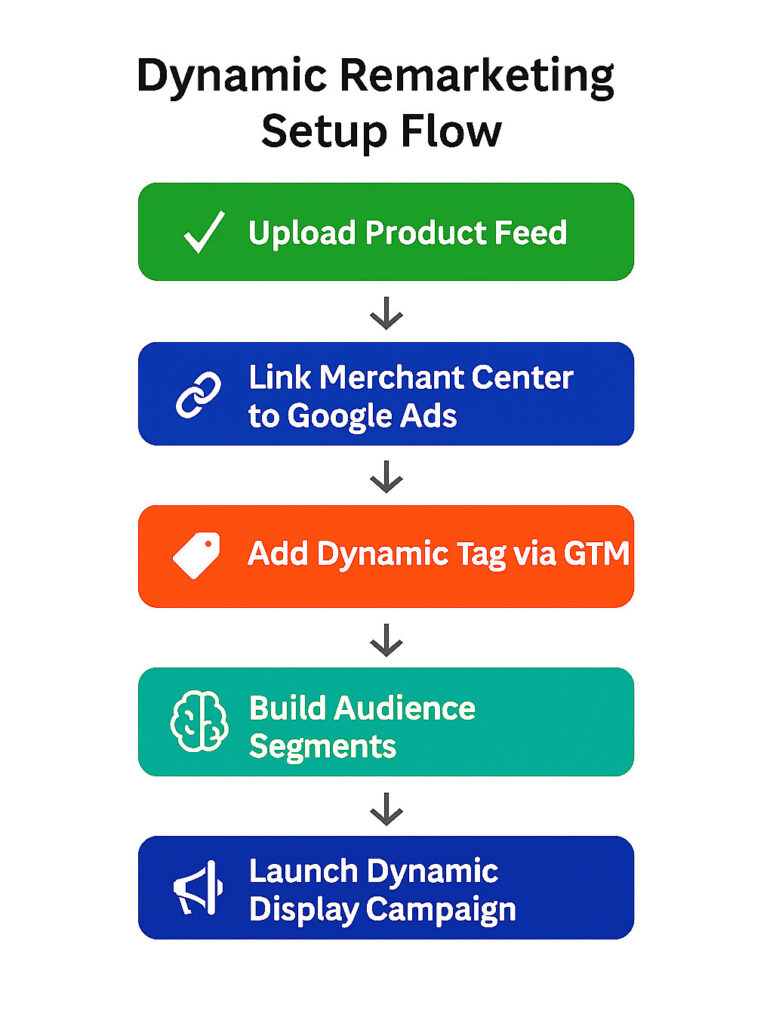
1. Connect a Product Feed and Merchant Center
- Prepare your remarketing feed with product IDs, names, image URLs, prices, etc.
- Upload the feed to Google Merchant Center
- Make sure the feed’s destinations include display ads
- Link Merchant Center to your Google Ads account
If you’re not a retail brand, build the feed yourself as a .csv, .tsv, .xls or .xlsx file and upload it to Tools > Business data in Google Ads, picking the template that matches your vertical — flights, hotels, education, jobs, travel, real estate, local deals or custom.
2. Install the Google Ads Remarketing Tag (with Dynamic Parameters)
- Use Google Tag Manager (GTM) to install the Google Ads remarketing tag
- Enter your conversion ID
- Enable dynamic remarketing in GTM settings
- Send the event parameters Google expects today: an items array carrying id and google_business_vertical. The older ecomm_prodid and ecomm_pagetype naming belongs to the legacy tag — and it is still what most tutorials show
- Create GTM triggers for page views, cart events, purchases
Make sure your website’s data layer exposes the right product and page information. This lets Google serve ads that match what each visitor previously viewed.
3. Enable Remarketing and Build Audience Segments
- Enable remarketing lists in Google Ads
- Go to Tools > Shared library > Audience manager and work in the Segments tab — Google now calls these data segments rather than remarketing lists
- Create segments for:
- All Visitors
- Product Viewers
- Cart Abandoners
- Past Buyers (exclude from general ads)
If using GA4, import audiences into Google Ads. Link GA4 and Ads accounts to sync audience data.
4. Create a Dynamic Remarketing Campaign
- Create a Display campaign in Google Ads
- Choose a conversion-based goal (Sales, Leads)
- In the dynamic ads section, choose “Use feed for personalized ads”
- Select your business type and linked feed
- Set budget and bidding (Target CPA or Target ROAS recommended)
- Add audience lists
- Use responsive display ads with feed integration
Google will mix product images and copy to auto-generate personalized ads based on your feed.
Best Practices for Dynamic Remarketing Success
Audience Segmentation & Campaign Structure
- Create different campaigns or ad groups for:
- Homepage visitors
- Product viewers
- Cart abandoners
- Tailor messaging per group
- Allocate budget and bids strategically
Leverage Automation
- Use Smart Bidding (Target CPA or Target ROAS)
- Enable creative optimization
- Rotate images and headlines to prevent ad fatigue
- Let Google adjust layout based on performance
Conversion Tracking and Attribution
- Set up conversion tracking in Google Ads or GA4
- Monitor ROAS, CPA, bounce rate, and session time
- Use data-driven attribution models for accurate value tracking
- Set frequency caps to avoid overexposure
- Exclude recent converters from ads
Dynamic remarketing is more than just a display tactic — it’s a full-funnel performance engine. By reconnecting with users who’ve already shown interest in your products or services, you dramatically increase the relevance of your advertising and shorten the path to conversion.
Yes, the setup involves several components — connecting a live product feed, deploying the correct tracking tags with dynamic parameters, and defining precise audience segments. But once in place, it creates a self-sustaining, highly targeted advertising ecosystem that adapts to each visitor and scales automatically as your traffic grows.
When executed with the right strategy — including audience segmentation, automated bidding, creative optimization, and ongoing analytics — dynamic remarketing becomes one of the most efficient and profitable tools in your Google Ads arsenal.
Need expert support? At 3MY, we don’t just launch campaigns — we engineer full-funnel remarketing systems tailored to your business. From data feed preparation and GTM configuration to audience logic, ad creative, and continuous optimization — we handle it all.
Let’s turn your traffic into conversions.









