

If you run a small business, chances are you’re tracking customers across email threads, spreadsheets, or mental notes.
And it works — until it doesn’t.
A spreadsheet doesn’t fail because it runs out of room: Excel holds over a million rows per sheet. It fails when two people open two copies of it, when the person who built the formulas leaves, or when nobody can say which version is current.
- A lead goes unanswered.
- A client slips through the cracks.
- Your best employee quits — and takes context with them.
Your competitors aren’t waiting for leads to get lost. They’re automating follow-ups, tracking every stage, and working from one place everyone trusts: a CRM.
Automated follow-ups come with rules attached. If you email people in Canada, CASL requires consent before a commercial electronic message goes out, and the CRM is where that consent is recorded and where an unsubscribe actually sticks. A spreadsheet has no memory of who said no.
What Happens Without a CRM
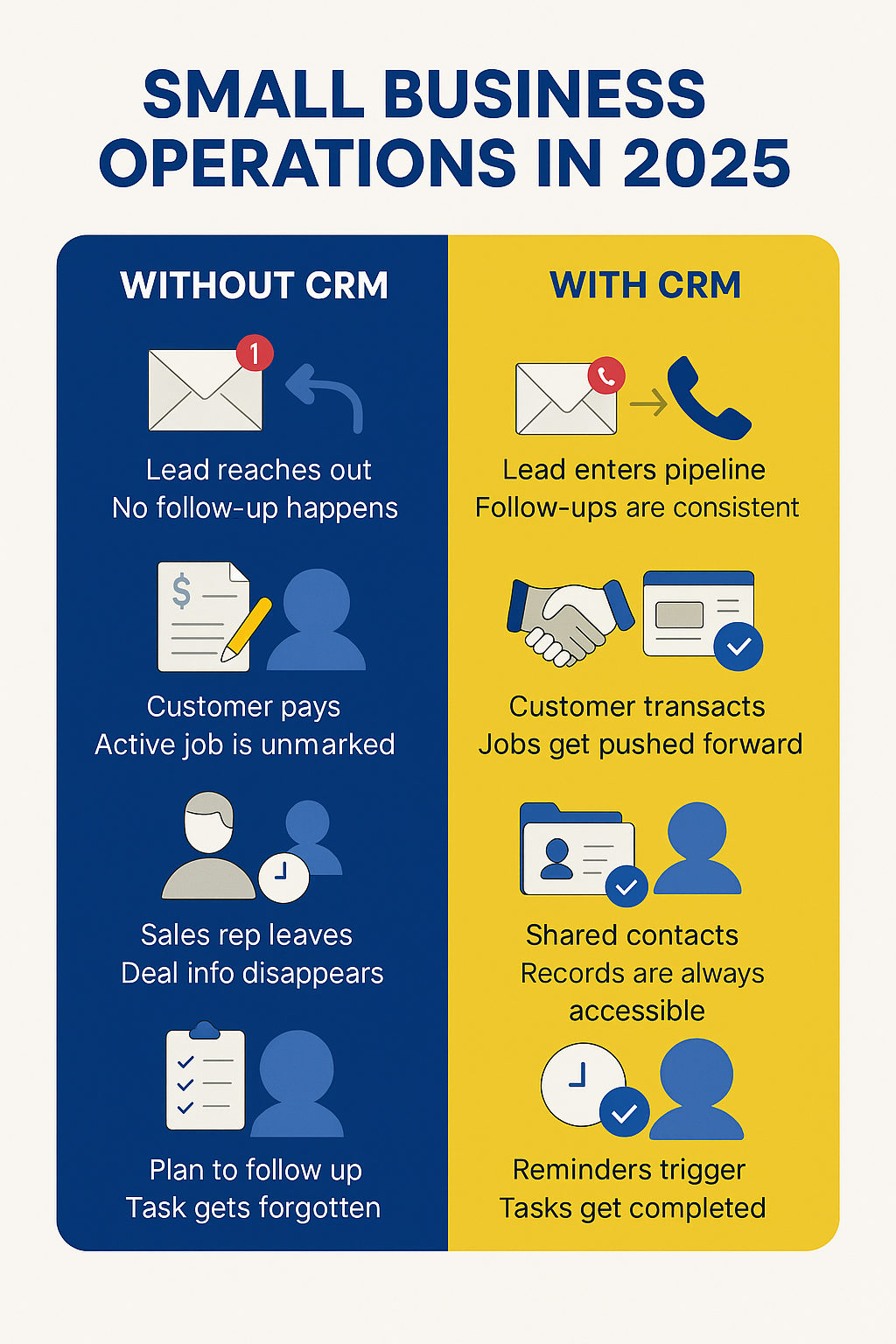
- A new lead reaches out. No one follows up until it’s too late.
- A customer pays. But fulfillment is delayed because no one marked the order as active.
- Your sales manager leaves. Along with deal notes, email history, and customer trust.
- You plan to follow up. Then forget. That deal goes cold.
Every one of these scenarios is silent revenue loss — and entirely avoidable.
There is a second cost that shows up later. Customer names, phone numbers and notes are personal information, and under Canada’s federal privacy law a business is responsible for how it is collected, used and kept. Scattered across four inboxes and a laptop desktop, nobody can even answer where it all is.
What a CRM Actually Solves
| Function | What It Fixes | Why It Matters |
|---|---|---|
| Deal Pipeline | Visualizes every lead stage | Everyone knows what’s active and what needs attention |
| Shared Contact History | Emails, notes, files all in one place | Context stays — even if people leave the team |
| Reminders & Follow-ups | No more forgotten calls or overdue proposals | Close more deals without chasing your own memory |
| Segmentation & Tags | Filter by status, industry, size, or priority | Easy targeting for sales and reactivation campaigns |
| Real-Time Analytics | Track source, funnel, win rate, and deal value | Stop guessing — start making data-driven decisions |
Why CRM Is Critical for Small Teams
In large companies, inefficiencies are absorbed. In small businesses, they’re painful and visible.
When 2–5 people run sales, ops, and service — having a central system means:
- No duplicated work
- No missed steps
- No scattered information
A CRM is the structure your brain no longer has to hold. It brings clarity, consistency and repeatability — without adding headcount.
Common Objections — Revisited
“We’re not big enough for a CRM.”
“CRMs are expensive.”
“Too hard to implement.”
What 3MY Does Differently
We don’t sell CRM licenses. We build operational clarity.
We help clients who:
- Lose track of leads and follow-ups
- Rely on spreadsheets or inboxes as a system
- Can’t tell what stage each client is in
- Need visibility without adding more staff
How we help:
- Audit your current sales & delivery process
- Recommend the right CRM — an off-the-shelf one where it fits, a custom system where it doesn’t
- Customize fields, pipelines, and automation
- Integrate it with email, forms, site, calendar
- Train your team to actually use it daily
Sometimes the honest answer is that no product on the shelf matches how the work runs. That is usually true for teams that spend the day on the road rather than at a desk: we wrote separately about why most CRMs don’t work for field-based teams, and about a contractor with roughly a hundred sites who needed his jobs on a map before he needed another pipeline view.
Not Sure If You Need a CRM — or Just a Smarter Setup?
We’ll review your current system (or lack of one), identify gaps, and tell you honestly whether a CRM would help — or if a simpler fix is enough.
No pressure. Just clarity from people who build real systems, not sales decks.









