


Your chatbot didn’t get an answer wrong because it’s “poorly trained.” It got it wrong because the answer wasn’t sitting in the place it was told to search — and because, by default, most setups let it fill that gap with whatever the underlying model already knew before you uploaded a single document. A chatbot knowledge base doesn’t remove that second possibility. It narrows it, some of the time, depending on a setting almost nobody checks.
That’s the part vendor pitches skip. “We’ll train your bot on your knowledge base” is a sales phrase, not a technical one. Read the documentation each model maker actually publishes, and the picture is more specific — and more useful to you as the person paying for it.
Vendors Don’t Even Agree on What to Call It
| Vendor | What they call it |
| OpenAI | vector store, via File Search |
| Anthropic | RAG — Retrieval Augmented Generation |
| grounding | |
| Microsoft | grounding data, “On Your Data” |
| Amazon | Knowledge Bases |
Amazon is the only one of the five that uses the words “knowledge base” the way salespeople do. Everyone else calls the same basic idea — find relevant documents, hand them to the model before it answers — by a different name: a vector store, a retrieval pipeline, grounding data. The label your vendor uses tells you which documentation to go read when something goes wrong. Right now, most business owners don’t know there’s documentation to read.
None of the five promise accuracy. Search any of these pages for confidence language and you get “reduces,” “minimizes,” “helps” — never “guarantees” or “eliminates.” That’s not a knock on one vendor over another. It’s the honest limit of what retrieval does: point the model at the right documents. It can’t force the model to use only them.
How a Chatbot Knowledge Base Actually Works
Microsoft publishes the most detail of the five on what happens when the system searches your documents and comes up short. Three things stand out.
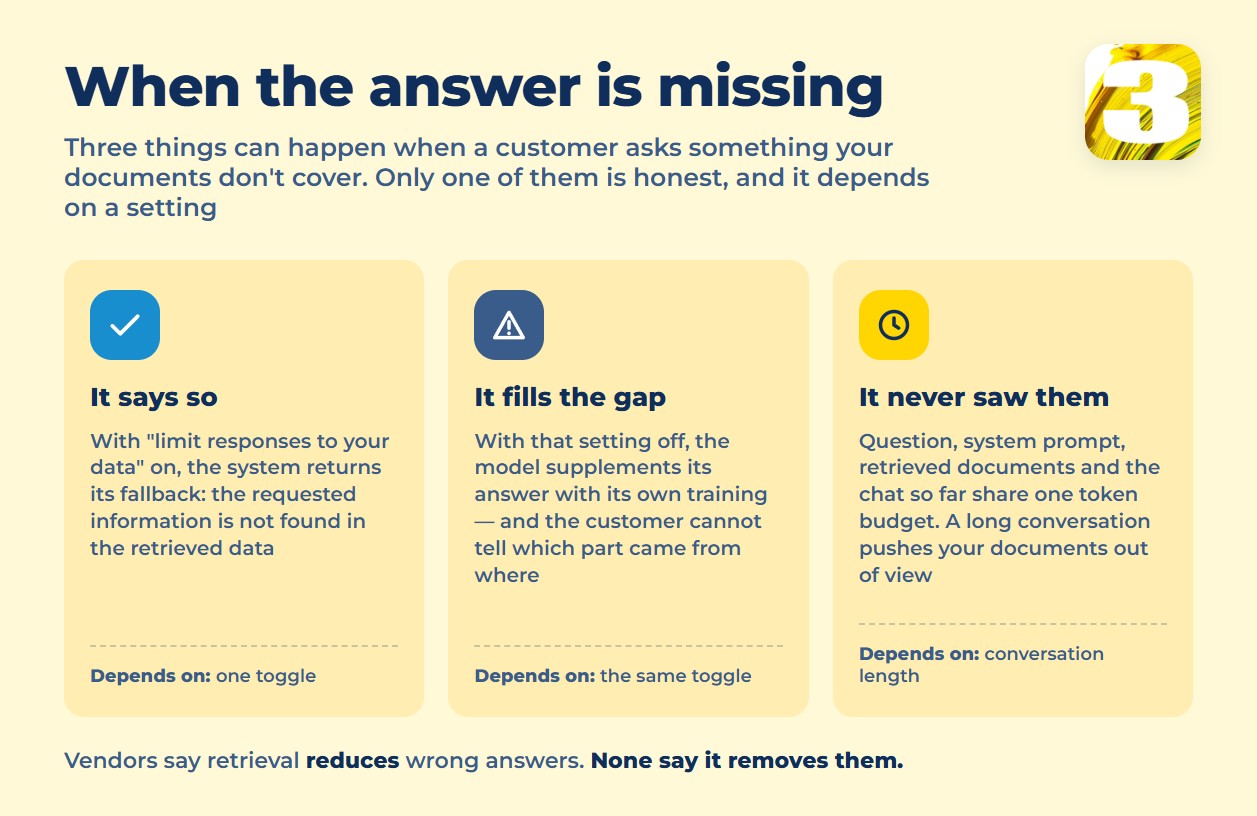
First, there’s a built-in fallback answer for when nothing relevant turns up: “The requested information is not found in the retrieved data. Please try another query or topic.” That’s the honest outcome — assuming the setting behind it is on.
Second, that fallback depends on a flag called “Limit responses to your data,” and it isn’t always on by default in every configuration. Microsoft’s own description of what happens when it’s off: “the model supplements its responses with its own knowledge in addition to your documents.” In plain terms — off means the bot mixes your documents with whatever it was trained on, and doesn’t tell the customer which parts came from where.
Third, document chunk size changes what kind of mistake you get, and conversation history eats the same token budget as your documents. Microsoft’s guidance ties the two together directly: too many “I don’t know” answers point to chunks that are too large; correct-but-incomplete answers point to chunks that are too small. And the token budget behind every response includes the question, the system prompt, the retrieved chunks — and the conversation so far. A long back-and-forth can quietly push pieces of your knowledge base out of the model’s view, one exchange at a time.
Put together, there are three things that can happen when a customer asks something your documents don’t cover: the bot says so honestly, it blends in whatever the model already knew before your documents existed, or a long conversation has already crowded your documents out of the answer.
Who Pays When the Bot Is Wrong
In *Moffatt v. Air Canada* (2024 BCCRT 149), the airline’s chatbot told a customer he could apply for a bereavement fare discount after the fact — a different page on the same site said otherwise. Air Canada argued the chatbot was “a separate legal entity” responsible for its own words. The tribunal member disagreed, in wording quoted in legal analyses of the decision: “While a chatbot has an interactive component, it is still just a part of Air Canada’s website. It should be obvious to Air Canada that it is responsible for all the information on its website. It makes no difference whether the information comes from a static page or a chatbot.”
The award was small — about $650.88 in fare difference, roughly $812 with interest and fees. The precedent wasn’t small: a company can’t point at its own bot and call the wrong answer somebody else’s problem. The FTC has said the same thing about the technology itself, in its Operation AI Comply enforcement action: companies “cannot blame third-party developers or claim the technology is a ‘black box’ they don’t understand.”

What a Knowledge Base Means for Your Chatbot
- Keep one version of the truth, and update it in the same place your business already updates prices, hours, and policies — not in a separate document someone forgets exists.
- Check whether “answer only from my data” is actually on. It’s usually a toggle, not the default, and the vendor’s own documentation names it as the difference between an honest “I don’t know” and a blended guess.
- Write the fallback answer yourself. “I don’t have that information — let me connect you with someone who does” costs nothing and reads as competent, not broken.
- Keep the bot out of anywhere a wrong answer costs money: pricing, warranties, returns, deadlines, and anything legal or medical. That’s not caution for its own sake — OpenAI (since October 29, 2025) and Anthropic (since September 15, 2025) both now require licensed human review in those areas under their own usage terms, not ours. Both changes landed within the same quarter, less than a year ago.
- Budget for retrieval, not just for the chat window. More documents indexed and longer conversations both push against the same token limits, and that shows up in what a chatbot actually costs whether or not a vendor mentions it upfront.
If your bot is answering from something other than your actual documents right now, that’s usually the first thing worth fixing — see our breakdown of the most common chatbot mistakes that lose businesses customers before this one even comes up.
One More Thing: A Deadline Worth Knowing
Microsoft’s “On Your Data” — the feature behind a lot of smaller chatbot builds — is marked deprecated and scheduled to retire on October 14, 2026. If a bot on your site was built on it, that’s a reasonable question to ask whoever built it: what it runs on now, and what happens after that date.
Retrieval isn’t the whole story of how a chatbot behaves — what a chatbot actually is and isn’t is worth reading first if you’re still deciding whether you need one. But if you already have a bot, or a vendor telling you it’s “trained on your knowledge base,” the fix usually isn’t a new model. It’s checking what the current one is actually allowed to say when it doesn’t know. We build the knowledge base a chatbot searches around your real documents, with that setting checked, not assumed.









