
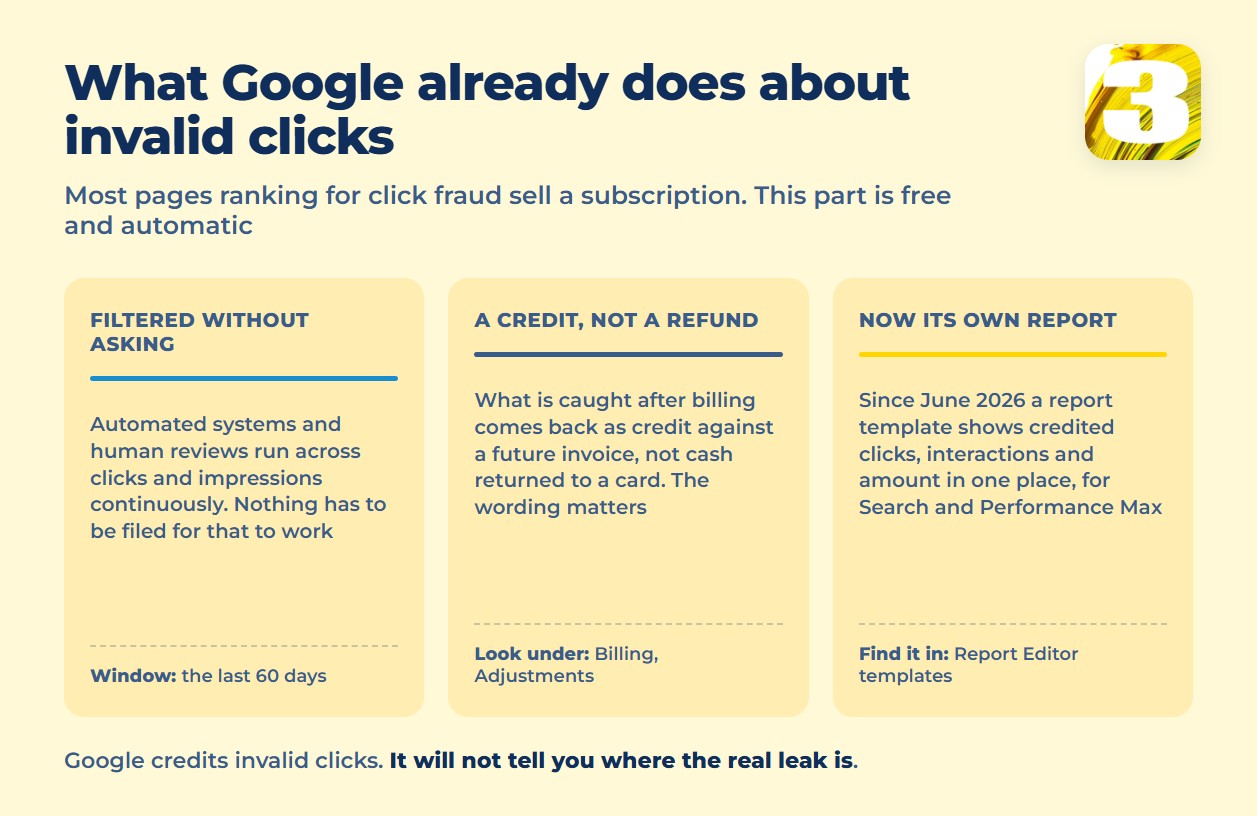
If you searched this because your cost-per-click chart spiked and you’re convinced someone is clicking your ads on purpose, here’s the first thing worth knowing: Google has quietly given you a much better way to check. In June 2026 it published documentation for a dedicated Invalid Activity Credit Report — a report template that shows credited clicks, credited interactions, and credited amount in one place, instead of leaving you to hunt through billing line items and guess.
You’ll find it in Report Editor → Template gallery, listed as “Invalid Activity Credit Report: Search & PMax” — and the name tells you its limit. It covers Search and Performance Max campaigns only. If your spend sits in Display, Video, Demand Gen or App campaigns, this report won’t show it to you, and you’re back to reading the billing adjustments line by line. Three columns do the work. Credited clicks and credited interactions tell you how much of your traffic Google threw out after the fact; credited amount tells you what that was worth in money. Pull it for a date range that covers the spike you’re worried about, and you’ll know within a minute whether Google already handled it.
Almost everything else ranking for this term sells a subscription. We don’t sell click-fraud software, so we have no reason to make this sound scarier than it is — or safer.
Invalid traffic and click fraud aren’t the same thing
Google’s framing is broader than the term you searched. Invalid traffic covers any click or impression that isn’t the result of genuine user interest, and that splits into two very different buckets. One is intentional: a competitor, a bot or a script clicking to run up your bill. The other is accidental: a double-click counted twice, a bad connection reloading a page, a crawler with no interest in hurting you. Google runs both automated systems and human reviews across every click and impression, looking for either kind.
That distinction matters because most of what advertisers call “click fraud” isn’t malicious. It’s noise. Which is exactly why the fix usually isn’t a blocker — it’s a closer look at where the clicks are actually coming from.
Invalid click filtering happens automatically — but you can still ask
You don’t have to file anything for the basic protection to work. Google’s detection runs continuously, and the standard automated review window covers the last 60 days of activity. Clicks caught before your invoice is generated simply never appear on the bill. Clicks caught after the fact are handled differently — and that’s the part almost every vendor page glosses over.
If you believe something slipped through anyway, there is a second route: Google accepts an investigation request through its click quality form, also covering the last 60 days. Be ready to hand over the account ID, the date range, the campaigns involved, and whatever server-side evidence you have — IP addresses, user agents, click IDs. It isn’t a complaint box; it’s a request for manual review of specific traffic, and vague reports go nowhere.
It’s a credit, not a refund
Search the phrase “click fraud Google Ads” and nearly every result promises Google will “refund” you. That’s not the mechanism. Invalid clicks and impressions caught after billing are applied as a credit against a future invoice, not a cash refund to a payment method — Google’s page on invalid clicks spells out the distinction. You’ll find these under Tools → Billing → Summary → Adjustments, labeled “Invalid Activity” — the older, harder way to read the same story, one line at a time.
That word — credit — isn’t a technicality. It shapes what you should expect: money back on the account, applied over time, not a cheque in the mail.
IP exclusions: a real tool with a real ceiling
If you’ve identified a specific source hammering your ads — an office, a competitor, a known bad actor — Google Ads lets you exclude IP addresses so those visits stop counting against your budget. The list can hold up to 500 addresses per campaign, supports wildcard masking, and applies at the account level, the campaign level, or both — the mechanics are in Google’s guide to excluding IP addresses.
Two limits matter before you treat this as a solution rather than a patch. First, where you set it: campaign-level exclusions aren’t available for every campaign type — Performance Max, Video, App, Hotel and Smart Display don’t take them — so there you work at the account level instead. Second, the list leaks by design. Most invalid traffic doesn’t sit on one static address; it comes from residential proxies and rotating connections that swap IPs faster than you can add them. Treat exclusions as a scalpel for one identified irritant, not a fence around the account.
Before you buy click fraud detection software, rule these out
The clicks that look like fraud are, more often, one of these:
- The Display Network partner network and placements. Broad automatic placements can rack up clicks from sites that were never a good fit for your ad.
- Broad match keywords pulling in searches loosely related to what you sell, at volume.
- Your own team. Staff or contractors checking that an ad is live and clicking it — more common than anyone likes to admit.
- A conversion count that never made sense to begin with. If “we’re being clicked on” really means “our conversions dropped,” the problem may not be the clicks at all. More often it’s conversion tracking that stopped firing correctly weeks ago. That failure has its own article: what breaks in conversion tracking.
None of these need a subscription. They need someone to open the account and look. A spend chart that jumped without a matching jump in clicks, for instance, is usually a budget-and-rank story rather than a fraud story. The report that tells those two apart is the search impression share formula.

What we actually do when a client says this
As a Google Partner, this is a conversation we’ve had more than once in our Google Ads work. We don’t start by recommending a blocker. We start with the same first move every audit does: the search terms report and the network breakdown, side by side. It is the same opening move as a twenty-minute account audit. Search terms show whether the clicks are coming from queries that were never relevant. Network breakdown shows whether they’re landing on Search, Display placements, or partner sites — three very different problems with three different fixes. Only after that do we know whether we’re looking at wasted broad match, a bad placement, a tracking gap, or something that genuinely needs an IP exclusion. We’re not going to pretend we’ve caught a criminal network to make this article more dramatic. Most of the time, the leak is boring — and boring is fixable.
The honest version
Google already filters invalid clicks without you asking, credits what slips through after billing, and has just made that credit easier to see. What it won’t tell you is whether your real problem is fraud, a mistargeted placement, or a broken conversion tag — that takes someone reading your account, not a script running in the background.
If your cost-per-click has spiked and you’re not sure which of those it is, we’ll pull the credit report, the search terms and the network breakdown, and tell you what we see — not what we’d like to sell you.