
Search impression share is the impressions your ads received on the Search Network, divided by the estimated impressions you were eligible to receive. Show up 800 times out of 1,000 possible chances, and your search impression share is 80%. That’s the whole formula.
The formula is trivial. The number that actually moves your account sits in the two columns right next to it.
The Three Impression Share Columns That Actually Matter
Google Ads splits that one percentage into three columns you can pull for any campaign, ad group, or keyword on the Search Network:
- Search impression share — the 80% from the example above.
- Search lost IS (budget) — the share of the time your ad was eligible to show but didn’t, because the campaign ran out of budget. Most reporting surfaces show it at the campaign level.
- Search lost IS (rank) — the share of the time your ad was eligible to show but didn’t, because your Ad Rank wasn’t strong enough to win the auction.
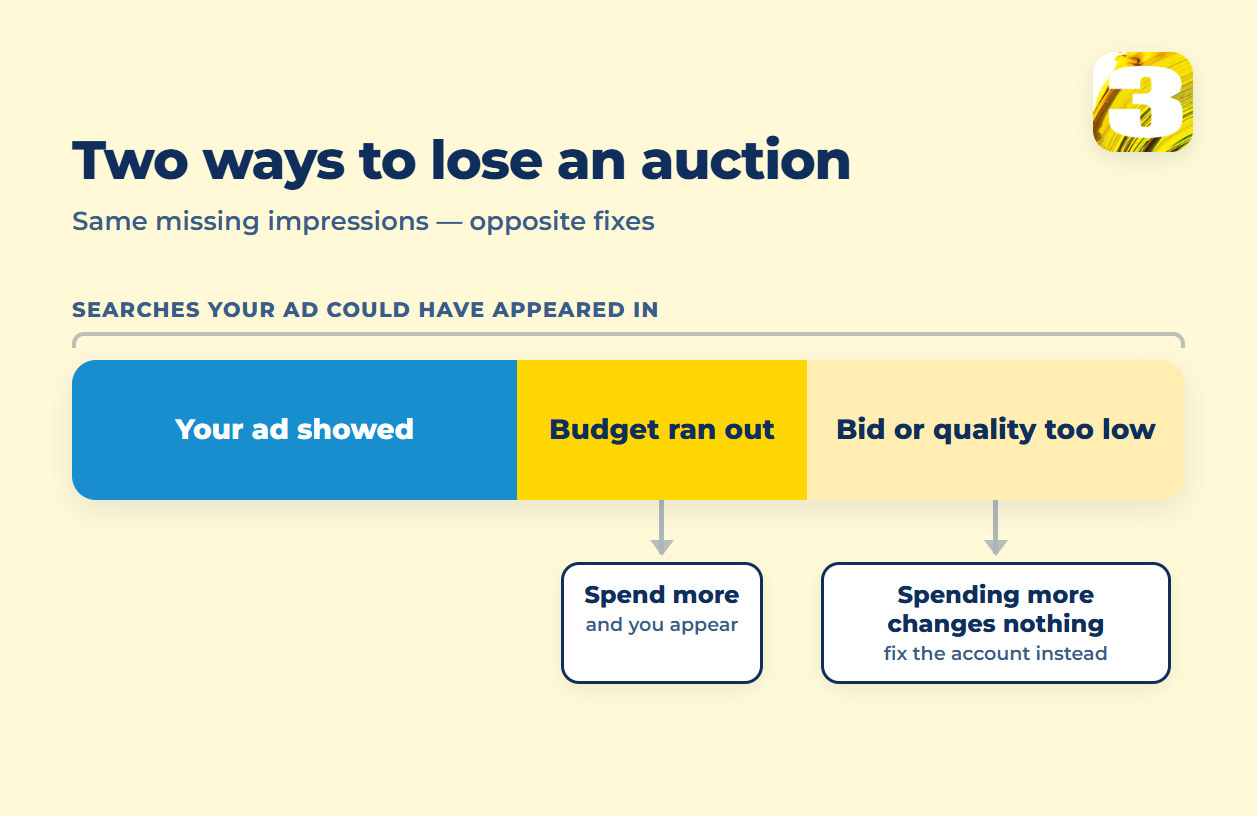
All three are calculated against the same denominator — the estimated number of impressions you were eligible to receive. That’s arithmetic, not a line Google publishes as a rule: add the three together and you land close to 100%. A campaign showing 55% search impression share, 30% lost to budget, and 15% lost to rank isn’t three unrelated facts. It’s one pie, cut three ways.
It’s one of the first reports worth opening in a Google Ads account you didn’t build — before conversions, before Quality Score. The split rarely looks the same in two accounts, and inside one account it rarely looks the same for a brand campaign as for a non-brand one.
One caveat worth flagging, because plenty of guides still get it wrong: impression share reporting for Performance Max campaigns didn’t exist before September 2024. Google’s own announcement was direct about it:
“Impression share reporting is coming to Performance Max for the first time as well.”
That’s from Google’s official product blog, dated September 18, 2024. Before that, a Performance Max campaign was a blind spot on this specific metric — you could see spend and conversions, but not how much of the available auction you were actually winning. Since the update, the number reported for PMax is a blend, calculated from Search plus Shopping inventory; Display, video, app, and Demand Gen placements aren’t part of that figure. If something you’re reading talks about Performance Max impression share as if it’s always been there, that’s a sign it wasn’t written recently.
Why “Eligible Impressions” Is an Estimate, Not a Count
Every one of those three percentages depends on the same denominator: the estimated number of impressions you were eligible to receive. Estimated is the operative word. Google isn’t counting auctions that failed to happen — it’s modeling how many times your ad could plausibly have shown, based on your targeting, budget pacing, and current settings, and it recalculates that estimate on an ongoing basis.
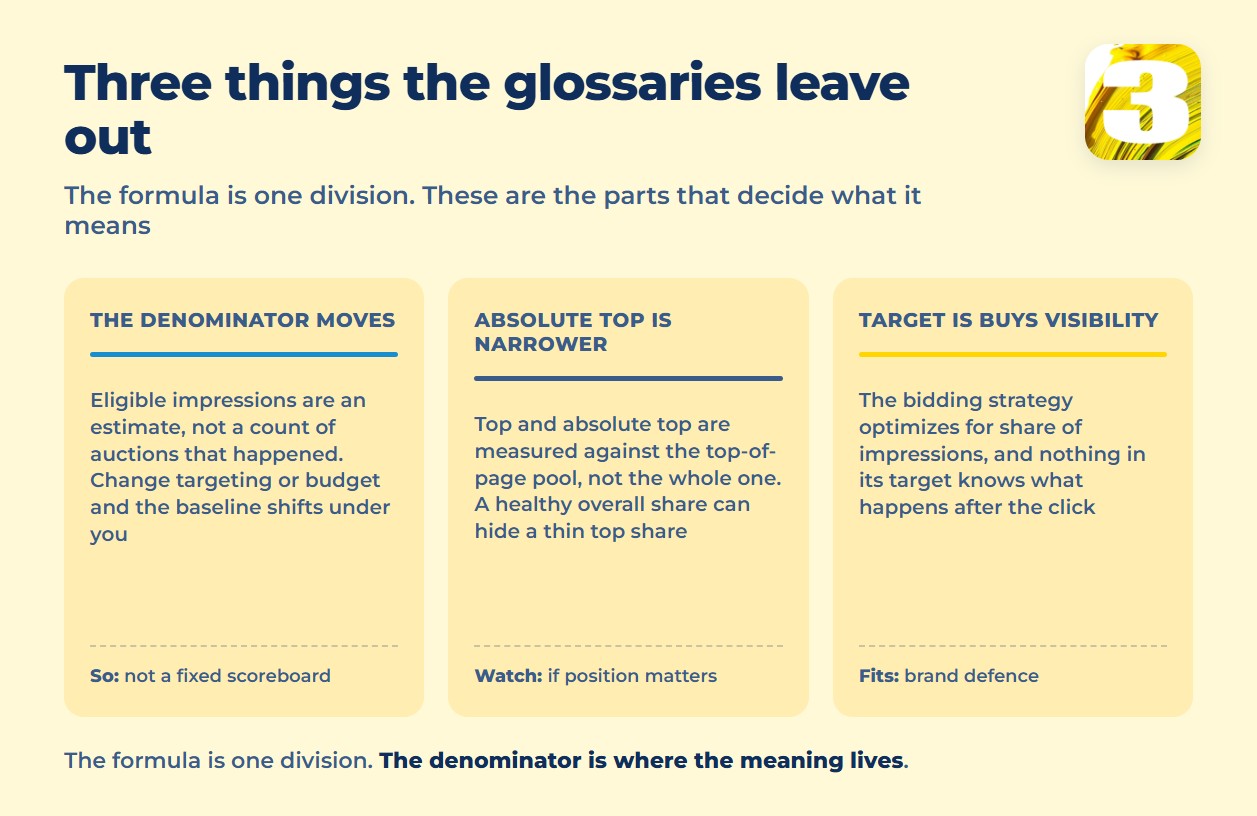
This is where most of the glossary-style explanations you’ll find online stop. They give you the formula, maybe the definitions of top and absolute top, and call it done. What they leave out is that the denominator moves. Change your keywords, your budget, your bids, or even the time of day, and the estimate shifts under you — so a jump from 40% to 55% search impression share isn’t only about what you did last week. It can also be about how much total opportunity Google’s model thinks existed to begin with. Reading the number as a fixed scoreboard, rather than a moving estimate, is the fastest way to draw the wrong conclusion from it.

Lost to Budget vs. Lost to Rank: The Only Fork That Decides Anything
Once you accept that the total is accounted for, the only decision left is what to do about the leftover 20%, or 45%, or whatever it is in your account. And that decision splits cleanly in two directions, because the two lost-IS numbers point at two different problems.
Search lost IS (budget) means your ad was competitive enough to win the click, and the auction was there to be won, but the campaign’s daily budget ran out before the day did. If this number is large, spend is the ceiling — not your ad, your bid, or your landing page. How much to add, and whether adding is even the right move, is a separate question: what a daily budget actually controls.
Search lost IS (rank) means the opposite: budget wasn’t the constraint, Ad Rank was. Your bid, your Quality Score, or both weren’t strong enough to win the auction as often as you were eligible to. Adding budget doesn’t fix this number on its own — you’d be paying to lose the same auctions more expensively. What sits behind that rank number is covered in what Quality Score actually changes.
Confusing the two is the single most common way this report gets misread: adding spend when the real constraint is Ad Rank doesn’t move the needle, because the auctions being lost were never a money problem in the first place. Which column is bigger — that’s the whole question, and it’s answered before anything else about the account is worth touching.
Top Impression Share and Absolute Top: What Replaced Average Position
Average position used to be the headline metric for where an ad landed on the page. Google retired it, and what replaced it are two more impression-share variants, scoped to a smaller pool of auctions:
- Search top impression share — impressions you received among ads shown near the top of organic results, divided by the estimated impressions you were eligible to receive in that same top-of-page pool.
- Search absolute top impression share — the same idea, narrowed further to the very first ad position on the page.
The distinction that matters: these two percentages are calculated against a smaller, different denominator than plain search impression share. A campaign can carry a comfortable 70% search impression share and a thin 20% absolute top impression share at the same time — it’s showing often, just rarely in the one slot that gets clicked without scrolling. If a business depends on being the first thing a searcher sees, rather than merely being present somewhere on the page, absolute top is the number worth tracking, not the overall share.
Target Impression Share: A Bidding Strategy That Buys Visibility, Not Conversions
Impression share isn’t only a report — it’s also a bidding strategy you can hand your account over to. Target Impression Share is a Smart Bidding strategy that sets bids automatically to hit a chosen target — for example, showing your ad in the absolute top position 65% of the time. You pick the location you’re aiming for — top of page, absolute top, or anywhere among the results — and Google adjusts bids to reach that percentage.
What it optimizes for is right there in the name: share of impressions, not conversions or revenue. Handing bidding over to this strategy makes sense when visibility itself is the goal — a competitor bidding aggressively on your brand term is a common reason to want the top spot held regardless of cost. It’s a weak default for a campaign whose job is to produce leads or sales, because nothing in the strategy’s target is aware of what happens after the click. You can hit your visibility number and still watch cost per conversion drift in the wrong direction, because the strategy was never asked to look at that number at all.
The brand-defence case is worth spelling out, because it’s the one where this strategy genuinely earns its place. When a competitor starts bidding on your company name, the searcher typing that name already knows who they want. Losing the top slot there doesn’t cost you a marginal impression — it hands a warm, high-intent visitor to somebody else at the exact moment they were looking for you. That’s a situation where paying more per click to hold position is a defensible trade, because the alternative isn’t a cheaper click, it’s a lost customer who was already yours.
The same logic falls apart on a generic keyword. Nobody searching a broad service term has decided anything yet, so buying the top slot more often buys you more early-stage traffic at a higher price, not more customers. If you do turn this strategy on for a lead-generation campaign, watch cost per conversion alongside the share target from day one — the two numbers can move in opposite directions for weeks before anyone notices, and the strategy will report success the whole time.
What Counts as a “Good” Share — and Why 100% Is a Bad Goal
There’s no universal healthy percentage, and anything that hands you one flat target number is guessing. What decides whether a given share is fine depends on what the campaign is for and what happens after it wins the click.
A campaign selling a service with a long buying cycle can run at a modest share and still perform, because the job is to be present when demand exists, not to dominate every search. A campaign defending a brand term against competitor bidding usually needs a much higher share, because every impression lost there is a competitor’s ad sitting in front of a customer who was already looking for the business by name.
Chasing 100% search impression share is a lot like chasing zero customer complaints — it sounds like the obvious goal until you look at what closing the last gap actually costs. Winning the last handful of auctions between 95% and 100% usually means outbidding for impressions you were already going to win most of the time anyway, at the weakest part of the curve. Spend goes up, and very little of it buys a customer you wouldn’t have gotten at 90%. The number worth watching isn’t the share itself — it’s whether what’s missing is sitting in budget or in rank, because that’s the part you can act on.
How to Read Search Impression Share Without Fooling Yourself
Pulled as one blended figure for an entire account, search impression share tells you almost nothing. It needs to be split at least three ways before it means anything.
Brand versus non-brand. A branded campaign and a generic-keyword campaign live in different auctions entirely. Branded terms usually post a high share, because there’s rarely serious competition for them — folding that number in with a non-branded campaign’s share produces a blended figure that flatters the account and hides the campaign that actually needs attention. Pull brand and non-brand separately; averaging them into one line is how a weak campaign stays invisible.
Device. Mobile and desktop auctions don’t behave the same way. A share that looks fine on desktop can be quietly weak on mobile, where bid adjustments and different competitor behavior change who’s eligible to show at all.
Geography. A national or multi-region campaign can post a healthy overall number while individual cities or states sit well below it — the average hides the map. Segmenting by location is the only way to see where a loss is concentrated.
Read as one flat percentage on an account-overview page, this number invites exactly the wrong reaction — either false comfort at a figure that looks fine on average, or unnecessary alarm at a low number that’s being dragged down by one weak segment.

What to Do With This Number This Week
None of the above requires new software, a new bidding strategy, or a bigger budget commitment before you even know which one you need. It requires opening two columns and reading them.
Pull search impression share, search lost IS (budget), and search lost IS (rank) for your top campaigns, segmented by device and by brand versus non-brand. Whichever lost-IS column is larger tells you which problem you have. If it’s budget, that’s a spend conversation. If it’s rank, extra spend on its own won’t fix it — bid strength, Quality Score, and ad relevance need attention first.
This is also where a fuller account audit earns its place: the same two columns read differently once someone who isn’t attached to the account looks at them next to conversion data, search terms, and account structure. That wider read is what a twenty-minute account audit is for.
Opening those two columns takes a couple of minutes. Reading them correctly is the part most impression-share write-ups skip entirely.