
Turning on Meta’s Conversions API is not the hard part. Any number of guides will walk you through it in an afternoon: create a dataset, generate a token, pick an integration method, fire a test event. None of them cover what happens the week after — the conversions that quietly start counting twice, the server nobody at your company can point to, and a match-quality score that has nothing to do with how good your ads are. If you’re already running Facebook and Instagram ads and someone told you it’s time to add server-side tracking, this is the part worth reading before the setup guide, not after.
What the Facebook Conversions API Actually Sends
The Conversions API isn’t a replacement for the Meta Pixel — it’s a second channel into the same dataset. Meta’s own documentation describes it as a connection “between an advertiser’s marketing data…from an advertiser’s server, website platform, mobile app, or CRM to Meta systems that optimize ad targeting, decrease cost per result and measure outcomes.” Server events land in the same dataset ID as pixel events and get processed like events sent using the Meta Pixel. The browser still fires the pixel. The server now fires the same event a second time, from a channel an ad blocker or browser setting can’t interrupt — a delivery difference, not a permission one. Whether you were allowed to collect that data in the first place is a separate question, and it’s covered below.
That second copy is the whole point — and the whole risk. You can wire it up as a direct integration, through your ecommerce platform’s built-in connector, or through Meta’s own Conversions API Gateway, a product that runs in a cloud account you provision yourself. None of those choices matters as much as what happens once both copies of the same event start arriving at Meta within the same minute.

The Duplicate Event Nobody Catches Until the Numbers Look Too Good
Send the same purchase from the pixel and from the server, with nothing tying them together, and Meta counts it twice. Meta’s own documentation is explicit about the fix: a Meta Pixel’s eventID must match the Conversions API’s event_id, and a Meta Pixel’s event must match the Conversions API’s event_name. Get both matching within a 48-hour window and Meta generally prefers the event that arrives first, discarding the later duplicate — its wording allows for exceptions where the two events differ meaningfully in content. Miss the match entirely, and every purchase, lead, or add-to-cart that fires from both channels reports as two.
Nobody notices this by staring at Ads Manager. It shows up as a conversion rate that improved for no reason the week server events went live, or a cost-per-result that dropped exactly when nothing in the campaign changed. Meta’s ad delivery system optimizes toward whatever it’s told converts, so a doubled event doesn’t just misreport — it teaches the algorithm to chase the wrong signal. Google Ads has the same failure mode from a different cause, and it’s just as invisible from inside the account — we’ve written up how duplicate conversions creep into Google Ads for the same reason: nobody checks the plumbing until the report stops making sense.
Whose Cloud Is Your Conversions API Gateway Actually Running In
Meta’s Gateway product is provisioned in a cloud account you stand up yourself — AWS or GCP. Meta documents where it runs; whose name should be on that account is our recommendation, not Meta’s, and it’s the same one we’d give about the ad account: yours. That detail gets skipped often enough that it’s worth spelling out: if whoever set up your server-side tracking stood up a gateway or a direct integration inside their own infrastructure instead of yours, that server is now a dependency the same way a rented ad account is. It doesn’t show up on an invoice as a separate line item, and it doesn’t come up until the relationship ends and the events stop arriving with no error message anywhere. It belongs on the same list as the ad account and the pixel — what actually stays yours when an agency leaves walks through which of those assets come back and which don’t.
Consent Doesn’t Move Just Because the Call Moved Server-Side
The most common thing people get wrong about Conversions API is what it changes about consent. It doesn’t. Moving a conversion event from a browser call to a server call changes where the packet originates — it doesn’t change whether the visitor agreed to be tracked in the first place. “CAPI gets around ad blockers” shows up constantly in search results and forum answers, and it’s the kind of claim that sounds like an engineering fact and is actually a compliance one. A server-side event built from data you weren’t allowed to collect is still built from data you weren’t allowed to collect. Consent banners, regional rules, and your own privacy policy still govern what you’re permitted to send — CAPI only changes the pipe, not the permission.
Event Match Quality Measures Your Website, Not Your CAPI Setup
Once server events are flowing, Meta scores how well they can be tied back to a real account — Event Match Quality, “a score (out of 10) that indicates how effective the customer information sent from your server may be at matching event instances to a Meta account.” It’s calculated from which parameters you send, how clean they are, and what share of events actually match. It sounds like a traffic-quality metric. It isn’t. It’s a website metric, and Meta’s own documentation notes it is “currently available only for web events.” A store with excellent traffic and a checkout that never collects an email will still score low, because there’s nothing to hash and match.
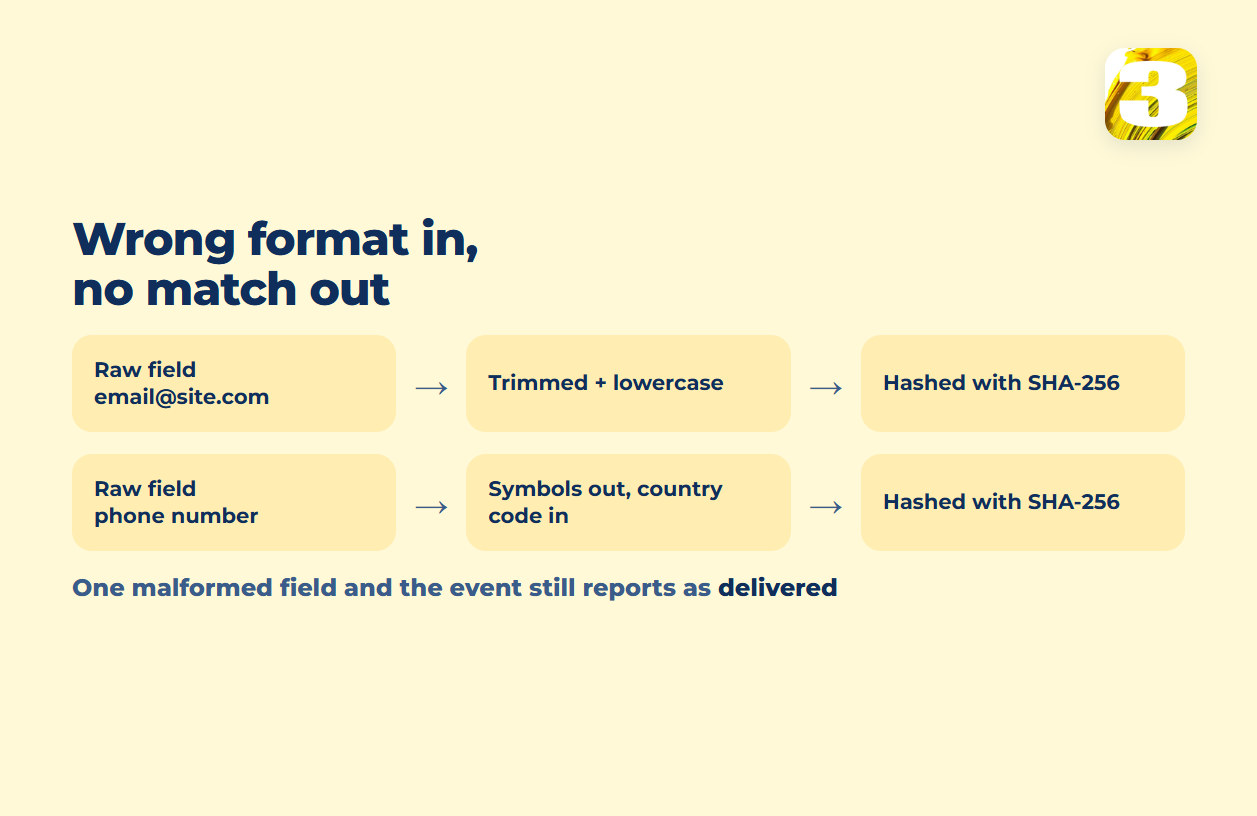
The trap underneath it is formatting. Every contact field has to be prepared a specific way before it leaves your server — trimmed, lowercased, given a country code where one is required, then hashed with SHA-256, because Meta’s systems are designed to reject unhashed contact information outright. Get that wrong in one field and the symptom is silent: a phone number sent without its country code produces a hash that matches nothing, and the event still reports as delivered. Nothing errors. The score just sits lower than it should, and nobody can say why.
Where This Actually Gets Fixed
Every problem above traces back to the same place: your website’s code, not your ad account’s settings. That’s also where checking any of it happens — the browser extension people used for this was renamed rather than removed, which is its own small trap, and it deserves that separate answer rather than a paragraph here.
It’s also why we treat this as one job rather than two. We set up Conversions API for clients ourselves, and where we also built the site the ads point to, the server-side code goes in by the same people who wrote the checkout, the lead form, and the confirmation page — not handed off to a developer who’s never seen it. Our own lead-tracking plugin sits on that same site watching the same forms, which is the difference between reading a match-quality score and being able to look at what the form actually sent. That’s one piece of work rather than a vendor handoff.
If you’re weighing whether to turn Conversions API on, the honest first question isn’t which integration method to pick. It’s whether your site currently collects enough clean customer data to make server events worth sending at all — and whose server that data is going to land on.