


If you searched “conversion tag” hoping for a definition, here it is: there isn’t a single “conversion tag” anymore. There’s a Google tag that sits on every page of your site, and an event snippet that fires on the specific action you want to count — a purchase, a form submit, a sign-up. Google’s own documentation calls the thing you set up in your account a “conversion action,” described as “a specific customer activity that is valuable to your business.” The tag and the snippet are two separate pieces that have to agree with each other, and that two-part structure is exactly where extra conversions get recorded for something that only happened once.
This isn’t a story about Google counting wrong. Google counts precisely what you told it to count. The problem sits in the account, not the algorithm — and it’s one of the most common breaks visible at a glance at the list of conversion actions, once you know where to look.

Three ways duplicate conversions appear in one account
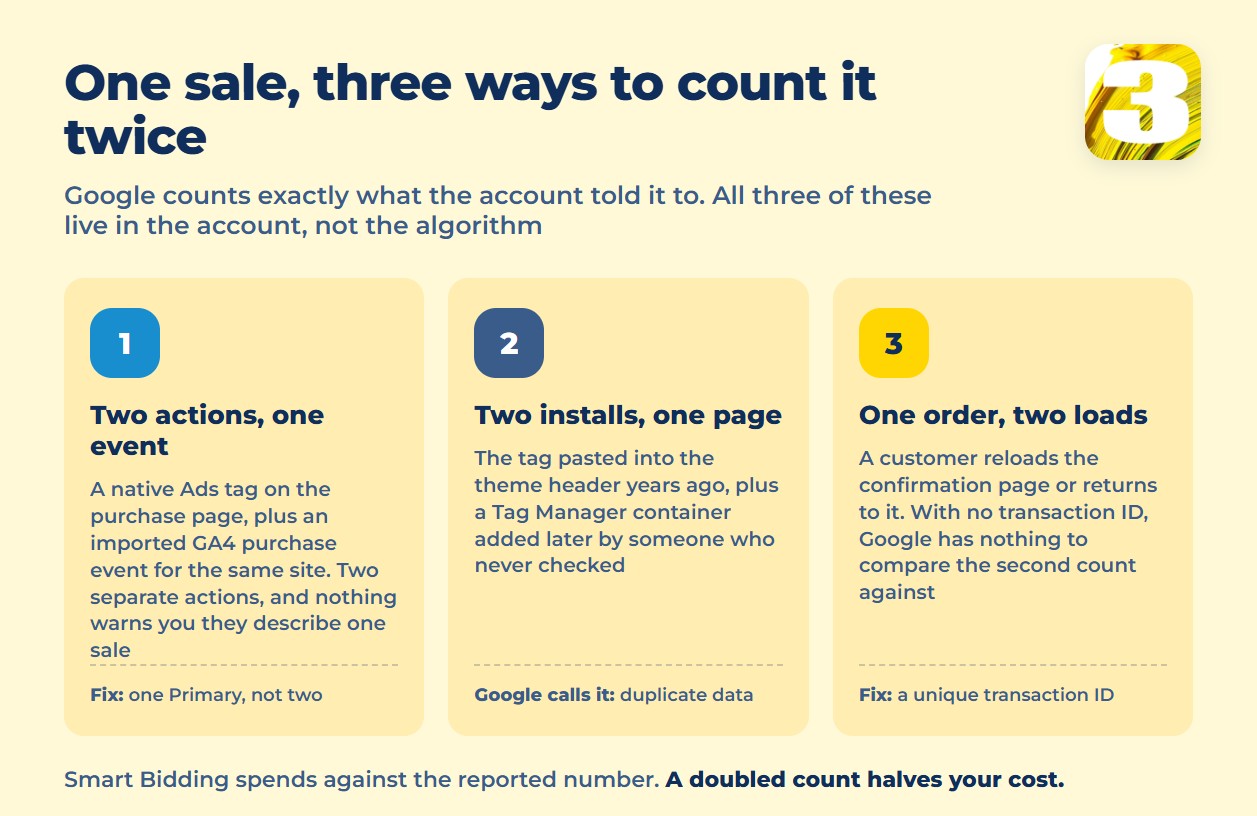
1. The native Ads tag and an imported GA4 key event are both watching the same thing. Someone sets up a conversion action from the Google tag directly on the purchase page. Later, someone else imports a “purchase” key event from GA4 into the same Google Ads account, pointed at the same website. Nothing warns you that these are the same real-world event — they’re two separate conversion actions, so Google Ads happily reports both. The same one-account, one-event confusion shows up on the lead side too, where web and lead tracking now sit under a single switch. That change is explained in enhanced conversions and the June switch.
2. The same tag is installed twice. Google’s support documentation is blunt about this: “If the same Google tag is configured two or more times on the same page, it may cause duplicate data or mixed settings.” It goes further — check that you “don’t have multiple Google tags or Google Tag Manager containers installed on the same page, as this can also lead to issues,” and remove “any legacy tags, such as old Google Ads Conversion Tracking, from your converting pages to avoid double counting.” In practice this is a developer pasting the tag straight into the theme header years ago, then a later hire adding Google Tag Manager without checking what was already there. There’s a five-minute way to tell whether that’s happening on your own site. It is walked through in Google Tag Manager or a direct tag.
3. The count setting is on “Every” where “One” belongs. This one isn’t a bug — it’s a setting doing exactly what it says. Google Ads describes “Every conversion” as counting “every conversion (per tracked conversion action) that happens after an ad interaction,” and recommends it “if you’d like to track and improve your sales, because every sale likely adds value for your business.” “One conversion” instead counts “only one conversion per ad click” and fits when “you’re not interested in the number of sales, but instead whether or not a certain kind of lead was generated.” A lead-gen form left on “Every” will count a confused visitor who submits it twice as two conversions — not a duplicate exactly, but a second count that gets bucketed with the real thing.
Why this costs more than a wrong number on a report
A doubled conversion count doesn’t just make a spreadsheet look better than reality. Smart Bidding optimizes toward whatever number your account reports, so if it’s being told a page converts twice as often as it does, it bids as if that were true. Your reported cost-per-conversion then looks roughly half of what a sale actually costs you — and budget decisions get made against a number that was never real to begin with.
The actual fix for duplicate conversions: a transaction ID
Google’s documentation on duplicate conversions is direct about what solves this for purchases: “The transaction ID must be unique for every single transaction and must be dynamically generated by your website’s backend or e-commerce platform for each purchase.” With it in place, “if there are 2 conversions for the same conversion action with the same transaction ID, Google Ads will know the second conversion is a duplicate. You’ll get an error message, and the duplicate conversion won’t be counted.” Google calls it “the recommended option for purchases” for a specific reason: the most common no-ID duplicate isn’t a tagging mistake at all, it’s a customer who “returns to the conversion page or reloads the page,” firing the same tag a second time on the same order.
There’s a newer layer worth knowing about, not adopting blindly: multi-source conversions, which let you connect a tag to an additional data source and deduplicate “by matching the Transaction IDs from both data sources within the same conversion action.” It’s listed by Google as (beta), with no public launch date attached — useful to know exists, not something to build a process around yet.
Conversion action and conversion goal are not the same thing
A separate confusion makes duplicates look like they exist where they don’t: conversion action and conversion goal are two different, both currently active terms — not an old name and a new name for the same object. A conversion action is the individual tracked event you create. Conversion goals are the category buckets Google Ads groups those actions into automatically — “Conversion actions that you add are automatically grouped into conversion goals based on their conversion category type, for example, ‘Purchases,’ ‘Contacts,’ or ‘Submit lead forms.'” Seeing “Purchases” once as a goal and “Purchase — website” once as an action isn’t a duplicate. It’s one action sitting inside one goal, reported at two levels of the same account.
One event, one Primary — no exceptions
Google Ads splits conversion actions into primary and secondary, and the difference decides what actually feeds your bidding and your headline numbers. Primary actions are “reported in the ‘Conversions’ column in your reports and used for bidding.” Secondary actions “are for observation only. They are used for reporting in the ‘All conversions’ column in your reports, but not for bidding.” The rule that follows from that: if two conversion actions can fire from the same real-world event, only one of them should ever be marked Primary. The other belongs as Secondary, or gets removed.
| Conversion action | How many times the same sale gets counted | What to leave as Primary |
| Purchase — native Ads tag on the confirmation page | Once, correctly | Primary |
| GA4 “purchase” key event imported for the same site | A second time, no shared ID | Secondary, or drop the import |
| Same Google tag in the theme header and in a GTM container | Twice per page load | Remove one install |
| Lead form, count set to “Every” | Once per submission, including accidental resubmits | Primary, only if a resubmitted form is truly a new lead |
| Confirmation page reload or back-button return | An extra, unlinked count | Fixed by adding a transaction ID |
The quickest way to run this table against your own account: open your conversion actions list and check, side by side, which ones share a category and which one is actually set to Primary.
Meta counts in parallel, not in sync
If you also run Meta ads, know that its Pixel and any server-side setup track independently of whatever Google Ads reports — the two platforms don’t reconcile with each other, and a sale can show up counted in both without either one being “wrong.” Worth knowing before you go looking: the tool most guides still name for checking that pixel isn’t the one to use anymore. That’s a separate discussion from what’s in this account, and if you want it worked through properly rather than guessed at, that’s what Meta-certified specialists are for.
Two related topics sit just outside this one. If your numbers disagree because two entirely different ad platforms are each crediting themselves for the same purchase, that’s an attribution question, not a duplicate-conversion one. And if the doubling you’re chasing is on phone calls rather than web conversions, that’s covered separately too — the mechanics are different enough that mixing them up sends you down the wrong fix.
Where to start
Before anything else, open your conversion actions list and run it against the table above: for every action, ask what real-world event triggers it, and whether anything else in the account triggers on that same event. That single pass catches most of what’s described here. The wider set of ways conversion tracking breaks — including the symptoms that show up when this exact problem has been sitting unnoticed for months — is worth reading next. Start with where to look when conversion tracking breaks.
If you’d rather have someone go through the account line by line, an account audit is the next step — and it’s the same review we run before touching anything else in a Google Ads account.









