
Search “facebook ads agency” and almost every result sells you the decision in front of you: which company to hire, how to compare shortlists, what to ask on the first call. Almost none of them mention the decision after that one — the one you only feel the cost of once the relationship is already over.
A Meta ad presence isn’t a single account you hand someone the keys to. It’s a set of separate pieces — a portfolio, an ad account, a pixel and the dataset behind it, audiences, a Page, a catalog, an Instagram account, sometimes a WhatsApp number, a stream of leads, sometimes a server — and each piece has its own answer to who owns it, what happens when you part ways, and what simply doesn’t move at all.
Some of that is yours from day one. Some of it lives inside a structure the agency controls and stays there, untouched, the moment access is revoked. A little of it — a custom audience someone shared with you, say — was never really yours to keep. This is a walk through each piece, in the order they tend to come up, starting with the one everything else sits inside.
Why “Which Facebook Ads Agency” Isn’t the Only Question
If you’re still deciding whether Meta is even the right platform for the budget you have, that decision comes first, and it starts somewhere else entirely. Everything below assumes you’ve already committed spend to Meta and are choosing who runs it for you. And if the open question is how a marketing agency should charge for that work — retainer, percentage of spend, performance fee — that’s a real conversation, and we’ve had it in full elsewhere rather than repeating it here: choosing an agency by how it gets paid covers the models and the conflicts each one creates.
What’s left is arguably the more expensive question, because it doesn’t surface until the relationship ends: what do you actually own, and what were you only ever borrowing?
What a Facebook Ads Agency Actually Holds: Portfolio and Ad Account
Everything Meta-related for a business sits inside a structure now called a Business Portfolio — the interface still shows the older name, Business Manager, in places, and older articles use it too. Meta’s developer documentation describes what it’s for in one line: connecting business assets so an agency can “run campaigns on behalf of another company.” Whoever’s portfolio an asset was created in is, structurally, who owns it.
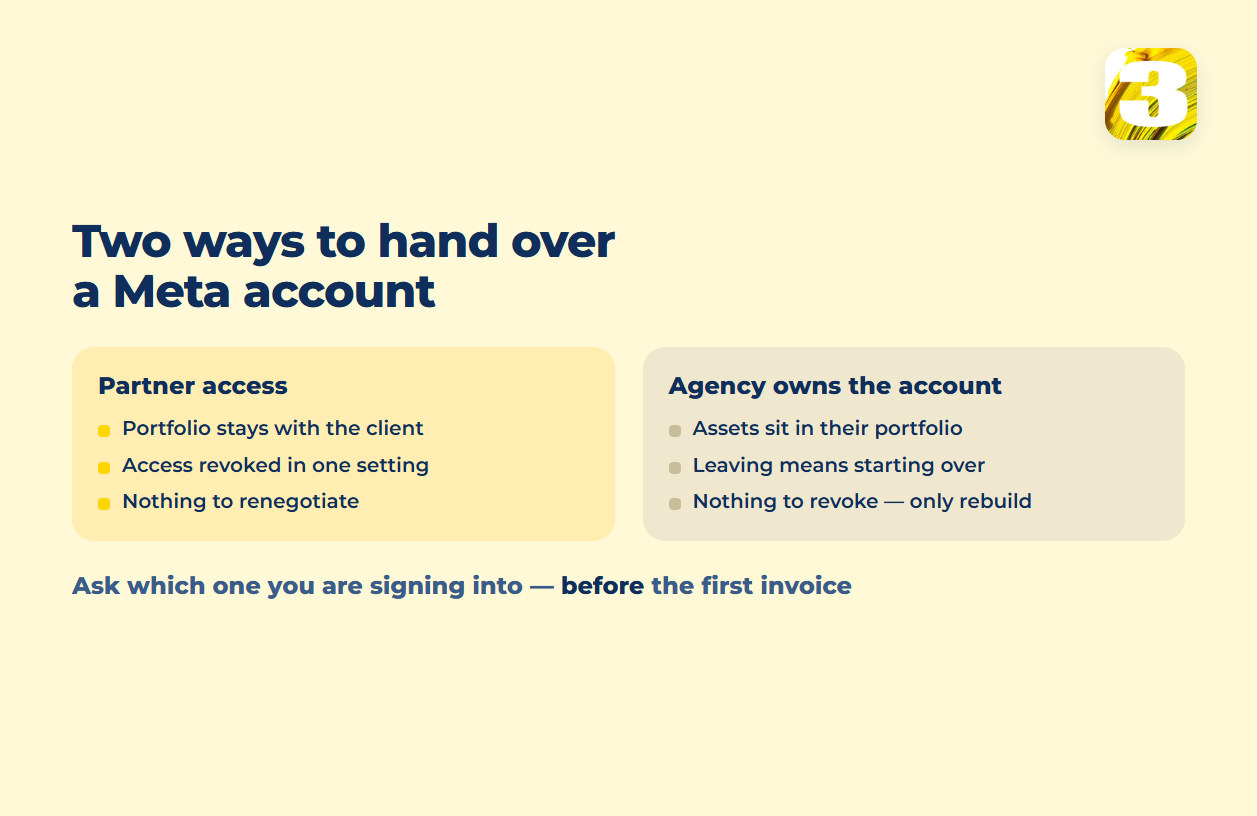
Meta has an official, documented way for an agency to work inside a client’s portfolio without owning anything in it: partner access. The agency is added to specific, named assets — the ad account, the Page, the pixel, the catalog — and can run campaigns against them. The portfolio itself, and everything inside it, stays the client’s. Revoking that access is a setting the client changes, not a negotiation, and it doesn’t require touching a single password.
The other setup is an agency creating and holding the ad account inside its own portfolio, with the client as, at best, a partner looking in. Meta doesn’t publish a warning against this — there’s no official page that tells you not to do it, and plenty of businesses run this way for years without incident. What it changes is what ending the relationship looks like. If the portfolio is yours, ending a facebook ads management arrangement is a setting you change. If it isn’t, ending it is a request you have to make to whoever holds the portfolio — and everything below is about what that request can and can’t get back.

That’s the first question worth asking before you sign anything, and it’s more useful than anything about reporting cadence or campaign strategy: are you handing over a login, or are you adding a partner to a portfolio that stays yours the whole time?
The Pixel and the Dataset Behind It
The pixel is on that same list of nameable, shareable assets — same rule as the ad account. Whichever portfolio created the pixel holds the dataset it feeds, and any server-side events sent through a Conversions API integration are tied to that same dataset ID, processed the same way pixel events are. It isn’t a second, separate signal; it’s the same one, from a different door.
You’ll hear, constantly, that switching pixels means losing “the learning” a pixel has built up — that the new one starts cold. Meta doesn’t publish that specific claim anywhere we could find, so we won’t hand it to you as fact. What is confirmed is narrower and, in practice, just as costly: if the pixel sitting under an account was created inside the agency’s portfolio, walking away doesn’t get you a copy of that dataset. You get a new one. Whatever event history accumulated under the old dataset ID stays exactly where it was created.
The question that follows isn’t “who has access to the pixel” — it’s whose portfolio it was created in, which is a different answer and rarely written down anywhere either party checks before the relationship starts.
Audiences You Shared but Can’t Take With You
Custom audiences and lookalikes live on the same list as the pixel and the catalog — assets that can be shared into a portfolio through partner access without ever changing hands. That distinction matters more here than anywhere else on this list, because a shared audience feels like yours while you’re using it. You can build campaigns against it, size it, layer exclusions onto it. What you can’t do is take it with you.
When access to a shared asset ends, the audience doesn’t move into your portfolio and it doesn’t get copied out to you as a list. It simply stops being available on your side. Whatever a client’s own portfolio built directly — their own website custom audiences, their own customer-list uploads — travels with the account that built it. Whatever was shared into that account by someone else’s portfolio disappears from view the moment the sharing stops, full stop.
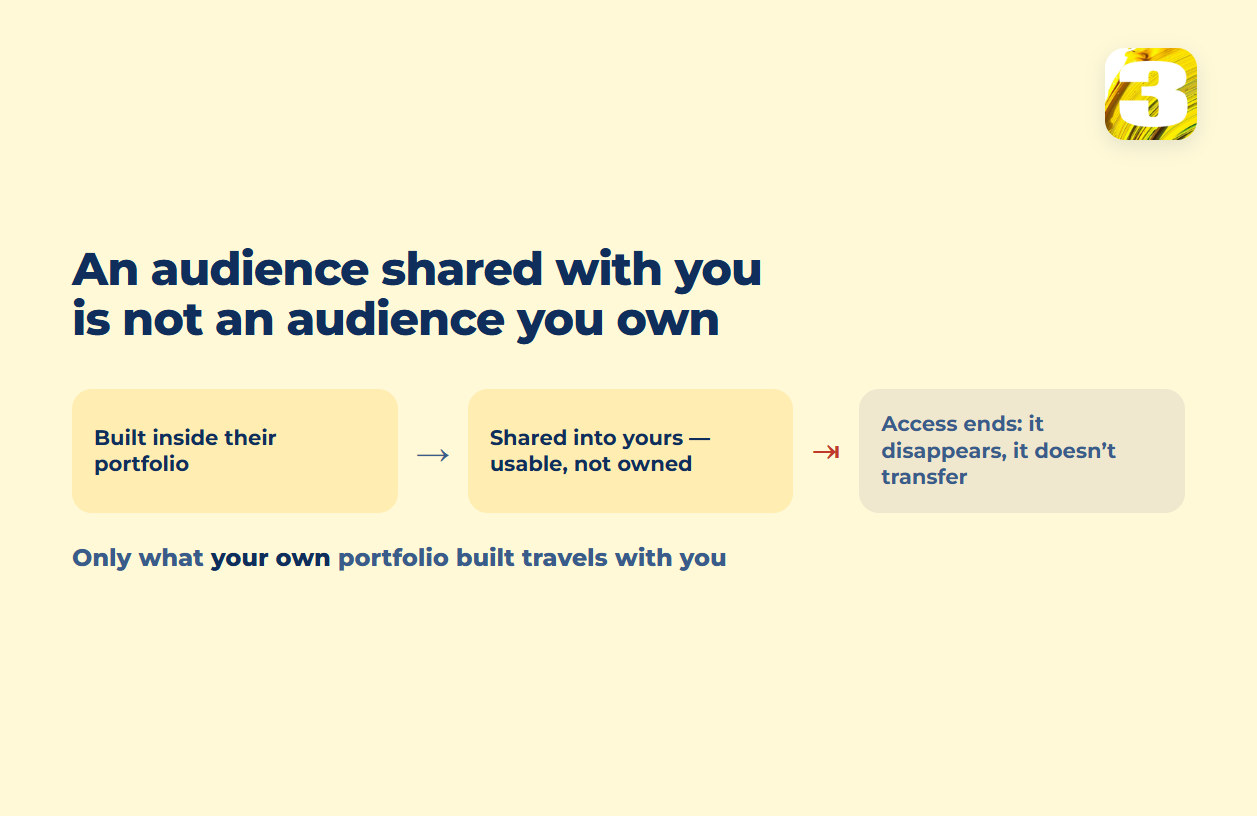
Before the account has any history worth protecting, ask outright: of the audiences a campaign is running against today, which ones were built inside your own portfolio, and which were only ever shared into it? Only the first kind will still be there a year from now if the agency isn’t. Whether those lists are the right lever in the first place is a separate question — what changed in Facebook targeting, with dates covers what targeting looks like now that your own audiences carry more of the weight than interest picks do.
The Page and the Catalog Aren’t One Handoff
It’s tempting to think of “the Meta account” as one object with one owner. It isn’t. The Page, the ad account, the pixel, and the catalog are each named individually when partner access is granted, and each can be revoked individually too. Getting your ad account back doesn’t automatically hand you back a product catalog if access to that catalog was set up as its own, separate grant — and the reverse is just as true.
In practice this means a business can end up with partial custody without noticing: the ad account reverts cleanly, the Page reverts cleanly, and the catalog quietly stays connected to a portfolio nobody’s paying anymore, because nobody wrote down that it was ever a separate line item. A plain list — Page, ad account, pixel, catalog, and anything else named on it — is worth asking for at the start of any meta ads agency relationship, not the end of one, because most agreements never spell it out at all.
Where Your Leads Live While a Meta Ads Agency Runs the Account
Lead-form submissions add a wrinkle of their own, because the data doesn’t sit inside your CRM by default — it sits inside Meta. Leads collected through an Instant Form are downloadable for a limited window, and only whoever’s been granted access to pull them can actually do it; a campaign can be running, showing leads in the dashboard, while nobody with a login to your CRM has ever received one. That’s a different failure than losing an asset when an agency leaves — it can happen while the agency is still very much in charge — and it deserves its own answer rather than a paragraph here: where a Facebook lead actually goes walks through exactly where a lead goes after someone taps submit, and how to check it isn’t quietly getting lost.

The Server Behind Your Conversions API
If server-side tracking is part of the setup — sending conversion events from a server rather than only from a browser — there’s one more asset in play that rarely gets a line in the contract: whatever server that integration actually runs on. If an agency stood that infrastructure up on hardware or hosting it controls, that’s another thing that doesn’t travel when the relationship ends. The events stop, the same way access to a shared pixel stops, and nobody notices until the reporting looks off a week later.
We set up that server-side connection ourselves, and where we also built the site, we’d rather it run on the client’s own infrastructure than on something we host separately and could walk away with. What actually breaks when this kind of setup is done badly, and how to catch it before your reporting quietly goes wrong, is its own conversation: what breaks when you turn Conversions API on.
One more plain question, then: where does the server side of your tracking physically run, and whose name is on that hosting? Not who configured it — whose it is.
What a Restricted Portfolio Costs You Before You Even Argue With Support
There’s a risk in all of this that has nothing to do with ownership on paper and everything to do with proximity. An ad account being disabled and a whole business entity being restricted are two different states: the first is a problem with that specific account, the second reaches every asset attached to the business — every ad account, every Page, every connected number, all at once. If your account sits inside an agency’s shared portfolio, and something else in that portfolio triggers a restriction that has nothing to do with your campaigns, your account goes down with it. Not because of anything you did.
That’s the argument for a client owning its own portfolio and granting partner access outward, rather than the other way around, stated plainly rather than as a scare tactic: fewer accounts sharing one roof means a problem elsewhere doesn’t become your problem. What to actually do, in order, the moment an account is flagged — and what never to try — is covered fully in what to do when an ad account is disabled.
The question most contracts skip entirely is what else sits inside the portfolio your account would live in if something goes wrong somewhere else in it.
What to Do If Your Account Is Already in Someone Else’s Portfolio
Most people don’t read this before signing. They read it in the middle of leaving, which is a worse moment but not a hopeless one. The order that salvages the most, in the time you actually have:
Create your own Business Portfolio first, before any conversation about handover. It costs nothing, it takes minutes, and it gives the other side something concrete to grant access to instead of a vague request to “transfer the account.”
Ask for partner access to the existing assets, named one by one — the ad account, the Page, the pixel, the catalog, the Instagram account, the WhatsApp number if there is one. Not “access to the account.” A list. Anything left off the list stays where it is, and nobody will notice for months.
Export the leads before anything else moves. Lead submissions sit inside Meta on a limited clock, and a handover argument is exactly the kind of thing that runs past it. This is the one item on the list that can’t be recovered later at any price.
Accept that the dataset may start over, and plan for it rather than fighting it. If the pixel was created in their portfolio, you’re getting a new one. Knowing that in advance is the difference between a planned gap in your reporting and a month of wondering why the numbers look wrong.
Write down what actually transferred, on the day it transfers. Partial handovers are the norm, not the exception — the ad account comes back, the catalog quietly doesn’t, and there’s no notification either way.
None of that is a negotiation tactic. It’s just the difference between asking for what you’re owed with a list in hand and asking for it in general terms.
The List Worth Having Before You Sign Anything
The version of this to ask for at the start is short enough to fit in an email, and it’s the single most useful artifact in this whole article: for each of the Page, ad account, pixel and dataset, catalog, Instagram account, WhatsApp number, lead access, and any server running Conversions API — whose portfolio does it live in, and who is being granted access to it?
Eight lines. Sent before the first invoice, it’s a quick favour to ask. Sent after a relationship sours, it becomes the thing you argue about. Any agency that runs Meta accounts properly can answer it without hesitating; one that can’t is telling you something useful.
What We Do With All of This, Before the First Campaign Runs
None of the above is a reason to avoid hiring help — it’s a reason to ask sharper questions before you do. We’re Meta Certified and a Google Partner, and we manage ad accounts across a genuinely mixed set of industries — attorneys, a clinic, a fencing manufacturer, and an event company — which is a fair sample of how differently “what stays yours” plays out depending on what you sell and who you sell it to. What that costs to run is a separate question with its own answer: what Facebook and Instagram ads actually cost.
Our own rule is simple and it isn’t specific to advertising: when a client of ours moves on, they take what they paid for. That applies to a website the same way it applies to an ad account — the assumption going in is that the relationship ends cleanly, not that leaving is a negotiation. It’s the same reason we run our own lead-tracking on top of the standard tools: the plugin we built exists because the default reporting stops at the point where a lead officially “arrives,” and a business that only trusts the dashboard is trusting a number that’s already missing pieces.
If you’re evaluating a Facebook Ads agency right now, the conversation worth having before the first invoice is which of these assets you’ll actually own when it’s over — not just what the first month of results might look like. Send us the list of what’s currently sitting in someone else’s portfolio and we’ll tell you which parts come back cleanly, which come back empty, and which are worth exporting this week. That’s the same starting point as any Facebook Ads engagement we take on.