


If you went looking for “Meta Pixel Helper” to install the little extension that checks your pixel, it isn’t there anymore under that name. What you’ll find instead does more than the old tool did, which is part of the problem — a green checkmark from it answers a narrower question than most tutorials still claim.
Meta also moved the ground underneath the pixel itself. Screenshots barely a year old show a pixel ID sitting on its own screen, a standalone events log, a setup flow that no longer matches what’s actually in your business account. None of that is wrong exactly — it’s just describing an interface that got folded into something wider.
None of this means the pixel disappeared or that Meta stopped supporting it. It means the checkpoints moved, and passing them tells you less than a checkmark implies. A test event firing in your browser is not the same fact as a lead showing up as a counted conversion.

Your Pixel Events Now Live Inside a Dataset
The pixel ID you set up years ago still works, but it’s no longer the top-level object in Meta’s own system. Meta merges website, app, offline, and messaging events into one combined view, and calls that view a dataset. As Meta puts it directly: “Website, app, offline and messaging events will be merged together into a single view. This is called a dataset.” Your existing pixel ID doesn’t get replaced — Meta says you can “use your dataset ID like you would use your pixel ID, such as to set up the Meta Pixel or Conversions API.”
Practically, that means the settings screen a guide describes from two years ago may not exist where the guide says it does. If you’re hunting for a pixel-only settings page and can’t find it, you’re not doing it wrong — you’re looking for a page Meta consolidated somewhere else.
The Tool You Actually Want Is Called Meta Ads Data Advisor
Meta’s own documentation is specific about the rename: “Meta Ads Data Advisor (formerly Meta Pixel Helper) is a free Google Chrome extension that helps you automatically connect your website and other data to Meta, monitor your setup for issues, and fix them with your approval.” It still checks pixel installation and event firing, and now it checks Conversions API setup at the same time — which matters, because plenty of accounts run one without the other and don’t know it.
People are still searching for the old name by the thousand every month, looking for an extension Meta retired. That gap between what people type and what’s actually in the Chrome Web Store is exactly the kind of thing a checklist written last year won’t catch.
A Green Checkmark Doesn’t Mean the Conversion Counts
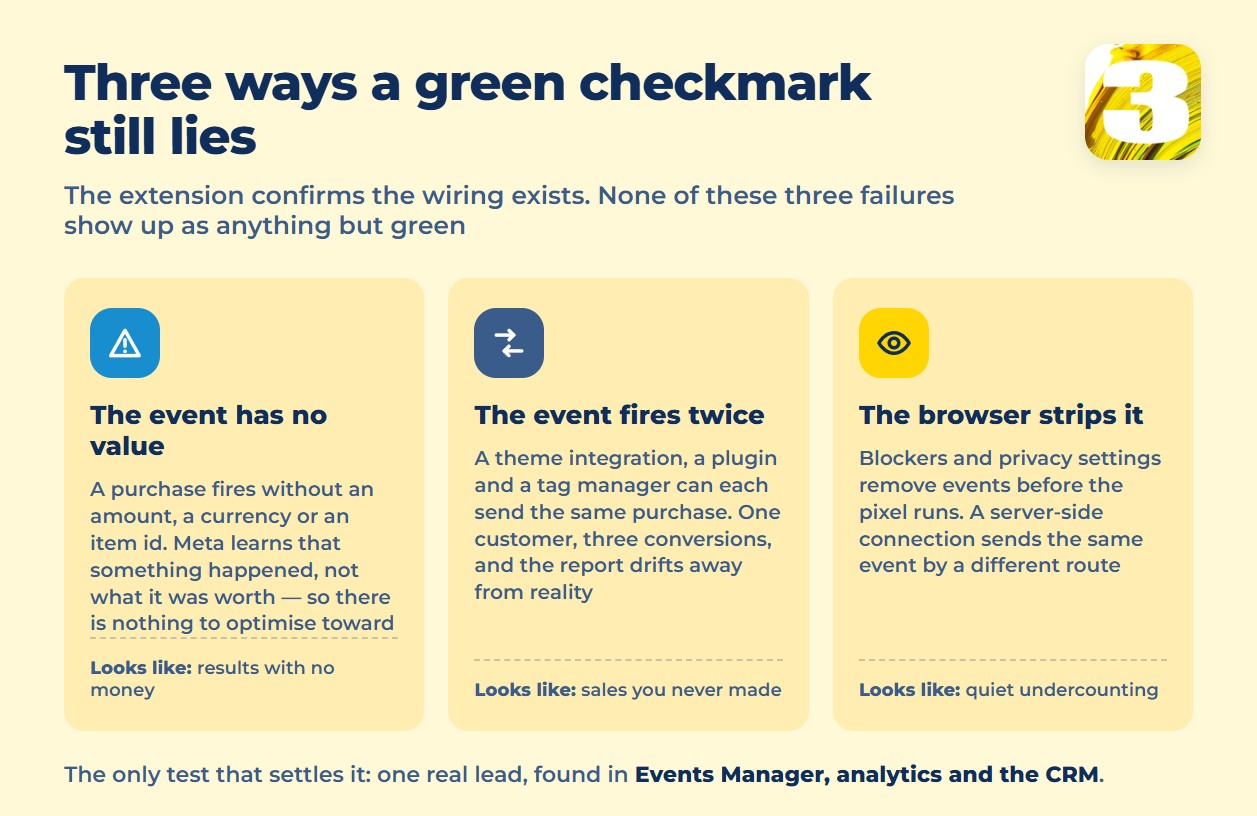
Even with Ads Data Advisor showing everything green, three separate things can still be wrong underneath it.
The event fires with no parameters attached. A Purchase event that fires without a value, a currency, or a content ID tells Meta that something happened, not what it was worth. There’s nothing for the ad set to optimize toward, which quietly undercuts the budget math a lot of accounts are built on. There’s a separate piece on what Facebook and Instagram ads actually cost.
The same event fires twice. A theme’s native integration, a tracking plugin, and a tag manager container each firing the same Purchase event is a common setup, not a rare mistake. Meta counts three conversions where one customer bought once — and nobody notices until the numbers stop making sense next to what actually shipped.
Browser-side data gets cut before it’s collected. Ad blockers, cookie restrictions, and browser privacy settings all remove events before the pixel ever fires — a limitation of anything that has to run inside a visitor’s browser. Meta’s Conversions API is built, in Meta’s own words, “to create a connection between an advertiser’s marketing data (such as website events, app events, business messaging events and offline conversions) from an advertiser’s server, website platform, mobile app, or CRM to Meta systems that optimize ad targeting, decrease cost per result and measure outcomes.” That’s a second, independent path for the same event, sent from your server rather than the visitor’s browser. Meta doesn’t publish this as an ad-blocker fix — but the event no longer has to survive whatever the browser stripped out.
Phone leads have the same blind spot in a different shape: a call that never shows up in a report doesn’t mean the call didn’t happen, it means the tracking never reached that channel. A green checkmark on a pixel has the same limits — it tells you the wiring exists, not that every lead travels through it.
What Actually Proves the Pixel Counts: Money, Not a Checkmark
The only test that means anything is the one an extension can’t run for you. Submit a real test lead through your own form, then go find that one lead in three separate places: Events Manager, your website analytics, and your CRM. If it shows up in all three, with the same rough timing and the same source, your setup is doing its job.
If it’s missing from one of the three, stop there — that’s the actual leak, and it’s usually more specific than “the pixel is broken.” A lead in the CRM but not in Events Manager points at a firing problem. A lead in Events Manager but not the CRM points at the sales side losing it after the click. Numbers that never quite match between Meta and your analytics platform aren’t automatically a bug either — different systems count using different windows and different attribution logic, which is a separate problem worth understanding on its own. Worth reading next: why two platforms claim the same sale.
This three-way check is also why tracking that ties a lead back to its actual source matters more than any single dashboard. A platform’s own event log can only tell you what that platform saw.
What We Check Before Touching a Client’s Budget
Before we adjust bids or spend on a Meta Ads account, we run this exact check — a submitted test lead traced through Events Manager, the site’s analytics, and the CRM record. We also run our own lead-tracking plugin alongside the standard setup, and the difference shows up regularly: Meta’s tools confirm an event fired; ours shows which specific lead it was and where that lead actually came from. Both pieces of information matter, and only one of them is available from a green checkmark.









