
Google’s own answer to “how do I optimize for AI Overviews” is short: you mostly don’t, not as a separate job. Its AI Features and Your Website page states it plainly: “There are no additional requirements to appear in AI Overviews or AI Mode, nor other special optimizations necessary.” We made the wider case for that in our breakdown of what actually works in AI search optimization. This piece is narrower: which levers on your own site are real, and which ones the advice columns keep pointing at by mistake.
That mistake usually starts from one wrong assumption — that AI Overviews run on a separate system with separate rules, so getting into them needs a separate fix. Google’s guide to generative AI features on Search says otherwise: the features “are rooted in our core Search ranking and quality systems,” and optimizing for them “is optimizing for the search experience, and thus still SEO.” Accept that, and the list of things on a page worth touching gets much shorter than most checklists suggest.
The Switch Everyone Flips for the Wrong Reason
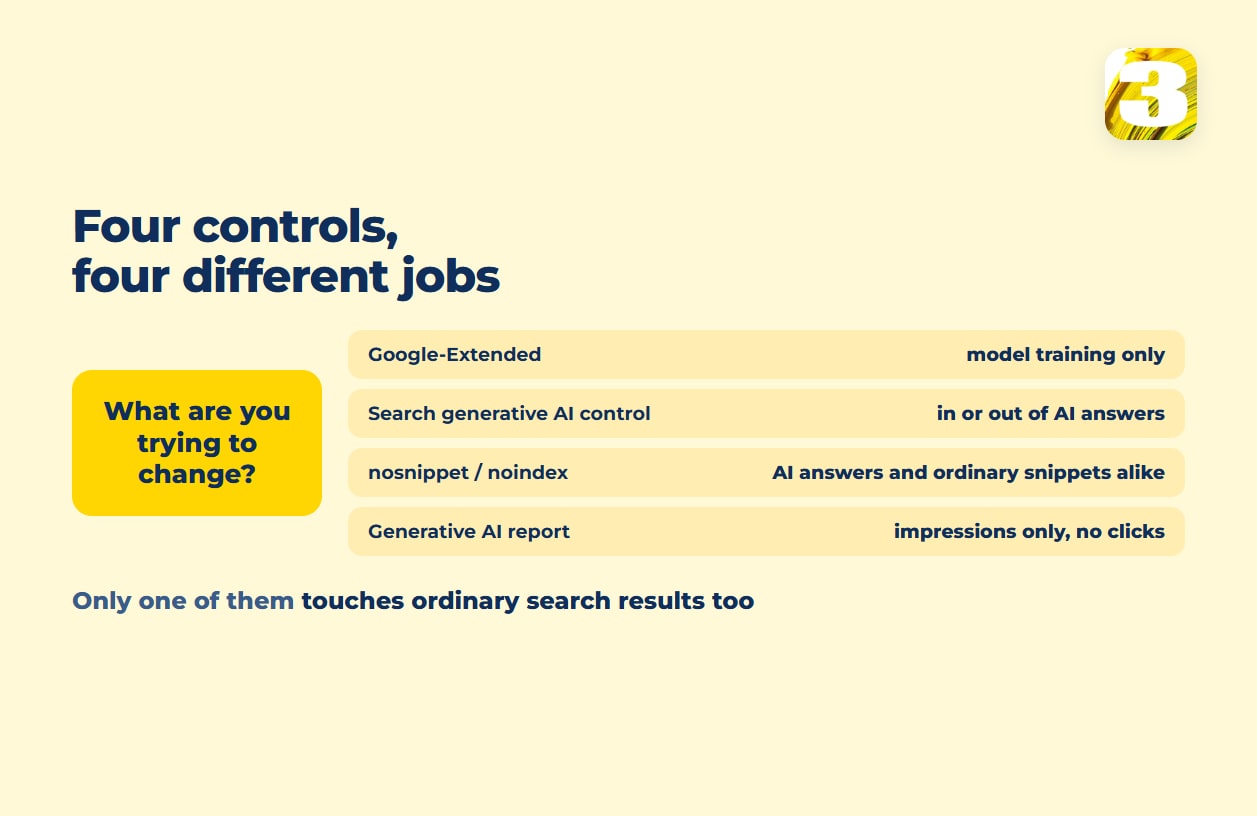
Ask ten site owners what turns AI answers off, and most will say Google-Extended. It’s the wrong control for the job. Google introduced it in 2023 as a way for publishers “to manage whether their sites help improve Bard and Vertex AI generative APIs” — training and grounding, not the results page. The current documentation keeps the split explicit: Google-Extended exists “to limit AI training and grounding in some of Google’s other systems,” while a separate line handles what shows up in Search: “To limit the information shown from your pages in Search, use nosnippet, data-nosnippet, max-snippet, or noindex controls.”
Block Google-Extended and an AI Overview can still quote your page, because it’s built on the regular Search index, not on the system that bot feeds.
What Actually Controls Whether You Appear in AI Overviews
Two settings and one editorial habit — and none of them are new markup.
The Search generative AI control, which is the switch people are usually looking for. It lives in Search Console under Settings → Search generative AI, and Google rolled it out to every site worldwide on August 31, 2026. It has three states — include, exclude, or inherit from a parent property — and include is the default, so unless somebody changed it, you’re already in. Set it to exclude and your content is “prevented from being visible to users in Search generative AI features,” across AI Overviews, AI Mode, and generative features in Discover, with no impressions or traffic from any of them.
The line that makes this control different from everything else on this page is Google’s own: it “isn’t used as a ranking or inclusion signal affecting other parts of Search.” That is the opposite of what the snippet tags do.
Snippet controls, and what they cost you. nosnippet stops any text preview of a page. data-nosnippet does the same for one section instead of the whole thing. max-snippet caps how much text can be quoted. noindex removes the page from consideration entirely. All of them reach into AI answers — and all of them reach into ordinary search results at the same time, because they’re the same tags that have governed regular snippets and featured snippets for years. Use nosnippet to stay out of an AI Overview and you also give up your description text in the blue-link results. That’s the trade the generative AI control was built to avoid, and it’s the reason to reach for the control first and the tags second.
Facts about your business that agree with each other. Name, address, phone number, hours, and service list should read the same on your site, your Google Business Profile, and in your schema markup. This one isn’t a Google-documented rule and we won’t dress it up as one — it’s what we see doing this work: a business whose hours say one thing on the site and another on the profile gives a system two answers and a reason to reach for a third source instead. We cover the profile side in Google Business Profile optimization and the markup side in schema markup for local businesses; getting both to agree with the site itself is most of what happens in our local SEO work.
Pages that answer the question instead of leading up to it. A page that opens with three paragraphs of scene-setting before it names the price, the hours, or the answer isn’t quotable — there’s no clean sentence to lift. And this is not AI-specific formatting: Google’s guide to generative AI features is explicit that “you don’t need to write in a specific way just for generative AI search,” and that “structured data isn’t required for generative AI search, and there’s no special schema.org markup you need to add.” Nothing new to install, in other words. Just the habit that has always helped: put the answer near the top, in a sentence that stands on its own.

AI Mode SEO: The Same List, One Different Search Box
AI Mode runs on the same rules as AI Overviews — same snippet tags, same reliance on the core index, same “no special optimizations” position from Google. What changes is where someone typed the question, not what controls whether your page shows up in the answer. Treat “AI Mode SEO” as its own discipline and you’ll end up chasing a distinction that doesn’t move anything on your side of the site.
How to Tell If Any of This Is Working
The Generative AI performance report in Search Console rolled out worldwide on August 31, 2026, the same day as the control above — though Google notes it is still reaching some properties, so an empty screen isn’t necessarily an empty result. Two things about it are worth keeping apart. It counts impressions only: it can tell you a page appeared inside an AI feature, but it gives no click-through rate, and it doesn’t separate AI Overviews from AI Mode — they’re counted together. The click side is a different report, with a different limitation, and our piece on the one AI bot you should never block takes that apart along with the blind spots in GA4’s “AI Assistant” channel, added on May 13, 2026.
Which is why impressions are the wrong thing to judge this by on their own. An impression says a page was shown; it doesn’t say anyone came, and it certainly doesn’t say anyone got in touch. The place that answer actually turns up is the contact form at the other end.
How to Check Your AI Overviews Setup, in Order
Twenty minutes with the account, no tools:
- Search Console → Settings → Search generative AI. Confirm it says include. If it says exclude and nobody remembers choosing that, that’s your answer.
- The page source of your two most important pages. Search for
nosnippetandmax-snippet— plenty of SEO plugins set these by default, and few owners know it. - Search Console → the Generative AI performance report. Impressions on a page mean you’re being shown. No impressions on a page that ranks well is the interesting case.
None of that guarantees a citation, and nobody can. It does tell you whether you’re eligible for one — which is the part actually on your side of the line.