
Google Ads gives you four different ways to draw a service area, and most accounts default to whichever one the setup wizard suggested first. That’s usually the wrong call. A radius makes sense for a business that drives to the job; a list of named cities makes sense for a business that works specific venues; postal codes make sense when you need precision inside a metro area a radius can’t give you. Pick the wrong shape and you either pay for clicks outside your reach or miss streets you’d happily serve.
We’re not covering why ads sometimes show outside your target country here — that’s a separate diagnosis, and we’ve already written it up. That side of it is here: why Google Ads shows your ads outside your target country. This is about designing the zone correctly in the first place.
Four location targeting shapes, and which business fits which
Radius targeting draws a circle around an address and targets everyone inside it. It fits businesses that go to the customer — installers, repair crews, delivery routes — where “how far will we drive” is the actual business question. Google’s API documentation calls this proximity targeting — a `ProximityInfo` object built around a radius and a geographic point, the API-level version of the same radius option you see in the Ads interface.
City and region lists target named places instead of a shape on a map. This fits a business that works specific locations rather than everything within a set distance — a company that runs events at particular venues in particular cities has no use for a 40-mile circle; it needs exactly the cities where it operates and nothing between them.
Postal codes target at a finer grain than a city, which matters when your service area follows a boundary a radius or a city list can’t draw — a neighborhood, a delivery zone, a franchise territory that ends mid-city rather than at the city line.
Location groups bundle multiple places into one target — a chain with several physical addresses, or a radius applied around each one at once — so you’re not managing dozens of individual settings by hand.
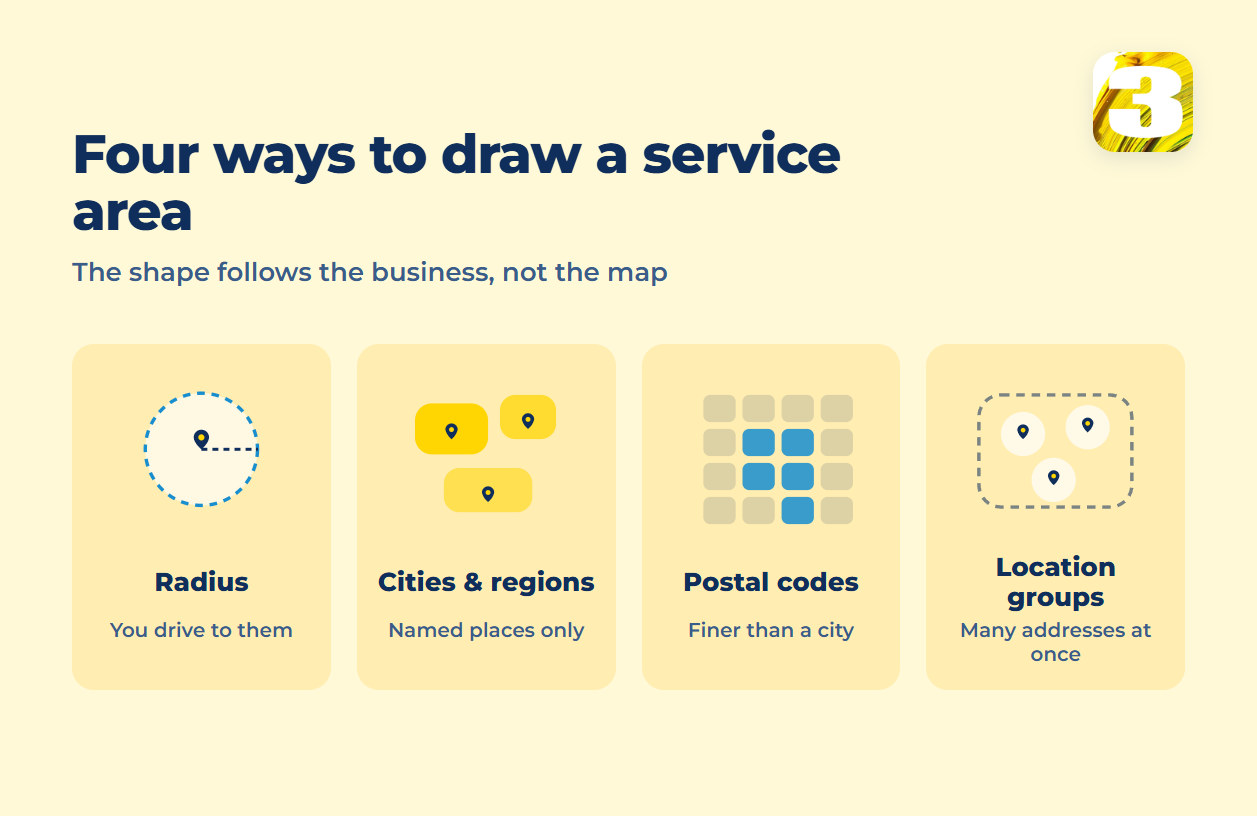
None of these is universally “better.” The question is which shape matches how the business actually reaches customers — and that’s usually obvious once you say it out loud, which is exactly why it gets skipped.
One campaign, one budget, one bid — so geography sometimes has to split
Here’s the setting that decides everything else: budget and bid strategy live at the campaign level, not inside a location target. You can target three cities in one campaign, but you can’t give one city its own budget while it shares a campaign with the other two. If a city or region needs its own spending cap, its own bid strategy, or its own conversion reporting separate from the rest, it needs its own campaign — targeting alone won’t get you there. Deciding where those lines fall is a good part of what managing an ads account actually consists of.

This is the same logic that decides when anything else in an account deserves its own campaign rather than living inside a shared one — worth reading in full if you haven’t. The general version of that rule is what a modern account structure looks like. Applied to geography specifically: one metro that consistently outperforms should probably control its own money, instead of quietly subsidizing (or being subsidized by) a region it has nothing in common with.
Location bid adjustments: the smaller lever before you split anything
Before reaching for a separate campaign, there’s a lighter option: a location bid adjustment. Inside a single campaign, you can raise or lower bids for a specific city, region, or radius without touching budget or bidding strategy for the rest of the campaign. It’s the right tool when one area simply converts better or worse than its neighbors and you want the algorithm to lean into that — not when the area needs a genuinely separate budget or a different conversion goal. That distinction is what tells you whether you need an adjustment or a whole new campaign.
One more signal worth reading before you touch either: if a region is losing impressions because the campaign runs out of money rather than because it loses auctions, splitting the geography won’t fix anything by itself. The number that tells you which it is: the search impression share formula.
What the Google Ads location report actually tells you
The location report splits performance by where people were when they interacted with your ad — and by default, “where people were” is broader than it sounds. Google’s targeting documentation is specific about this: the default inclusion setting, PRESENCE_OR_INTEREST, “reaches people who are likely to be in, or regularly in, your targeted locations, PLUS people who have shown interest in your targeted locations.” Someone searching your service area from three states away can register in that same location’s numbers.
Exclusions behave differently, and the gap between how inclusion and exclusion read location is exactly where accounts start paying for the wrong clicks. That’s its own diagnosis rather than a design decision, and we’ve covered it separately. That side of it is here: why Google Ads shows your ads outside your target country.
The practical point for designing a zone: a location report shows you where interest is clustering, not a clean map of where your customers physically stood. Build the zone for that blur instead of treating the rows as exact addresses.
Location Manager: one place instead of three
Google has been consolidating location settings that used to live in separate corners of the interface — campaign settings, business assets, targeting options — into a single section under Tools called Location Manager. If you manage more than a handful of location targets, it’s worth checking whether your account already has access, since the alternative is stitching the same information together by hand across several settings screens. Google’s own location targeting help covers where each setting lives in the current interface.
Two client zones that look nothing alike
Two of the accounts we manage make the contrast obvious. A fencing and construction business needs a radius — customers are wherever a crew can reasonably drive with equipment, and the boundary is distance, not a list of neighborhoods. An event company needs a city list — it works specific venues in specific cities, and a radius around its office would target plenty of places it never operates and skip cities it works in regularly. Same platform, same settings screen, two completely different shapes — because the businesses themselves are shaped differently.
Before you touch the settings
The zone is usually the first thing worth checking in an account that’s spending more than it should, right alongside the account structure it sits inside. Both are on the list in a twenty-minute account audit.