


Your phone has been ringing all week. Reception logged four calls yesterday that turned into estimates, plus two more that just asked about pricing. Open the Google Ads dashboard for the same campaign and the conversions column reads two, or zero. Nothing about the ads changed — the report just never learned the calls happened.
That’s a different problem than “how do I turn on call tracking.” What actually helps is knowing what’s happening on your specific account: where calls go missing in three predictable spots, how the same call can get counted twice in the opposite direction, why a “conversion” in Ads doesn’t mean a lead landed anywhere your sales team can see it, and a check you can run yourself before changing a single setting.

What a Blind Report Actually Looks Like
In the dashboard, this rarely shows up as an error message — it shows up as campaigns that “aren’t converting.” Cost per conversion climbs, a campaign that’s clearly driving real business gets flagged as underperforming, and budget quietly shifts toward whichever channel happens to log form fills, because forms report cleanly and calls, left unconfigured, don’t report at all. The ad worked. Ads just never heard about it, so nothing in the account distinguishes a genuinely dead keyword from one that’s feeding your phone lines every single day.
That gap is worth checking before cutting spend on anything — see our guide on reading a Google Ads report for what the standard columns tell you, and where they quietly go silent.
Three Places a Phone Call Falls Out of Google Ads
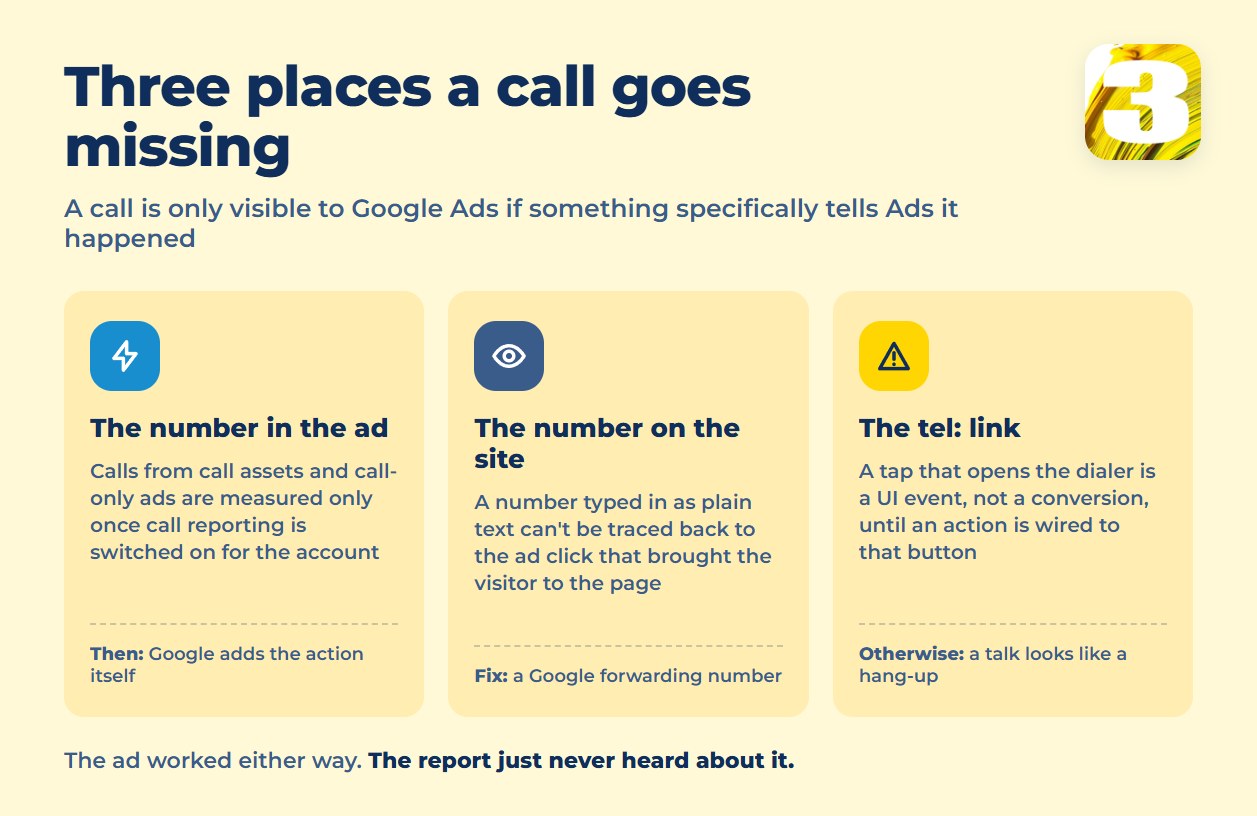
A call is only visible to Google Ads if something specifically tells Ads it happened. There are three points where that handoff usually breaks.
The number in the ad. Calls from call-only ads and call assets are only measured once call reporting is switched on for the account. Turn it on and Google creates the “Calls from ads” conversion action for you and adds it to the Conversions column automatically, with a minimum call length you set, so a two-second misdial doesn’t count the same as a real inquiry. Leave it off and the tap still shows up as a click — but never as a conversion, and nothing in the report tells you whether anyone actually talked.
The number on the site. If your header and contact page show your business number typed in as plain text, a visitor who clicked an ad and then called from your site did something Google Ads has no way to trace back to that click — it just looks like a random visit that left without converting. Where Google forwarding numbers are available — the US and Canada included — the fix is dynamic number insertion: swapping in a Google forwarding number for ad visitors, so the call routes through Google before it reaches your phone and gets attributed to the click that caused it.
Click-to-call on your own site. The tel: link in your header or on a landing page — a tap that opens the dialer is a UI event, not a conversion, until a conversion action is wired to that specific button. Without it, someone who tapped and actually talked to your team looks identical in your reporting to someone who tapped and hung up before it rang.
When One Call Counts Twice
The opposite failure is just as common, and it’s the one businesses rarely think to check for: the same phone call getting logged as two separate conversions. It happens when two different conversion actions are measuring the same calls and both are ticked into the Conversions column — the native “Calls from ads” action running alongside call conversions imported from your phone system or CRM, for example, or a click-based call action left switched on next to one that counts by call length. Google’s own guidance is blunt about the result: include both, and it “will result in counting 2 conversions for every call.” Ads counts two conversions off one customer. Cost per lead looks better than it actually is, and a mediocre campaign starts reading as your best one.
Catching this means opening Goals → Conversions → Summary and reading the breakdown rather than the total: which actions exist, and which of them have “Include in ‘Conversions'” ticked. One real-world event should feed exactly one ticked action. Then sanity-check the total against your own call log for the same period.
A Counted Call Isn’t a Logged Lead
Even a perfectly tracked call only tells you an ad worked — it doesn’t tell you what happened after. If a call is logged as a conversion in Ads but nobody enters it as a contact in the CRM, the lead exists in one system and nowhere else: no follow-up task, no record for whoever’s supposed to call back, and nothing to attach the revenue to if you later want to import that closed sale back into Ads. The ad report says the campaign converted. The pipeline says nothing came in. Both are true at the same time, and that’s the actual problem: a number in an ad platform isn’t the same thing as a person your business can reach again.
A Four-Step Call Tracking Check You Can Run Yourself
Before touching any setting, confirm what your account is actually doing. Three of these take ten minutes; the first one you start today and read tomorrow, because call conversions are not instant:
- Call your own ad. Click through a live ad or call asset from your phone, then check Goals → Conversions → Summary the next day. Did that call show up?
- Check the number on your site. Click through to your site from the ad, ideally on a separate device or in an incognito window. Is the number on screen your real business line, or a different forwarding number? If it’s identical every time, dynamic insertion isn’t running.
- Tap your click-to-call button. Watch whether that tap shows up as an event anywhere in Ads or your analytics — not just as a call your phone happens to receive.
- Ask reception. If a call did come through in step one, is it sitting in the CRM as a contact, or only as a name on a sticky note by the phone?
Any “no” in that list is the leak. Which one matters most for you depends on how your specific campaigns and site are built — not on a generic checklist.
Why This Is Worth Fixing Before Spending More
Our Google Ads management is billed flat rate, not as a percentage of your ad spend, so we have no reason to want your budget bigger before your reporting is telling the truth — a campaign that looks dead because its calls aren’t counted is worth fixing before it’s worth funding.









