

Buy a theme or a builder plan. That’s the honest default for most businesses asking whether to build a website from scratch, and it holds true most of the time. A WordPress theme, a Shopify plan, or a Squarespace site gets you live in days, not months, and someone else is responsible for patching the platform when a security hole shows up.
The question only gets interesting when the templated option keeps failing you in the same specific way — not “it looks generic,” which is a design problem you can usually fix inside the platform, but a workflow the platform genuinely has no slot for. That’s a narrower group of businesses than the “we need something unique” pitch usually implies.

The Default Is Buy, Not Build
The math starts with what’s actually on the vendors’ own pricing pages, not with a guess. WordPress the software is free and open source — you’re paying for hosting, a domain, and usually a theme, not for the platform itself, according to WordPress.org’s own download page. Shopify’s entry-level Basic plan lists at CA$49 a month billed monthly, or CA$37 a month on annual billing, per Shopify’s current pricing page — that page shows your local currency, so US readers will see a USD figure in the same range.
For reference from the other side of the line: our own platform-based build is listed on our site at a fixed $1,900 for up to eight pages, on a timeline measured in weeks rather than months. That is the number a from-scratch quote has to beat on something other than looks.
If one of those plans has a theme that fits your business and a page or product limit that covers what you actually sell, then paying for a custom build isn’t the smarter move — it’s a more expensive way to arrive at roughly the same site. We covered the technical side of that gap — what actually changes when code stops being templated — in a separate breakdown of custom development versus template-based design; this piece is about the decision, not the mechanics.
Three Signs the Template Has Actually Stopped Fitting
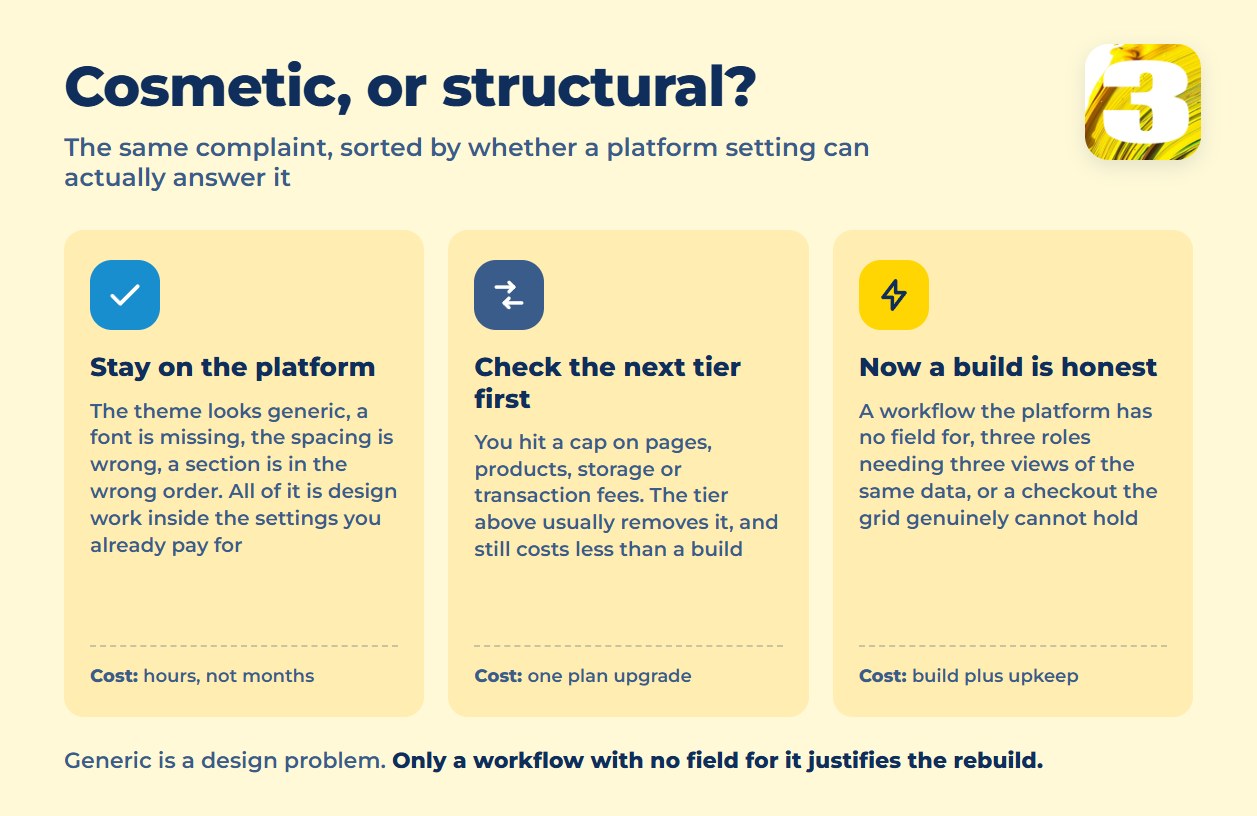
- Your workflow doesn’t have a field for it. A booking system that needs to check real-time availability across multiple resources at once, a dashboard where three roles need three different views of the same data, a pricing calculator wired to your own internal rules — these aren’t things a theme setting turns on. If the plugin marketplace has three half-working attempts at your exact workflow, that’s usually the tell.
- The plan’s own limits are the wall, not your imagination. Every builder caps something — pages, products, storage, transaction fees on top of the subscription. Before you call that a reason to build from scratch, check whether the next tier up actually removes the cap. It usually does, and it’s still cheaper than a build. The wall is real when you’re already on the top tier and still hitting it.
- The design difference is structural, not cosmetic. Wanting a font a theme doesn’t ship with is cosmetic. Needing a checkout flow, a multi-step form, or a layout logic the platform’s grid genuinely can’t hold — where the workaround breaks on every update — is structural. Only the second kind justifies the cost.
If none of these describe your business, the conversation is over: keep the plan you’re on, and put the saved budget into the content and ads that actually bring people to the site.
What You Sign Up For After Launch
The build itself is the visible cost. The part that doesn’t show up on a proposal is what happens the week after launch: a platform vendor pushes a security patch to everyone automatically — WordPress, for instance, applies minor core releases in the background by default — while a custom site doesn’t get that unless someone is specifically watching for it. That someone is now part of your overhead, not the vendor’s.
The sharpest version of that risk isn’t technical, it’s a person. If one developer understood how the whole build fit together and that person moves on, you don’t just lose a contact — you lose the only documentation that mattered. A custom site nobody on your team can safely touch isn’t an asset anymore; it’s a liability with a login screen. Anyone recommending a from-scratch build who skips this part isn’t giving you the full picture. If you’d rather not carry that risk in-house, that is what a fixed-scope build-and-maintain arrangement is for — our website development service is priced as a fixed scope rather than an open-ended retainer.
This is also where the buy-versus-build question shows up a second time, one layer down: even after you’ve decided the site itself needs to be custom, most of what runs inside it — the CRM, the invoicing, the internal tools your team touches daily — usually shouldn’t be. We laid out that narrower decision, tool by tool, in our build vs buy breakdown for business software. A custom website chassis and a custom back office are two separate calls, and conflating them is how budgets balloon.
When Not to Build From Scratch
If you’re validating an idea and don’t know yet whether the business works, build the cheap version first — a from-scratch site is the wrong place to spend runway on a hypothesis that might change in three months. If it’s a one-off event page or a brochure site with no ongoing functionality, a template plan will outlive its usefulness long before it becomes the bottleneck. And if nobody on your team, or on retainer, will actually maintain custom code once it exists, don’t build it — a site nobody patches is worse than a template nobody customized.
The Short Version
Start with a theme or a builder plan. Move to a custom build only when a specific workflow doesn’t fit anywhere in that platform’s settings, not because the site “feels generic.” At 3MY we work both ways — platform builds on WordPress and WooCommerce, and custom code when the platform genuinely can’t do the job. Which one we recommend depends on the workflow, not on which one is bigger to sell.









