
Our price, before the explanation:
- $800 — one workflow, built and handed over in a single sprint.
- $1,500 — up to three workflows in the same sprint.
- Enterprise — scoped to the work, no fixed ceiling.
- CAD for Canadian clients, USD for US clients. No platform subscription on top: the automation runs on our own infrastructure rather than a subscription platform, so nothing keeps billing you in year two.
A sprint usually runs one to two weeks, most often two. We are not going to pin that to a promise, because the honest length depends on what the process turns out to be once we open it up — which is the same reason the rest of this market gives you a range instead of a price. The difference is which half we fix: the price.
That is a real number, published before you talk to anyone. Almost nobody in this market publishes one — which is most of the reason this article exists. Here’s what’s inside each sprint.
We can hold that price because we stay small on purpose: we take on no more than five new automation projects a month.
Now the explanation. Ask two vendors to quote the same job — “connect our CRM to our invoicing tool, notify sales when a deal closes” — and you can end up with a $2,000 quote and a $15,000 quote for what reads like an identical sentence. Neither number is fake. Neither is a scam. The question how much does workflow automation cost doesn’t have one answer because the sentence you wrote down isn’t the actual scope of work — it’s a summary of it, and everything that makes the price move happens in the details that summary leaves out.

What the market actually publishes
Search for pricing and you’ll find a lot of ranges, all confident, none matching. Cohevo’s 2026 pricing guide puts business process automation at $5,000 to $500,000 overall, narrowing to $5,000–$50,000 for a small business project plus $500–$2,000 a month in support. Taskip’s breakdown from the same year, “AI Automation Agency Pricing”, lists retainers from $500–$1,500 a month for small businesses up to $3,000–$8,000+ for enterprise, with one-off builds ranging from $1,500 for a single workflow to $100,000+ for enterprise integration work. A cluster of enterprise-focused agencies — Groovyweb, Parix, Nuroblox among them — quotes $50,000–$150,000+ on their published pricing pages before a single workflow is built, aimed squarely at companies far bigger than the ones asking this question.
Stack those ranges next to each other and you get a spread of roughly 10 to 100 times between the low end and the high end — for a category of work described in nearly identical language. None of these sources show a finished project with a price tag attached to a result. Ranges checked August 2026; sources are named in the text rather than linked, because most of them sell the same service we do.
Those $50,000–$150,000 figures aren’t wrong, and they aren’t padding. They price a different unit of work: a platform rolled out across a company that has an IT department to hand it to. We price one process at a time. If your problem is “the invoice data gets retyped into the CRM by hand every Tuesday,” that’s a one-sprint problem, not a six-figure one — and quoting it as a six-figure one is how this market ends up with a hundredfold spread.
That’s not proof anyone is lying. It’s proof that “workflow automation” is a category, not a product, and a category-level question gets a category-level answer — a range wide enough to be technically true and useless for budgeting.
What does a workflow automation project include
Strip away the marketing language and a quote is built from a small number of line items. Here’s the shape most of them take, based on how the industry commonly breaks down a build — treat the percentages below as rough ballpark figures collected from vendor pricing guides, not something we measured ourselves.
| Line item | What it covers | Typical share (industry ballpark) |
| Discovery & process mapping | Documenting the current process, edge cases, who touches it | Billed as its own line, not a percentage |
| Build | Connecting systems, writing the logic, handling errors | The core of the quote |
| QA & testing | Running real data through it before it goes live | ~5–10% of build cost |
| Training & documentation | Teaching the team the new process | ~5–15%; roughly 20–30 hours per person trained |
| Infrastructure | Servers, cloud licensing, security review | ~15–25% on top |
| Post-launch support | Fixing what breaks after handoff | ~15–20% of build cost, per year |
Two projects with the same line items can still land at very different totals, because “the build” is doing all the work in that table, and the build is the part that scales with everything below.
What actually moves the price
Four things push a quote up or down more than anything else:
Integrations and API access. Does the target system have a real API, and what kind — public, partner-only, internal, or a composite of several? Rate limits and API type add development days you won’t see in the summary sentence.
Data volume. Per-operation pricing feels irrelevant at a thousand runs a month and painful at two million. The same workflow architecture costs more to run — and to build reliably — at scale.
Reliability requirements. A workflow that feeds payroll or customer invoices needs more testing and error-handling than one that posts a message to a Slack channel. Same number of steps, different amount of engineering underneath them.
Ownership after handoff. If nobody on the client side is responsible for the integration once it’s live, it breaks quietly and starts corrupting data before anyone notices. That’s not a cost line on a quote, but it’s the single biggest driver of what a project actually costs you over its lifetime.
If what you’re actually looking for is something that talks to customers directly — answering questions, qualifying leads before a person sees them — that’s a related but different problem from workflow automation, worth reading about separately: AI chatbots for business. It is also easy to get wrong — we wrote up the three mistakes that cost companies customers.
What the tools themselves cost
If you’re building in-house rather than hiring it out, there’s a workflow automation software cost per month to budget for, separate from any agency fee.
- Zapier — free plan covers 100 tasks a month; Professional starts around $19.99/month (paid annually) for 750 tasks and scales to roughly $3,389/month at 2 million tasks.
- Make — free at 1,000 operations a month; Core $9/month, Pro $16, Teams $29, each at 10,000 operations. Those are annual-billing rates; month-to-month runs higher, so check which one a pricing page is showing you before you budget from it.
- n8n — cloud starts at about €20/month for 2,500 executions, €50 for 10,000, and €667 for 40,000 with SSO — but those are the annual-billing rates, roughly €24, €60 and €800 if you pay month to month. Free if you self-host the community edition and cover your own infrastructure.
- Power Automate — $15 per user/month for Premium; unattended RPA bots $150/month, hosted bots $215.
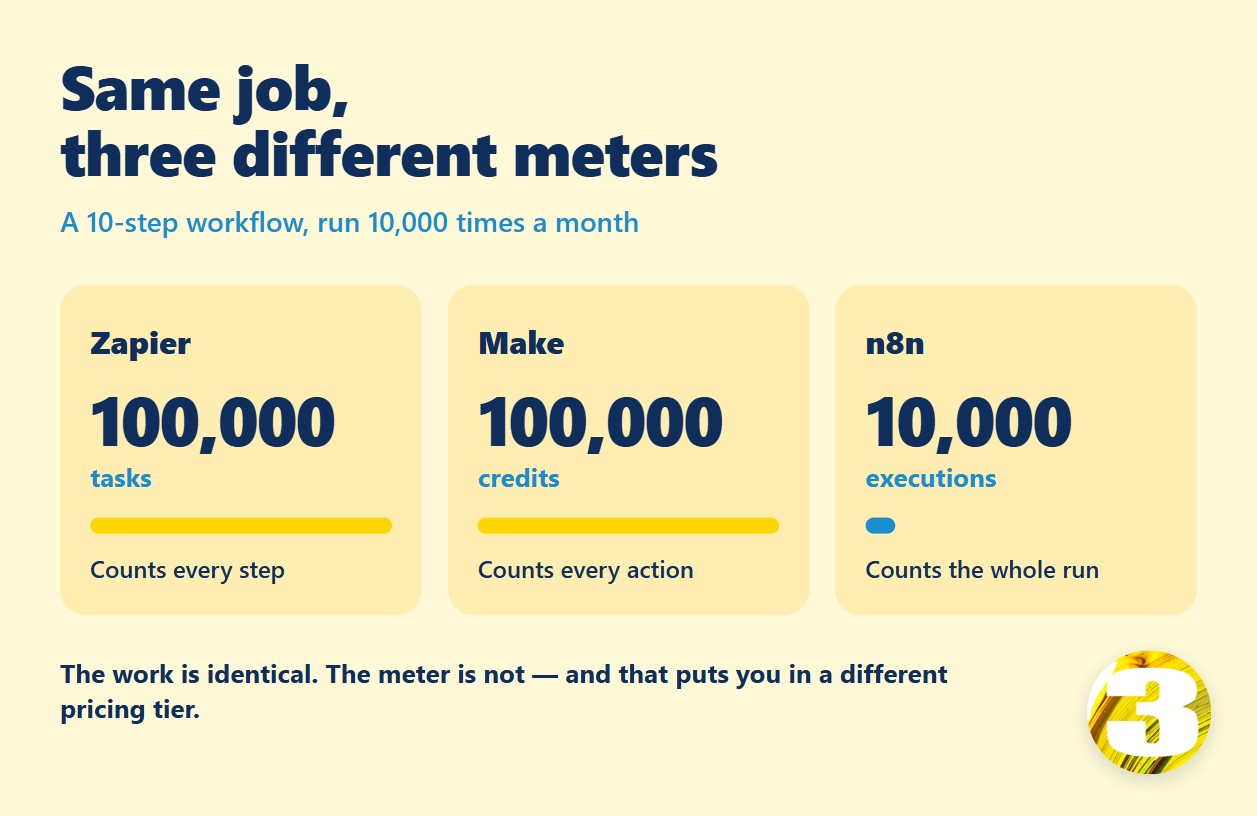
Here’s the part that matters more than any single price: these tools don’t charge for the same thing. A Zapier “task” is one action step — a five-step zap burns five tasks per run. Make counts an “operation” — each module firing once — and bundles them into monthly credits, which generally works out cheaper per unit. An n8n “execution” counts one full workflow run, no matter how many steps are inside it. Run a ten-step workflow 10,000 times a month and the meters read very differently for identical work: Zapier counts 100,000 tasks, Make counts 100,000 operations, n8n counts 10,000 executions. Same job, a tenfold difference in what the platform is counting — and that lands you in completely different pricing tiers. It’s the same phenomenon as the agency quotes above, just one layer down: the unit of measurement changes what “the same job” costs.
The costs that don’t show up in the quote
Running past your plan is the obvious one, and the three platforms handle it in three different ways — all of it published on their own pricing pages, which is where you should read it before signing a build quote. Zapier bills overage at 1.25× your base task rate on an annual plan and 2.5× on a monthly one, and pauses you at 3× your subscription. Make doesn’t bill overage at all — your scenarios simply stop until you buy more credits, in bundles of 1,000 or 10,000. n8n counts whole workflow executions rather than steps, and its Community Edition is free to self-host.
Less obvious: Power Automate puts the connectors most business systems need behind its paid tiers — Premium is $15 per user per month, billed yearly, and unattended RPA jumps to $150 per bot per month. That cost shows up on a different invoice than the automation project itself, which is why it rarely appears in a quote.
Then there’s the failure mode nobody quotes for: a vendor changes an API version, or renames a field, and the workflow doesn’t crash — it just quietly stops working, and you find out days later when the data that’s missing gets noticed by someone downstream. And there’s the ongoing cost of just keeping the thing running. The figure that circulates in vendor pricing guides — we’ve seen no primary source behind it — is 15–25% of the original build cost per year. You can check the other half yourself without trusting anyone: a workflow that eats half a day a week of someone’s attention costs four hours × 52 weeks = 208 hours a year. Put your own hourly rate against that number. We are not going to guess it for you.
About the ROI number everyone promises
Almost every article on this topic ends with a version of “pays for itself in 2–4 months” or “expect 3–5x ROI within a year.” Check the footnote on that claim and, almost always, there isn’t one.
The one study we found that discloses its sample is MIT’s Project NANDA, “The GenAI Divide: State of AI in Business 2025” (July 2025) — 52 executive interviews, a survey of 153 leaders, and analysis of 300 public enterprise deployments. Its headline finding: against $30–40 billion in corporate generative AI investment, 95% of pilots showed no measurable return, with value concentrated in a narrow 5%.
We’re citing it because it at least tells you who it surveyed — not because it applies here. In fairness, it is a preliminary paper, it has not been peer-reviewed, and its methodology has been publicly disputed. That still puts it ahead of an ROI claim with no source at all. It’s a study of enterprise generative AI pilots, not small-business workflow automation, and stretching it to cover Zapier zaps or CRM syncs would be exactly the kind of misuse we’re asking you to watch for elsewhere. We looked for a study of SMB workflow automation ROI with a transparent, checkable methodology and didn’t find one. If you know of one, we’d genuinely like to see it.
To be direct about our own position: we don’t have savings numbers for our clients’ projects, and neither, as far as we can tell, does anyone publishing “−70% manual work” without a source attached to it. Ask for the source. Ask us too.
The math you can actually do yourself
You don’t need our numbers to know whether automating something is worth it — you need two of your own: how many minutes the task takes once, and how many times a week someone does it.
Minutes per run × runs per week × 52 weeks ÷ 60 = hours a year the task currently consumes. A task that takes four minutes and happens 40 times a week is roughly 139 hours a year — not a projection, just arithmetic on what’s already happening. Whatever that number turns into in dollars depends on who’s doing it and what an hour of their time is worth to you, which is a number only you have. That’s the figure worth bringing to a vendor conversation, not a percentage borrowed from a blog post. For a sense of what a narrow, well-scoped automation looks like in practice, here is how we automate product descriptions.
What to ask before you sign a quote
Whoever you end up talking to, take a short list of questions into that conversation:
- What exactly is in scope — line by line, not as a paragraph
- What happens to the price if discovery turns up three more integrations than expected
- Are the tool subscriptions (Zapier, Make, n8n, or similar) included in the quote, or billed to you separately
- Who owns the automation once it’s built — can your team edit it, or is every change a support ticket
- Who gets notified the moment a sync breaks, and how fast
- What’s the plan for edge cases — duplicate records, failed API calls, empty fields — or is testing limited to the happy path
These are the same questions this article has been answering about the market in general. Ask them of any vendor, including us.
Not ready to talk to a vendor yet? Copy those six questions into your next email to one.
Here are our own answers to the two that cost people the most money.
Subscriptions. We host the automation ourselves, so there’s no platform subscription attached to what we deliver. That’s a real difference from a build on Zapier or Make, where the monthly bill continues for as long as the workflow runs and grows with your volume. If a vendor quotes you a build price, ask which platform it runs on and who pays for it in year two.
Ownership. The workflows run on infrastructure we manage. We can hand them over — they’re yours, and we’ll export them in an open, standard format that runs elsewhere: your infrastructure, ours, or a cloud host. No proprietary format, nothing to unlock. But we’d rather be straight with you than sell you a feeling of control: the real question isn’t whether you can take it, it’s who gets the notification on a Saturday when a sync fails. If that person doesn’t exist yet, a managed setup is cheaper than a broken one nobody noticed. Ask any vendor the same thing, and be suspicious of a yes that comes too easily.
What this looks like on a real project
A construction contractor near Montreal runs about 100 active projects at once, spread across roughly 60 miles (100 km) north to south and 300 miles (500 km) east to west. Every project — address, measurements, scope of work, history — lived on paper. Finding the right sheet meant spreading printouts across the garage floor until the right one turned up.

What replaced it: every project is a point on a map, shape and color showing status, filterable by status. Click a point and you get the address, dates, project description, notes, links to photos, and key milestones — the day the foundation gets poured, for instance. From there, one click into the client’s record pulls up their contracts. The whole thing syncs with Google Calendar, both the owner’s and the crew’s.
That’s what a completed automation project looks like from the outside: not a percentage, a system you can point to.
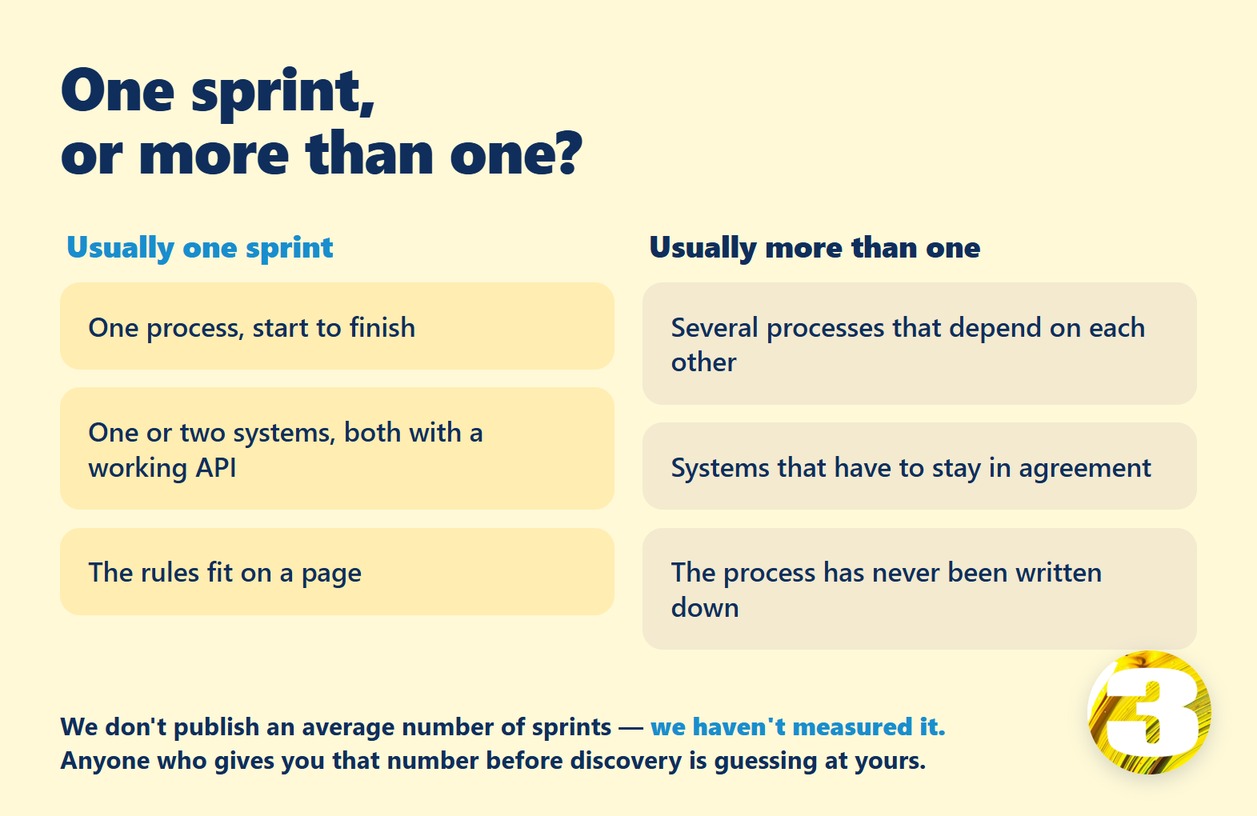
The smallest one we’ve built is our own: a lead-tracking workflow that records where a contact actually came from. It shows us people arriving from ChatGPT rather than a search engine — something standard analytics doesn’t surface. One process, one system, no percentage attached. That’s the scale most single sprints operate at, and the map above is well past it. Knowing which side of that line you’re on is worth more than any range:
| Usually one sprint | Usually more than one |
| One process, start to finish | Several processes that depend on each other |
| One or two systems, both with a working API | Systems that have to stay in agreement with each other |
| The rules fit on a page | The process has never been written down |
| Data starts clean at go-live | Historical data has to be migrated and cleaned first |
| One person approves | Approvals cross departments |
We don’t publish an average number of sprints per project — we haven’t measured it. Any vendor who gives you that number before discovery is guessing at yours.
What we charge, and what’s in it
Most pricing pages give you a range. Ours is one number for the two tiers most businesses need, and a scoped quote for enterprise work — see the full breakdown of what’s included in each sprint — because a range is only honest if you also show what’s inside it, which is the whole argument of this article.
| Starter — $800 | Growth — $1,500 | Enterprise — custom | |
| Workflows | 1 simple workflow | Up to 3 | No fixed limit |
| Audit & sprint planning | Included | Included | Included |
| Automation setup | Basic | Standard | Advanced, multi-process |
| AI integrations (chatbots, NLP) | — | Standard | Advanced, custom models |
| CRM / calendar sync | — | Multiple systems | Enterprise-scale |
| Reporting | Basic report | Interactive dashboards | Custom analytics |
| Iteration | — | Optional second sprint | Ongoing roadmap |
Prices are in Canadian dollars for Canadian clients, US dollars for US clients. Every tier includes a free audit, QA testing, and support after launch — and no platform subscription on top, because we host the automation ourselves. What varies is integration depth, the reliability the process demands, and how much iteration you want built in — the same four levers described earlier, priced instead of left as a range.
Where to start
You don’t need a finished spec to ask whether something is worth building. Send us a description of one process you’re doing by hand right now — what it is, how often, what systems it touches — and we’ll tell you honestly whether it’s a sprint’s worth of work, bigger than that, or not worth automating at all yet.