
If you run a small business, ChatGPT is probably open in a tab right now, next to your email. The question isn’t whether to use it — you already are. The real questions are what belongs in that box and what doesn’t, what your plan changes about your data, and how to catch the answer that’s wrong before it goes out under your name. For the wider question of where AI tools pay off and where a person is still cheaper, see our piece on where AI tools actually save time. This piece on ChatGPT for small business stays narrower: one tool, one chat window, and the line between using it well and handing it something it shouldn’t have.
The Line Between a Chat and a Process
Typing a question into ChatGPT and reading the answer is a chat. Pasting the same kind of thing into it every day — the same three fields off a lead form, the same product blurb template, the same reply to the same question — isn’t a chat anymore. It’s a process that happens to be running by hand, one paste at a time.
That distinction matters because it changes what the tool is costing you. A chat costs the few minutes it takes to type and read. A repeated paste costs those same few minutes every working day for as long as the business runs, and it still depends on someone remembering to open the tab. Once you notice you’re doing the same paste on a schedule, that’s the signal to stop doing it by hand. For telling a step that needs a model’s judgment from one that’s just data moving between systems, see our piece on which workflow steps actually need AI. Turning a repeated ChatGPT task into an automated workflow is a smaller step than it sounds: the prompt you’ve been typing becomes the instruction a system runs on its own, on the same schedule.
What ChatGPT Is Good For in a Small Business
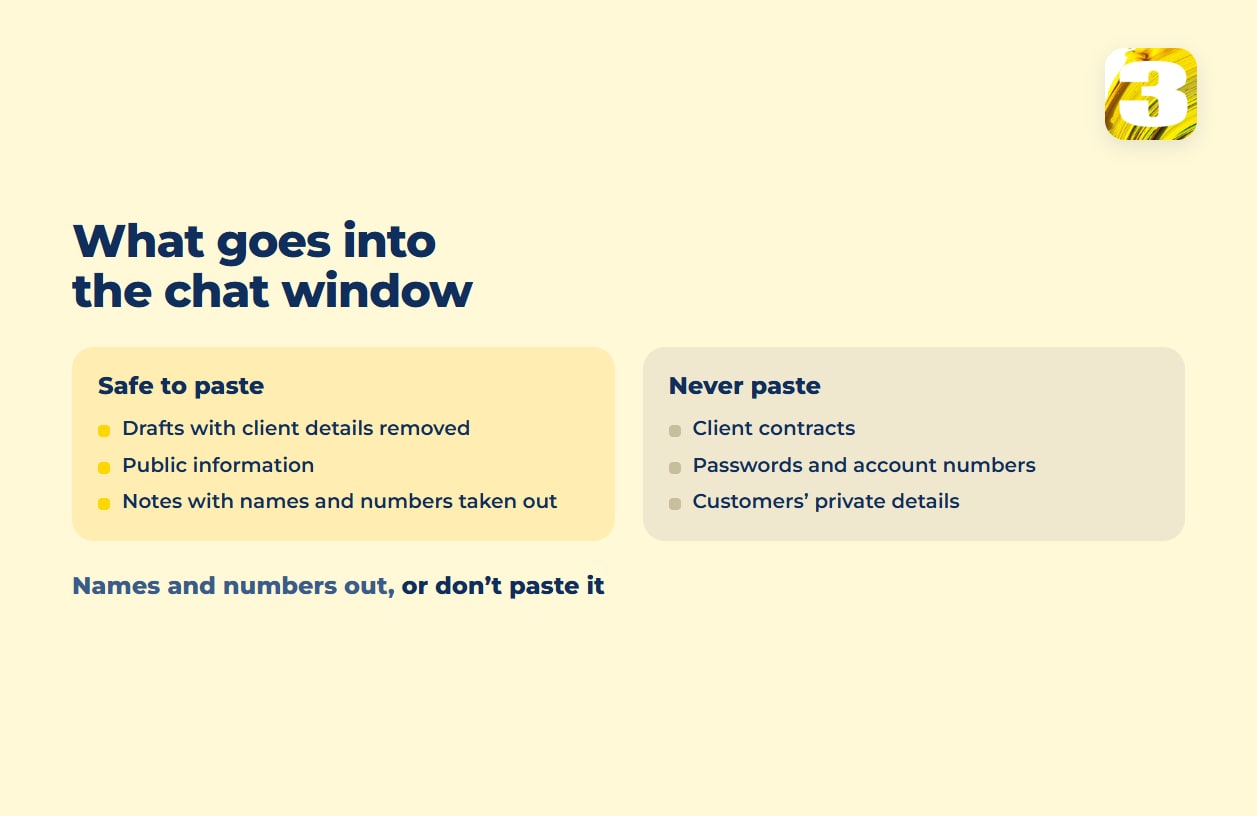
The jobs it handles well share one trait: you can check the result in a minute, and nothing private has to go in. A first draft of a reply to a common customer question, written from notes with the names taken out. A plainer rewrite of your own service page. An outline for a blog post or newsletter. A summary of a long public document, like a government guide. An explanation of a spreadsheet formula that stopped working. In each case you’re handing it words you’d be fine seeing in public, and you read what comes back before it goes anywhere.
What Not to Hand ChatGPT
The plan you’re on changes how OpenAI treats your data — more on that below. But the bigger risk isn’t the plan. It’s what gets pasted in before you’ve thought about it.
Client contracts, signed agreements, anything with a password or an account number, medical or financial details a customer gave you in confidence — none of that belongs in a chat window, on any plan. The U.S. Small Business Administration puts it plainly in its guidance on AI and small business: “Try not to feed any sensitive data or proprietary information. This will help keep it out of the data pool that the system uses when producing content.” The same guide adds a second habit worth keeping: “If you are using free AI tools or software in your small business, have another person review all AI products.”
A rough test that covers most of it: if you wouldn’t be comfortable seeing it in a public forum post, strip out the names and numbers first — or don’t paste it at all. Plan and settings aside, once information leaves your system, you’re trusting a policy page, not a lock.
What the ChatGPT Business Plan Changes
This is where the plan you’re on stops being a detail. On a Free, Plus, or Pro account, OpenAI can train on your conversations by default; you can turn that off under Settings → Data Controls → “Improve the model for everyone,” and it’s worth doing today if you haven’t. Business accounts start from a different default. OpenAI’s explanation of how your data is used to improve model performance states: “By default, we do not train on any inputs or outputs from our products for business users, including ChatGPT Business, ChatGPT Enterprise, and the API.”
Per the ChatGPT Business FAQ, a standard seat costs $25 a month on monthly billing or $20 a month billed annually; a premium seat is $125 a month on monthly billing. If your team is building anything through code rather than the chat window, the API carries its own data terms: data sent to it “is not used to train or improve OpenAI models (unless you explicitly opt in to share data with us).” None of that makes pasting a signed contract safe — it changes what happens to the words after you’ve already decided they’re safe to type.

Checking What It Hands Back
A wrong answer costs different amounts depending on where it lands. If ChatGPT drafts a blog post outline and gets a fact wrong, you catch it on the next read-through and nobody outside your desk ever sees the miss. If it drafts a price quote for a client and the number is off, or a paragraph of contract language where a clause doesn’t mean what you think it means, the mistake is now in someone else’s inbox with your name on it.
The fix isn’t to stop using it for the second kind of task. It’s to read that output the way you’d read a new employee’s first draft — assume it’s close, not that it’s right. Numbers, dates, anything with legal weight, anything a customer could hold you to later: read it twice before it leaves your outbox, on any plan.
ChatGPT Doesn’t Always Know Your Business
Ask ChatGPT to draft a reply about your return policy or your prices, and it will write one — confidently, and sometimes wrong. It doesn’t know your terms unless you paste them in, so it fills the gap with a guess that sounds like a fact. In the chat window the fix is simple: give it the actual policy text and tell it to answer only from that. Put a bot in front of customers and the same problem gets bigger — what a chatbot knowledge base actually does explains why pointing a bot at your documents still doesn’t guarantee a right answer.
The Other Direction: Customers Are Asking It About You, Too
The same habit runs both ways. While you’re asking ChatGPT to draft things, some of your customers are asking it who does this kind of work. Our own lead-tracking plugin shows us inquiries that started with a ChatGPT answer rather than a search result — a channel standard analytics only partly catches. We don’t have volume numbers to publish, but those leads are real, and it’s worth watching that channel rather than assuming it’s empty. What’s worth doing about it is in what works in AI search optimization.
None of this makes ChatGPT the wrong tool for a small business. It makes it a tool with a data policy, a plan tier, and a habit of sounding sure of itself even when it’s guessing — three things worth knowing before the next thing you paste in is something you’d rather keep out of a chat log. If the same paste is already happening every day, that’s the part worth turning into a process.