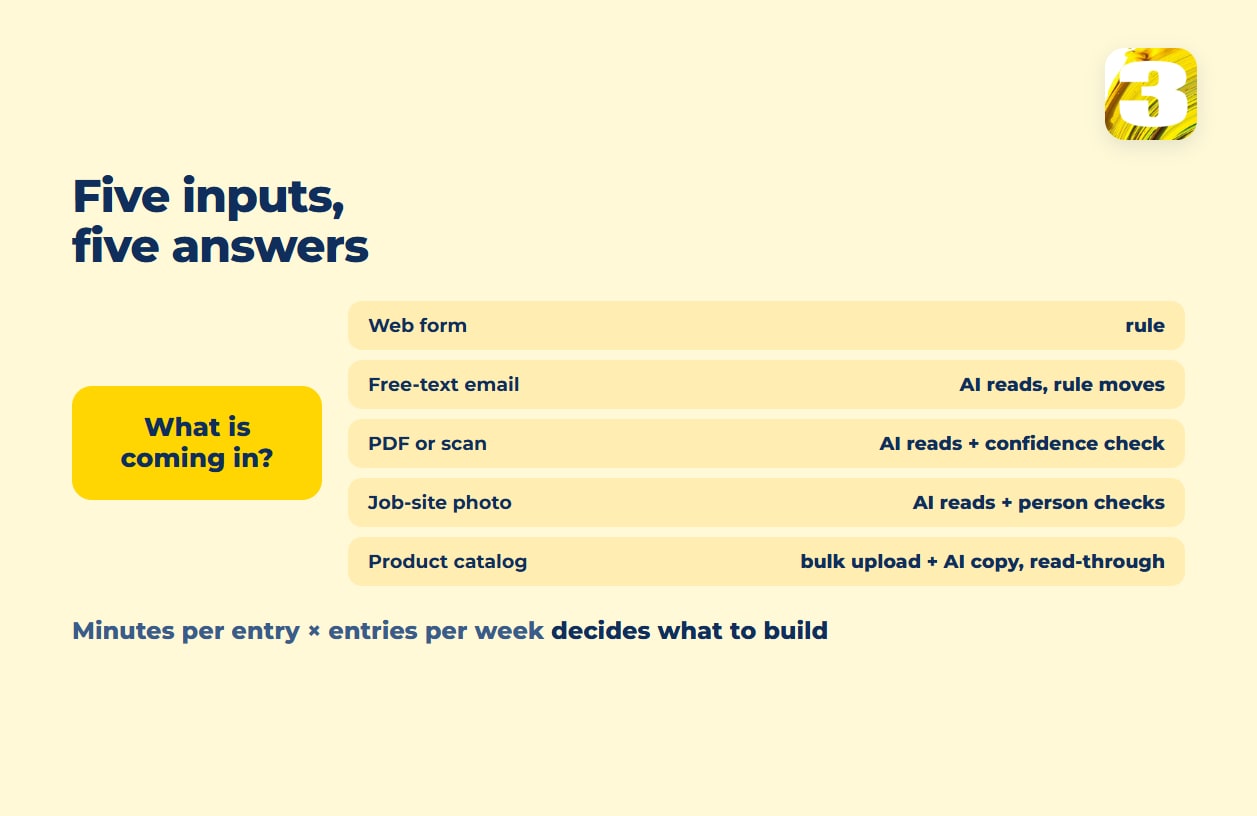
If you want to automate data entry, start here: not every piece of it is the same problem, which is why one tool can’t fix all of it. A web form already puts your customer’s name in a field labeled “name” — a rule can move that into your CRM without reading anything. A scanned invoice has the same information sitting inside a photograph of a piece of paper, with no fields at all. The two look alike but need different tools, and paying for AI on the first one is money spent solving a problem that doesn’t exist.
The sorting question that matters is simple: is the information already sitting in a labeled field, or does something have to read a page first and decide what the words mean? The same split at the level of a whole business — forms, phones, invoices, product copy — is laid out in our piece on where AI tools actually save time. Here we stay on one narrow strip of that map: how information gets from the outside world into your spreadsheet, CRM, or inventory system in the first place. What happens after it lands — sorting, routing, drafting a reply — has its own walkthrough: our piece on which workflow steps actually need AI. For the general idea of automating a business process, from trigger to finished record, start with what business process automation is.
Web Forms: A Rule Is Enough
If a customer fills out a form on your site, the platform already knows which answer belongs in which field. Connecting that form to a spreadsheet or a CRM record is a mapping problem, not a reading problem — field A goes to column A, every time, with no judgment involved. Paying per use for an AI model to “read” a structured form is paying to have it guess at something it was already told. Skip it. A rule doesn’t pay a model for every entry, and it doesn’t misread anything a person filled in correctly.
Free-Text Email: AI Reads, a Rule Moves
A form has fields. An email doesn’t. “Hi, following up on the quote for the Elm Street job, we’d want it done by the 20th if possible, and can you also confirm the price includes the material” is a real request, but there’s no field called “job,” no field called “deadline.” Something has to read the sentence and pull out what matters — customer, job reference, requested date, question about scope — before a rule can carry it anywhere. That reading step is where AI earns its cost. Once the fields are extracted, moving them into your system is back to being a rule: same mapping as the form above, with no model to pay for.
PDFs and Scanned Documents: Recognition Plus a Check
A PDF invoice or a scanned intake form is the email problem with one more layer: the text isn’t even typed, it’s a picture of text. Document recognition tools exist for exactly this — Microsoft’s Azure AI Document Intelligence, for one, extracts fields like customer name, billing address, due date, and amount due from an invoice and returns them as structured data, along with confidence scores for the fields it pulls (Microsoft notes that not every field returns one) — the tool’s own estimate of how sure it is it read a field correctly. High confidence, the number moves on its own. Low confidence, a person looks at that one field before it goes anywhere. Microsoft’s guidance on confidence scores describes exactly this use: confidence “can be used to determine whether to automatically accept the prediction or flag it for human review.” How far to trust invoice extraction specifically is covered in invoice processing accuracy.
Photos From a Job Site: Same Reading Problem, Different Format
A photo from a job site — a meter reading, a damaged part, a completed checklist taped to a wall — is the same category as the PDF: no fields, just an image, and something has to read it before a rule can log it anywhere. What changes is how forgiving the review step needs to be: a blurry photo taken outdoors in bad light is a worse candidate for “trust it automatically” than a clean office scan, so the person checking flagged items on this input tends to have more to look at, not less.
Product Catalogs: Bulk Upload Plus AI Descriptions, With a Read-Through
Getting a hundred products into an online store is its own version of this problem — SKUs, prices, and stock counts are usually already in a spreadsheet, which makes the transfer itself a bulk-upload job, not an AI job (Shopify, for one, imports products from a CSV file). Where AI does the work is on the descriptions: turning a spec sheet or a one-line product name into readable copy for every item in the catalog, instead of a person typing each one by hand. That copy still needs a read-through before it goes live — the same principle as the invoice’s confidence score, just done by a person instead of a number. We’ve written more specifically about how we approach AI product descriptions.

Where We’ve Built AI Data Entry
We’ve built workflows where AI reads incoming emails, PDFs, and submitted requests and pulls the data into a client’s system — the same reading step described above, running on real correspondence instead of a sample invoice. We’ve done the same thing on the catalog side, generating AI product descriptions for a store’s product line so a person didn’t have to write each one from scratch. What either one saves depends on how many emails or products run through it, so the useful number is your own — the calculation is below.
What a Person Still Checks in Data Entry Automation
None of the input types above end with “AI decides, done.” A well-built email or document step sends anything missing or uncertain to a person. Product descriptions get read before publishing. That checking step isn’t automation falling short of its promise — it’s the design. The cost of a wrong field on an invoice or a wrong date on a job request is higher than the few seconds it takes someone to glance at one flagged field, so the review step stays.
To see whether this is worth building for you, run your own numbers: how many minutes does one entry take by hand, and how many of those entries land on your desk in a week? Say fifteen emailed requests a week take four minutes each: that’s an hour a week; fifteen a day is five hours a week. That’s the number that tells you whether reading-and-checking is worth setting up at your volume.
What Data Entry Automation Costs to Set Up
We build these data-entry workflows for a fixed sprint price: $800 for a Starter sprint, $1,500 for Growth, with Enterprise scoped by volume for larger operations. There’s no platform subscription and no per-seat fee sitting on top of that. Who covers the cost of the AI calls themselves depends on the project — worth asking about before the sprint starts. See workflow automation services with a fixed sprint price for what a sprint includes.
If a catalog is your entry point instead of email and PDFs, that’s a separate service with its own pricing — see bulk product upload and catalog sync. Not sure where the data should land? Airtable vs. Excel for business helps with that choice.