


Responsive Search Ads (RSAs) have become the default ad format in Google Ads. While they offer powerful automation and flexibility, they can also feel unpredictable — especially when you’re trying to maintain consistent messaging.
That’s where pinning headlines comes in.
In this guide, we’ll walk you through:
- What pinning is and how it works
- The pros and cons of using it
- When to pin headlines (and when not to)
- Strategic pinning best practices
- A worked example, and how to test it honestly
What Does “Pinning” Mean in Google Ads?
In responsive search ads, you provide up to 15 headlines and 4 descriptions (the minimum Google accepts is 3 and 2). Google automatically tests and rotates them to find the best-performing combinations — our guide to responsive search ads covers how to build that asset list in the first place.
Pinning allows you to control where specific headlines appear by assigning them to a fixed position (e.g. Headline 1, Headline 2, etc).
Example:
You want your brand name to always appear first. So you write:
- Headline: Official Site – ACME Tools
- Pin it to Position 1 → Google will always display it as the first headline.
This is especially useful for:
- Compliance (legal disclaimers, brand terms)
- CTA consistency (e.g. “Buy Now” always in slot 2)
- Testing static vs dynamic combinations
How to Pin Headlines in Google Ads
The pinning process is simple:
- In your Google Ads account, open Campaigns → Ads. If a tutorial still sends you to an “Ads & extensions” tab, it was written before 2022: extensions were renamed assets and that tab no longer exists
- Edit or create a Responsive Search Ad
- Hover over a headline or description field
- Click the 📌 Pin icon that appears on the right
- Choose which position to pin (e.g. Headline position 1, 2, or 3)
- Save your ad
Repeat for any other element you want to control.
You can pin multiple headlines to the same position. In that case, Google rotates only between those pinned options in that slot — which, as we will see below, is exactly what Google recommends you do.
Two limits are worth knowing before you start, because most articles skip them. Headlines can be pinned to position 1, 2 or 3; descriptions to position 1 or 2. And the guarantee is not the same in every slot: per Google’s help page on responsive search ads, assets pinned to headline position 1, headline position 2 or description position 1 will always show, while “content pinned to Headline position 3 and Description position 2 are not guaranteed to show in every ad.” If your legal line is sitting in headline 3, it is not actually guaranteed to appear.
Should You Pin Headlines? Pros and Cons
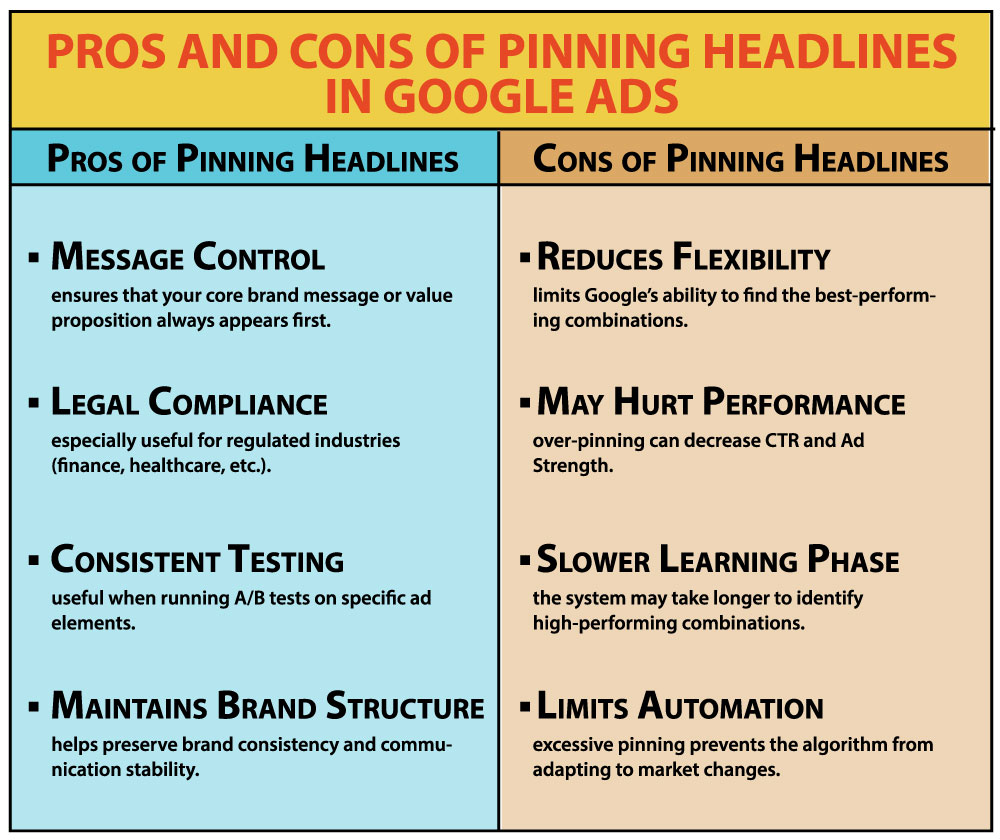
Pros of Pinning
- Message Control: Guarantees that your core value prop or brand message appears first
- Legal Compliance: Useful for industries like finance or health
- Consistent Testing: Useful when A/B testing other elements
Cons of Pinning
- Reduces Flexibility: Limits Google’s ability to optimize combinations
- May Hurt Performance: Over-pinning can decrease CTR and Ad Strength
- Slower Learning Phase: Ads may take longer to find high-performing combos
Google’s own position is blunt: pinning “isn’t recommended for most advertisers and can affect ad strength.” That does not make pinning wrong — it makes it a trade-off you pay for. In lead generation, and in regulated industries where a specific line has to be on screen every time, the price is often worth paying. What does not work is pinning everything and still expecting the automation to earn its keep.
Best Practices for Pinning Headlines
To pin effectively without hurting performance:
1. Pin Only What You Must
Pin brand names, legal disclaimers, or must-have CTAs. Let Google optimize the rest. Before you decide what has to be pinned, check what Google counts as a strong asset list — a pin is a fix for something the asset list cannot deliver on its own, not a substitute for writing better headlines.
2. Pin Two or Three Options Per Slot — Not One
This is where most guides get it backwards. Google’s advice is to “pin 2 or 3 unique headlines or descriptions to each position,” so the system can still run its own A/B test inside the slot you locked down. One pinned headline per position gives the algorithm nothing to compare. Two or three keep the message under control and keep the testing alive.
3. Monitor Ad Strength
Pinning cuts the number of combinations Google can build, and Ad Strength reflects that. Google publishes a figure for what the rating is worth: advertisers who move an ad from “Poor” to “Excellent” see “15% more clicks & conversions on average.” That is a correlation across Google’s own account base, not a promise for your account — but it is a reason to understand how Ad Strength is calculated instead of shrugging the score off. Pin one or two positions per ad, not five.
4. Match CTA to Position
If your best converting CTA is “Get a Free Quote” — test pinning it in position 2 or 3, where users typically expect offers or action.
5. Always Review Performance by Asset
Google Ads reports performance per asset and combination. If pinned assets underperform, test unpinning and compare.
Example Pinning Strategy (Lead Gen Campaign)
Goal: Get leads for a SaaS scheduling tool
Headlines (15 total):
- Pinned to position 1: Official Site – ScheduleNow
- Pinned to position 2: Start Free in Under 30 Seconds
- All other 13 headlines: unpinned
What this buys you:
- The brand name and the offer are on screen in every impression
- Thirteen headlines are still free to rotate around them
- Ad Strength drops a step, because pinned assets count against it
Whether that trade is worth it is an empirical question, not a rule, and it gets answered per account rather than by an industry average. Run the pinned and the unpinned version against each other in a campaign experiment and let your own conversion data settle it.
When to Avoid Pinning
- eCommerce campaigns with product variants or offers
- Brand awareness campaigns with broader themes
- Short-term testing when you want to give Google full control
If performance is volatile, test a version without pins and compare. Sometimes, fully unpinned RSAs perform best when Google has enough data.
Final Thoughts: Control vs. Performance
Pinning in Google Ads is a strategic lever — not a rule. Used wisely, it allows you to:
- Reinforce brand identity
- Improve clarity in competitive markets
- Maintain compliance where required
But like any constraint in machine learning systems, it can reduce flexibility and results if overused.
If your campaigns rely on consistent structure, messaging, or regulated language, then pinning is essential. If your goal is maximum performance at scale, consider using it sparingly.
Work with 3MY: Smarter Google Ads. Better Results.
At 3MY, we don’t just launch Google Ads — we design conversion-driven ad systems.
When we run RSAs, we:
- Plan structured headlines around user intent
- Pin critical assets to test message control vs algorithm freedom
- Split test pinned vs unpinned variants
- Optimize for CPL, CTR, and qualified lead rate
Whether you need to stabilize ad delivery or keep a compliance line on screen, we treat pinning as a decision to be tested rather than a default setting.









