


Reply to every review you can, publicly, within a few days of it going live. That’s the short answer if you’re the one holding the login to a Business Profile with reviews piling up and no clear routine for handling them. The longer answer is more interesting, because most of what gets repeated about replies and rankings isn’t something Google has actually said.
Do Replies Actually Move Your Ranking?
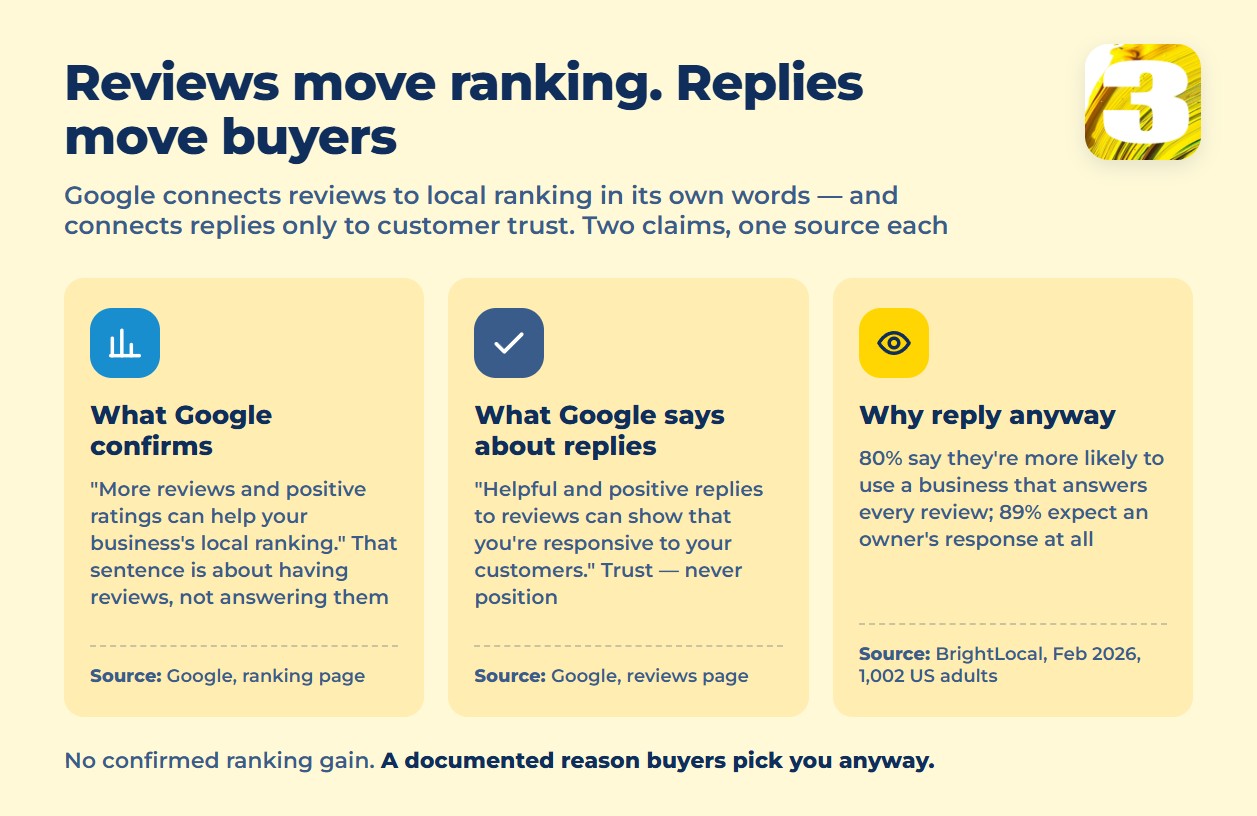
Google explains local ranking as a mix of relevance, distance, and prominence. Prominence is described as “how well-known a business is,” and Google is specific about one part of it: “More reviews and positive ratings can help your business’s local ranking.” That sentence is about *having* reviews — not about answering them.
Replies show up in a different part of Google’s guidance, framed around trust rather than position: “Helpful and positive replies to reviews can show that you’re responsive to your customers.” Nowhere on that page, or on the ranking page, does Google say replying moves you up in results. That gap is worth sitting with, because a lot of SEO content blurs it — treating “Google likes responsive businesses” as if it meant “Google ranks responsive businesses higher.” Those are two different claims, and only one of them has a source behind it.
Why Reply Anyway: What Buyers Actually Do
The case for replying was never really about the algorithm. It’s about what people do in the seconds before they call you. According to BrightLocal’s Local Consumer Review Survey, published February 11, 2026, based on 1,002 adult consumers in the United States:
| What buyers do | Share |
| Read reviews about local businesses | 97% |
| Read those reviews specifically on Google | 71% |
| More likely to use a business that replies to every review | 80% |
| Less likely to use a business that never replies | 42% |
| Expect the owner to respond | 89% |
| Say positive reviews make them more likely to choose a business | 85% |
| Made a purchase after reading reviews first | 93% |
Two of those numbers aren’t about replies at all, and they’re worth sitting with anyway: 85% say positive reviews make them more likely to choose a business, and 93% say they made a purchase only after reading reviews first. Neither depends on whether the business answers anyone. But once someone is already reading, a business that’s clearly listening tends to read as the safer choice between two options that otherwise look the same.
That’s a US sample, and BrightLocal’s own past editions show the numbers shift year to year — Google’s share of where people read reviews was 83% in an earlier edition and 71% now. If most of your customers are in Canada, read this as a directional signal, not an exact local number. The pattern still holds: reviews get read, and an unanswered thread reads as an unattended business.
What to Do With a Review That Breaks the Rules
Don’t argue with a fake or abusive review in the replies — report it instead. The path is: open your Business Profile, go to Read reviews, find the review, tap Report, pick a reason, and select Send report.
Google says evaluation “typically takes several days.” It doesn’t publish an exact number. The “5–20 business days” figure that shows up across SEO blogs isn’t an official Google timeline — it’s an industry estimate, and worth treating as one when you’re setting expectations with a client or a team.
What You’re Not Allowed to Do With Your Own Reviews
Google’s review policies name three things explicitly:
- Offering incentives — “payment, discounts, free goods and/or services” — in exchange for a review
- Posting reviews that aren’t based on a real experience
- Reviews affected by a conflict of interest, including current or former employees and contractors
Break these and you’re under the Fake Engagement policy, which allows for a temporary block on new reviews, temporary de-publishing of existing ones, and a warning banner telling anyone who visits your profile that fake reviews were removed. There’s an appeal process, but the cheaper fix is not needing one.
How to Actually Reply
There’s no template that works across a bad review, a good one, and an obviously fake one — because the job in each case is different.
On a negative review: name the specific problem the person raised, instead of a generic “we’re sorry you feel that way.” Don’t argue the facts in public and don’t promise a refund or a fix you haven’t cleared internally — a public promise you can’t keep is worse than no reply at all. Move the actual resolution off the page: a phone number, an email, a name to ask for.

On a positive review: reference what the person actually said. A generic “Thanks for the kind words!” reads as automated, and the next fifty people who search your business name will read it too — this reply isn’t really for the reviewer anymore.
On a review that looks fake or false: don’t accuse the reviewer publicly. It stays visible while your report is pending, so keep the reply factual and short, and let the reporting process do the rest.
Where Reviews Fit Into Local SEO
Reviews and replies are one piece of a bigger picture — part of the prominence factor that sits alongside relevance and distance in how Google’s local ranking works. If your profile is thin overall — missing categories, no photos, hours out of date — replies alone won’t carry it. That’s a broader setup problem, and it’s what our local SEO services are built to fix.









