


Tracking competitor prices means picking a set of products, checking what other sellers charge for them on some kind of schedule, and noticing when a number moves. That’s the whole job description. Nobody gets it wrong at the definition stage — they get it wrong by trying to do it for the entire catalog, by hand, forever, or by writing a script that quietly stops working the week nobody’s watching it.
This is the practical version: where to start, the point where checking by hand stops making sense, why a homemade scraper breaks in ways that aren’t obvious until they happen, and what you actually need once you’ve decided a spreadsheet isn’t enough anymore.

Start With a Short List, Not the Whole Catalog
Watching every SKU is the most common mistake in this exercise, and it’s the one that kills the habit fastest. Most products in a catalog don’t move in price often enough to be worth a weekly look, and checking all of them anyway just buries the handful that matter under a pile that doesn’t.
Pick marker products instead: the items customers actually cross-shop, the ones that show up in a comparison tab next to a competitor’s listing, the best sellers, the ones where a two-dollar difference changes who gets the click. Five to thirty products is a realistic marker list for most small and mid-sized catalogs — enough to know what the market is doing, small enough that someone can actually keep up with it.
The Math That Turns Competitor Price Tracking Into a Job
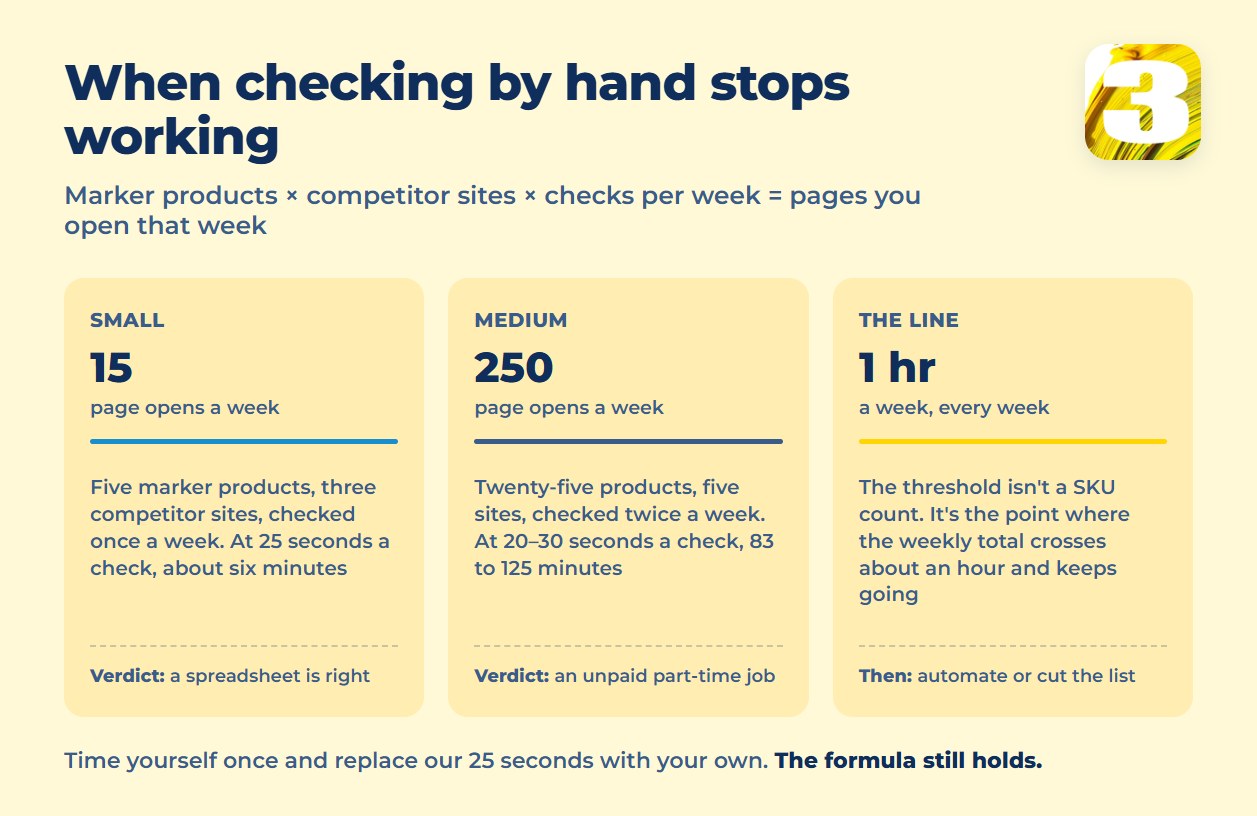
The workload isn’t set by catalog size. It’s set by one formula: marker products × competitor sites × checks per week = pages you open that week. Multiply that by the time it takes to open a page, find the price, and write it down, and you have a real number instead of a guess.
Take a small case: five marker products, three competitor sites, checked once a week. That’s 5 × 3 × 1 = 15 page opens. Assume 25 seconds a check — open the page, find the price, log it. That’s our own rule of thumb rather than an industry figure, and it’s the one number here worth replacing with your own after you time yourself once. At that rate it’s about 6 minutes a week. Genuinely trivial; a person can do that with a cup of coffee and never think about it as a task.
Now a medium case: twenty-five marker products, five competitor sites, checked twice a week. That’s 25 × 5 × 2 = 250 page opens a week. At 20 to 30 seconds a check, that’s somewhere between 83 and 125 minutes — an hour and a half at best, two hours at worst, every single week, indefinitely.
That’s the threshold we use when someone asks whether it’s time to automate, and it isn’t a fixed SKU count — it’s the point where the weekly total crosses about an hour. Below that line, a spreadsheet and five minutes of attention is the right tool. Above it, you’re not “checking prices” anymore, you’re running an unpaid part-time job, and the honest move is to admit that and either automate it or scope the list back down.
Three Ways a Homemade Price Tracker Breaks
Once the manual math stops working, the instinct is to write something — a script that opens a page, grabs the price, and saves it. Three things break this more often than people expect, and none of them show up until the script has already been running for a while.
The price loads after the page does. Plenty of stores render the base page first and fill in the price a moment later with a separate script call. A simple scraper that reads the page the instant it loads captures a blank field, a placeholder, or last week’s cached number — and reports it as current.
A script doesn’t always see what a person sees. Some sites treat automated requests differently from a browser tab a human opened — a stripped-down page, a login wall, a puzzle to solve before content loads. This varies site to site and isn’t something you can plan around from the outside; it just means a scraper that works today can quietly stop working with no warning and no error message worth trusting.
The same product has a different name everywhere. “Wireless Charger 15W Black” on your site might be “15W Fast Wireless Charging Pad – Black” on one competitor’s and just a model number on another’s. Collecting prices is the easy half of this problem; matching them to the right product across five different naming conventions is the half that actually takes the time. This is exactly the kind of mapping table worth keeping properly rather than in a scattered set of notes — see our comparison of Airtable and Excel for this kind of tracking work if the marker list is growing past what a single tab can hold.
The Price Alone Isn’t the Point
A price with no date attached is close to useless. Say a competitor is at $34.99: on its own that tells you nothing. “$34.99, checked Tuesday, down from $39.99 the week before” tells you there’s a pattern worth reacting to. The history is what turns a number into information, and it’s the part a one-off manual check never produces, because nobody goes back and builds a timeline out of a stack of sticky notes.
The second thing that matters more than the price itself: a notification the moment something moves outside a range you set, instead of a daily report that piles up unread. A price monitoring tool’s actual job is to read a number and flag it to a person — it isn’t the same product as a repricer that changes your own price automatically, and mixing the two up is a separate and common mistake we cover in price monitoring vs. repricing software. What matters here is simpler: an alert that fires on a real deviation gets read. A report that arrives every morning whether anything changed or not stops getting opened within a couple of weeks.
Where This Actually Leads
If what you need is a straightforward presence — watch a handful of products, get pinged when something drops — that’s exactly what the ready-made tools in this space are built for, and several of them publish an actual price instead of making you book a call to find out. Prisync prices by product count, PageCrawl prices by how often it checks, Priceva prices by the number of checks itself. Which one fits depends on which axis matches your catalog, and we broke down the full comparison — including the tiers where MAP tracking gets added on top — in what MAP monitoring software actually costs.
If the job is bigger than a subscription — prices need to feed straight into your own catalog, trigger an alert somewhere your team already works, or connect to a MAP policy you’re enforcing — that’s not a tool purchase anymore, it’s a workflow. At 3MY, we build that specific connection once instead of selling a monthly seat: $800 for a single workflow, $1,500 for a set of up to three, priced once with no ongoing platform fee. What that looks like in practice, including how it applies to MAP compliance specifically, is covered on our competitor price monitoring and MAP compliance page.
Not sure which side of that line your catalog falls on? Describe what you’re tracking and how often, and we’ll tell you honestly whether a $99-a-month tool covers it or whether it’s worth building the specific check once.









