


Invoice processing software reads a scanned bill and pulls out the vendor name, amount, date, and line items — and for a standard, typed invoice, it does that well. Vendors advertise field-level accuracy of 95% to 99%, and for invoices that look like the ones their model was trained on, those numbers hold up. That’s the easy 80% of the job.
The harder 20% is everything that happens next: matching the invoice to a purchase order, routing it to the right approver, choosing a GL code for a first-time vendor, and getting it into your accounting system without someone retyping half of it. None of that is “recognition,” and none of it shows up in the accuracy number printed on a pricing page.
This matters because most businesses shop for invoice processing software the way they’d shop for a scanner: highest accuracy wins. But the gap between what a vendor claims and what you’ll actually see on your own stack of invoices is wide enough to change which product makes sense — and whether recognition was ever your real bottleneck.

Why Accuracy Numbers on Invoice Processing Software Don’t Match What You See
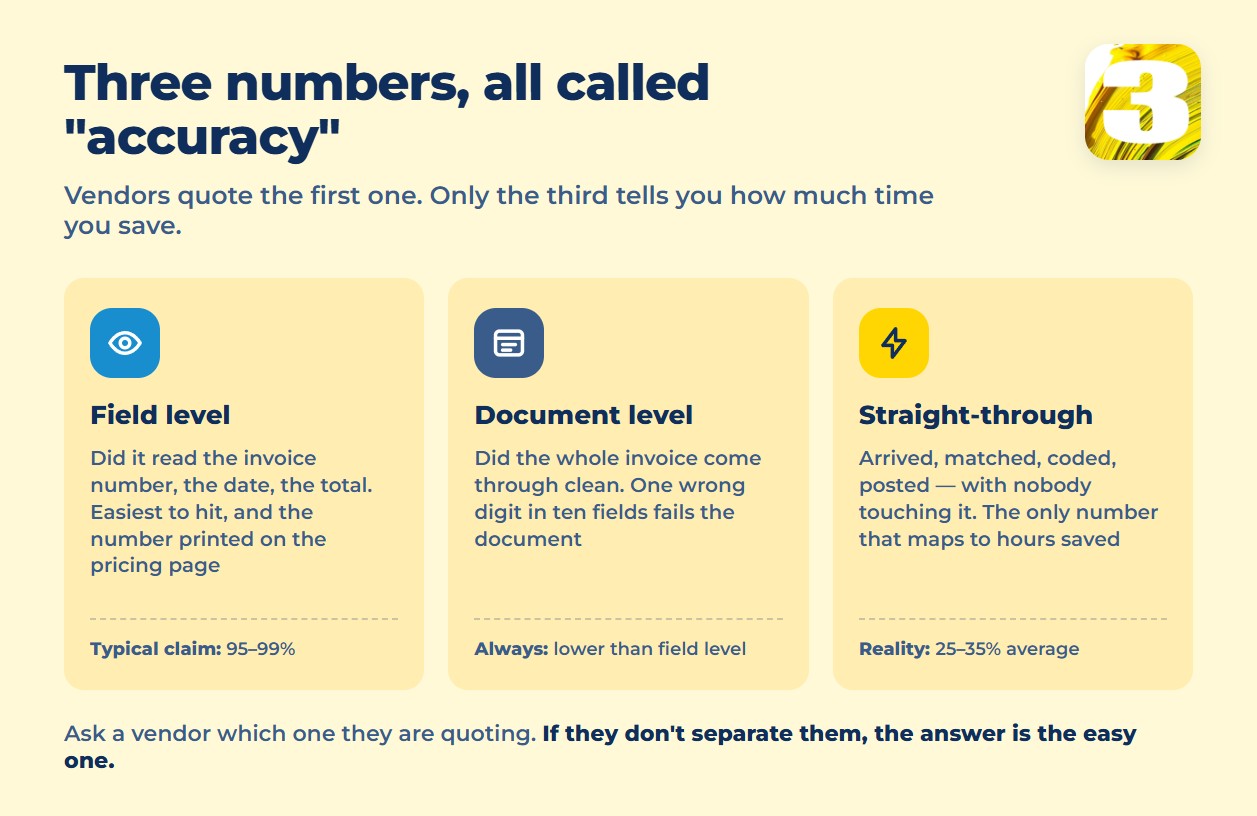
Three different vendors will each say “95%+ accurate,” and none of them are lying — they’re measuring different things.
- Field-level accuracy — did the software read the invoice number, date, and total correctly on a single field. This is the number on the pricing page, and it’s the easiest to hit.
- Document-level accuracy — did the whole invoice come through clean, every field, no fix needed. Lower than field-level, because one wrong digit on a ten-field invoice fails the whole document.
- Straight-through processing (STP) rate — the invoice that needed zero human touch, end to end, from arrival to posting. This is the number that maps to actual time saved, and it’s rarely the one advertised.
Independent research from IOFM and Levvel puts AI-based extraction at above 95% field-level accuracy with error rates under 1% — broadly consistent with what vendors claim. The number most often cited on the other side deserves its caveats said out loud: in a 2025 survey of 35 large enterprises conducted by Avaali, itself a vendor of automation software, only 8.8% of respondents said they clear a 90% accuracy threshold in their own operation. Small sample, self-reported, big companies, interested party — so treat it as a signal that lab conditions and real invoice streams diverge, not as a number to plan around.
On straight-through processing specifically, research from Ardent Partners — cited across several AP vendor blogs, including apexanalytix, Ascend Software, and Medius — puts the North American average at 25% to 35% touchless, with best-in-class operations reaching 60% to 80%. That range is the honest way to size what recognition software will do for your team: somewhere between a quarter and a third of your invoices will need no human at all, on average, before you tune anything.
What Actually Trips Up Recognition
The invoices that fail aren’t usually the ones a demo shows you. The recurring troublemakers, across independent sources:
- Handwritten notes — a price change scrawled in the margin, a purchase order number added by hand on a job site.
- Phone photos — glare, blur, low DPI, and the compression artifacts from a crew member snapping a bill and texting it in, instead of scanning it.
- Multi-page invoices — line-item tables that break across a page boundary confuse most engines, which either drop rows or duplicate them.
- Nonstandard layouts — a supplier who’s used the same invoice template since 2011 and puts the total in a spot the model has never seen.
None of these are edge cases in a real accounts payable inbox — they’re a meaningful share of it, and they’re exactly what separates a vendor’s headline accuracy from what you’ll experience on your own documents.
Recognition Is One Link, Not the Whole Chain
It’s worth separating what a piece of software actually does from what “invoice processing” implies. Dext, for example, is genuinely good at capture: it reads the invoice and pushes clean data into your accounting system. What it does not do is pay your vendor — there’s no payment execution inside Dext. That’s not a flaw; it’s scope. Platforms like BILL build recognition, approval routing, and the actual outgoing payment into one product, which is a different category of tool solving a different, larger problem.
The distinction matters when you’re evaluating software: “reads invoices accurately” and “runs your accounts payable process” are two different claims, and a lot of marketing blurs them into one. Our comparison of AP automation platforms and what they actually cover breaks down pricing and the full chain — capture, matching, approval, posting, payment, archive — for the tools worth comparing.
When Invoice Processing Software Is Enough — and When It Isn’t
If most of your invoices come from a handful of repeat vendors, arrive as clean PDFs, and follow a predictable layout, recognition software will do most of the job well out of the box — the 95%+ field accuracy vendors advertise is a fair expectation for that stream. Where it falls short isn’t the software failing; it’s a mismatch between what “accurate” was measured on and what your invoices actually look like: multiple vendors, field crews photographing bills on-site, or suppliers who each format things their own way.
In that second case, the fix usually isn’t a “better” OCR engine — none of them are dramatically different on standard documents. It’s building the steps around recognition: routing exceptions to the right person automatically, flagging invoices that need a human before they stall in someone’s inbox, and connecting capture to the accounting system so nothing gets retyped. That’s process work, not a bigger accuracy percentage.
At 3MY, we build that connective layer — automation around the parts of the invoice cycle that off-the-shelf recognition tools don’t touch.









