
In this article
- Website Refresh, Redesign, and Rebuild: What Each Word Covers
- Question 1: Do Your Page Addresses Change?
- Question 2: Does the Platform Change? Then It Is a Website Rebuild
- Question 3: Does the Path to an Inquiry Work?
- Revamping a Website: When a Refresh Is Enough and When It Is Not
- Refresh or Redesign: The Price Comes After the Audit
- Questions About Refreshing or Redesigning a Website
- Send the Address, Get the Verdict
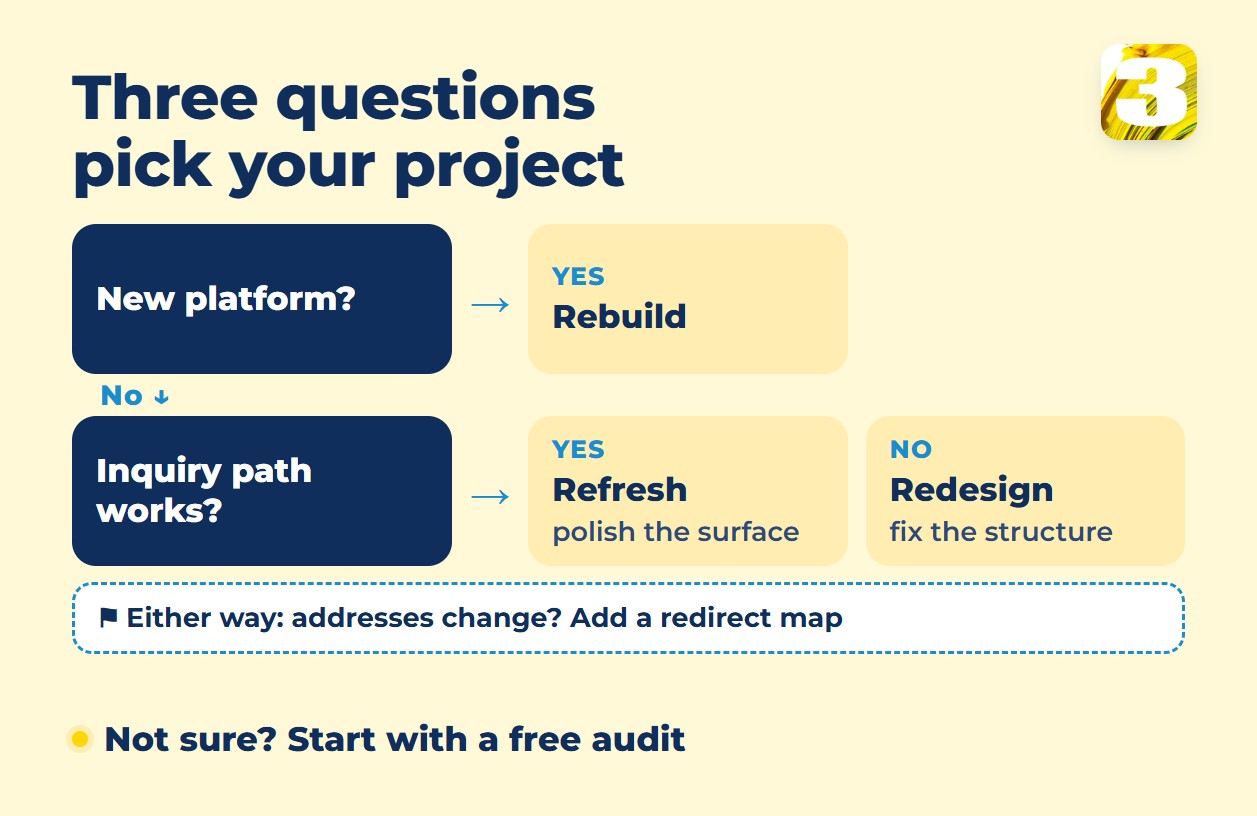
A website refresh changes how your site looks. A redesign changes how it is organized. A rebuild changes what it runs on. Three questions tell you which one you need: do your page addresses change (that decides whether you need redirects), does the platform change, and does the path to an inquiry, by phone or form, work?
A refresh suits a site that is mostly sound, but it rarely saves one that lacks structure and text: new colors supply neither. If you are not yet sure the site is the problem, our list of 5 signs your website is outdated comes first, and this article starts where it ends.

Website Refresh, Redesign, and Rebuild: What Each Word Covers
There is no industry standard for these words, so here is how we use them.
- Refresh: same pages, same platform, and normally the same addresses. Fresh fonts and colors, retouched photos, tightened text, a few speed fixes.
- Redesign: new layout and page structure, new text where the old text does not work. The platform may stay; addresses often change.
- Rebuild: a new platform, or a site started from zero. Everything is on the table, including addresses.
Question 1: Do Your Page Addresses Change?
If every page keeps its address, nothing needs redirecting. Keep the title, headings, and text on the pages that bring you inquiries today; those words are part of why people find them.
If addresses change, you are moving a site, and Google’s guide to site moves with URL changes spells out the steps: each old address gets a permanent redirect to its closest new page, not a mass redirect to the home page, and the redirects stay “generally at least 1 year.” The step-by-step routine, with the mistakes that cost rankings, is in our guide to website redesign SEO.
The redirect map and the check after launch are real work, so look for them as separate lines in any quote.
Before anyone touches the site, export your clicks by page from Search Console. After launch you will compare numbers, not memories.
Question 2: Does the Platform Change? Then It Is a Website Rebuild
Moving from one platform to another, say Wix to WordPress, is a rebuild even if the new site looks the same. A new platform often brings a new address structure, so Question 1 usually applies too. Google’s checklist for moves with URL changes says to set up the CMS “preferably the same as the old site used.” A new platform is a change of its own, on top of any address move.
The same guide has a rule for stacking changes: “Change only one thing at a time.” Its example is a domain change, a CMS change, and a new layout, done one after another.
Bundling them in one launch saves calendar time but costs clarity: if traffic drops, you will not know which change did it. Doing it in stages keeps the cause visible but costs time, and sometimes money: moving platforms first can mean rebuilding the old look before the new one. Settle that trade-off before the work starts.
If starting over is on the table, our guide to when and why to build a website from scratch covers the decision.
Question 3: Does the Path to an Inquiry Work?
Open the site on your phone as a stranger would. Pick the three pages that bring the most visitors. Can you reach a phone number or a form from each one without hunting?
If yes, the structure holds and a refresh can fix the surface: look, photos, speed. If no, the structure is the problem, and fixing it is a redesign; if nothing on the site is worth keeping, it becomes a rebuild. A refresh on a broken path makes the site prettier and leaves the visitor as stuck as before. One more check: send yourself a test inquiry through the form. If it never arrives, that is a repair to make before anything else, whichever project you pick.
Revamping a Website: When a Refresh Is Enough and When It Is Not
When we are asked to revamp a site, it often turns out to lack a proper structure, copy, and images. A refresh polishes what exists and creates nothing new, so on such a site you would pay to polish pages that need replacing.
A refresh is the right job for a site that is mostly fine: clear pages, text that still says what you do, a path to an inquiry that works, and a look or loading time that has aged. Once such a site is refreshed, steady upkeep keeps it from slipping again; our guide to what website maintenance includes lists what that covers.
Can’t tell which side your site falls on? Our free site audit shows which of your pages Google displays now and what is broken: speed, mobile layout, indexing, pages competing with each other. We also look at the site itself and tell you what is worth keeping.
Refresh or Redesign: The Price Comes After the Audit
Situations differ a lot. Some sites need a handful of fixes; others need everything redone. That is why we quote after a free audit, not before it: the price follows what your site actually needs.
When a site needs everything rebuilt — structure, copy, images — it is priced like a new site: from $1,900, sometimes more. A new site of up to 8 pages costs $1,900 with us, including the copy for every page and SEO for the home and landing pages. Whatever still works in the old site, we credit toward the price. If you ever leave us, you take what you paid for.
The full line-by-line breakdown is in our guide to website redesign cost. A one-page brief makes quotes comparable, and our guide to a website redesign RFP shows how to write one. What a finished site includes is described on our website development page.
Questions About Refreshing or Redesigning a Website
1. Will a redesign affect my Google rankings?
It can, and nobody can promise it won’t. Google says that if you change the URLs of existing pages, “you may experience ranking fluctuations while Google recrawls and reindexes your site,” and that for a medium-sized site it can take a few weeks to notice the change, longer for larger ones. Keeping addresses where you can and redirecting the rest lowers the risk, and a saved baseline makes the result easier to judge; the full routine is in our guide to website redesign SEO.
2. Is a refresh enough if my site is only slow?
Often, if the structure and text are sound and the fix keeps your addresses. Google’s Core Web Vitals guide says the loading measure, LCP, “should occur within 2.5 seconds of when the page first starts loading,” and recommends judging it at the 75th percentile of page loads, meaning three visits out of four. Our audit shows where your site stands.
3. What should I gather before a redesign starts?
Search Console access, your domain and hosting logins, and whatever photos and brand files you already have. If the domain is registered to someone else, such as a former agency, ask them to transfer it to you first: we always register domains in the client’s name, even when we buy them. You do not need finished text or a page plan: when we redesign or rebuild a site, those are part of the work.
Send the Address, Get the Verdict
The audit comes first, and the decision follows: refresh, redesign, or rebuild, and what it would cost for your site. Send us the address of your current site and we will look at what is there.