


You’re looking for construction project tracking software, not a lecture on whether you need one. Here it is plainly: buy a ready platform, assemble one from tools you already half-know, or pay for a single automated process instead of a whole platform. Three roads, three different price tags, and most of what shows up in search only tells you about the first one.
If you’re running several active job sites out of a spreadsheet, a shared drive, and a phone full of texted addresses, you already know the pain. What you want is a number and a shortlist, not a sales call. Below is what each road costs — the published numbers where they exist, and the gaps where they don’t.

Road 1: Buy Construction Project Tracking Software Off the Shelf
This is the road nearly every comparison page in search covers, because vendors write those pages. The platforms split by who they’re built for: commercial general contractors, residential builders, small crews doing field service work, or documentation-first tools built around photos and maps.
Here’s what each one publishes, checked directly on vendor pricing pages:
| Platform | Built for | Price | Contract terms |
| Procore | Commercial general contractors | Priced per product against your annual construction volume — no public number | Annual fee, built into the model |
| Buildertrend | Residential builders and remodelers | Not verified — the pricing page didn’t open when we checked | Not verified |
| Fieldwire (Hilti) | Field crews on any job site | Free plan available; Pro $39/user/mo, Business $64, Business Plus $89 (annual billing) | Monthly billing available alongside the annual plans |
| Jobber | Field service trades, also used for scheduling on smaller job sites | Core: $24/mo for the first 12 months, then $29/mo (billed annually); $49/mo month-to-month | Monthly billing available with no commitment |
| Contractor Foreman | Small and growing GCs | From $49/mo for one user (annual pricing) | Billed annually or quarterly only, no monthly option |
| Knowify | Contractors billing fixed-price or AIA jobs | From $99/mo annual, $149/mo month-to-month | Monthly billing available at $149/mo, no annual commitment |
| CompanyCam | Photo documentation; the live job map starts on the Crew plan | Core $63/mo, Crew $119/mo, Scale $199/mo (billed annually); extra users $29/mo each | Monthly billing available; annual prepay saves about 20% |
| Housecall Pro | Field service teams with dispatch and invoicing | From $59/mo annual, $79/mo month-to-month | The only one here that states it in writing: “does not require long-term contracts” |
| Raken | Daily field reporting | Price is not published; the pricing page routes to a demo request | Not disclosed |
Prices are in USD, checked on vendor sites in August 2026. Out of nine platforms here, two — Procore and Raken — simply don’t publish a number, and Buildertrend’s pricing page wasn’t reachable to check. That’s not a gap in this research. It’s a fact about the market: even Procore, the most recognized name in the category, won’t tell you what it costs until you talk to sales, and Raken, a daily-reporting tool, doesn’t either.
Which box fits which shop. Vendors won’t write this part about each other, so here it is plainly:
- One crew, one site, mostly drawings and task lists — Fieldwire’s free tier.
- Residential builds — Buildertrend, and be ready to ask for the number: we couldn’t verify what it costs or what the entry plan includes.
- Fixed-price or AIA billing — Knowify.
- Photo documentation with a map of where the photos were taken — CompanyCam, but the live job map starts on the Crew plan at $119/mo, not on the entry tier.
- Dispatching a service team all day — Jobber or Housecall Pro.
- A commercial GC with real construction volume — Procore, and prepare for a conversation about an annual figure rather than a monthly one.
What the Price Tag Doesn’t Show
The sticker price is the smallest part of the arithmetic. Four things it leaves out:
Platforms bill by seat, and construction crews are seat-heavy by nature. Jobber charges $29/mo for each additional user; CompanyCam does the same. Add five field staff who each need a login, and a $49/month month-to-month plan like Jobber’s is closer to $200. Office software that bills by seat assumes small teams. Construction has the opposite shape — more people in the field than behind a desk.
Then there’s setup. Some vendors fold onboarding into the price, some charge separately, and almost none of them publish that number either. Moving your existing job list, addresses, and photo history into a new system takes real hours, whether you pay someone for them or spend your own.
Third: no platform covers everything the way you track it. Whatever falls outside its feature set — a custom approval step, an odd status your crew relies on, a field nobody built — stays in a spreadsheet next to the platform you’re now also paying for. You end up running two systems and trusting neither completely.
And the last one is the quiet expensive one: the cost of leaving. Across public reviews of the big platforms, the recurring complaints aren’t “it doesn’t work” — they’re price, the training curve, and how hard it is to get your own data back out. In public Capterra reviews of Buildertrend, one owner describes exactly that: years of files, photos, proposals and client records that can only be exported one item at a time, and paying for a platform they had already stopped using just to keep access to the project history. That bill isn’t on any pricing page.

Road 2: Assemble One From Tools You Already Use
The second road rarely shows up in “best construction software” roundups, because nobody selling a finished platform benefits from telling you it exists. You take a flexible database or work tool — Airtable, monday.com, ClickUp — and connect it to your inbox, calendar, or forms with Zapier, Make, or n8n.
| Tool | Price | What the meter counts |
| Airtable Team | $20/user/mo (annual) | Records per base, automation runs, API calls |
| Airtable Business | $45/user/mo (annual) | Same, with higher ceilings |
| monday.com Standard / Pro | Public USD price not confirmed at time of writing | Automation actions per month: 250 on Standard, 25,000 on Pro |
| ClickUp Unlimited | $7/user/mo annual, $10/mo month-to-month | Automation runs per month: 500 rules / 1,000 runs |
| ClickUp Business | $12/user/mo annual, $19/mo month-to-month | Automation runs per month: unlimited rules / 5,000 runs |
| Zapier Professional | From $19.99/mo annual (750 tasks) | Tasks — one completed action inside a Zap |
| Make Core | $9/mo (10,000 operations) | Operations — one action inside a scenario |
| Power Automate Premium | $15/user/mo (annual) | Seats, plus separate limits on stored data |
We’re not printing a monday.com number here because their pricing page returns different currency by location, and we’d rather leave a gap than guess. The automation limits are public regardless of currency, and they matter more than the seat price anyway.
The catch with this whole road is what breaks the price: not headcount, but connections. Every new automated link — a form, a calendar sync, a status update — eats into a monthly action limit that has nothing to do with how many people you employ. Add a fourth or fifth connection and you can burn through a plan’s ceiling before your team even doubles.
The arithmetic is friendlier than Road 1 at small sizes: three seats on Airtable Team and a Make Core plan land you under $70 a month — until the fourth connection eats the action limit and you move up a tier.
What you get in a weekend is real: a shared board, a rough map view on some of these tools, mobile access. Two things usually don’t survive the first month. Permissions — deciding that a subcontractor sees one site and not the client list is fiddly work on tools built for open collaboration. And the crew’s phone view: what looks fine on a laptop turns into sideways scrolling in a truck, which is where it actually gets used.
What tends to break as the project list grows is anything nobody documented — because the person who built it in an afternoon is usually the only one who understands why it works.
Three Roads, Side by Side
Before the third road, here are all three the way they’re rarely shown together — entry price, and the condition under which each one is the right answer.
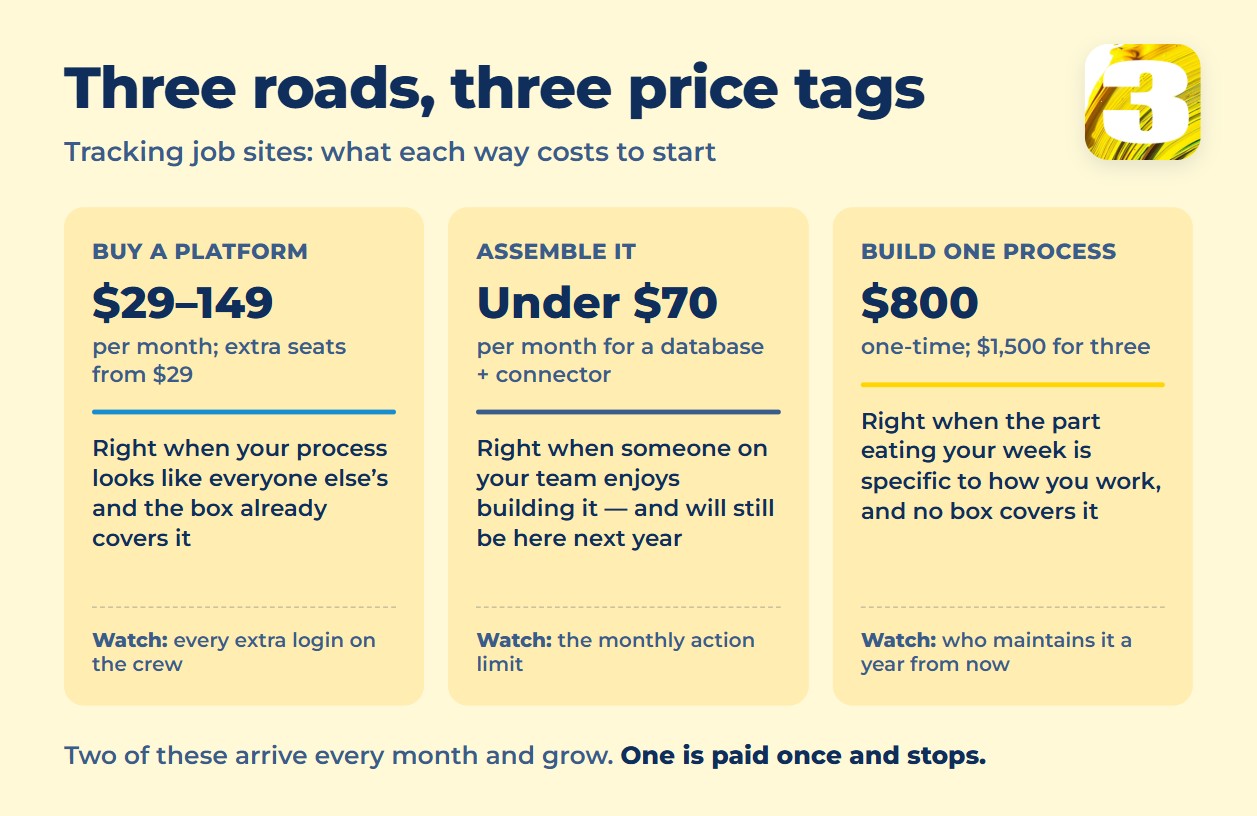
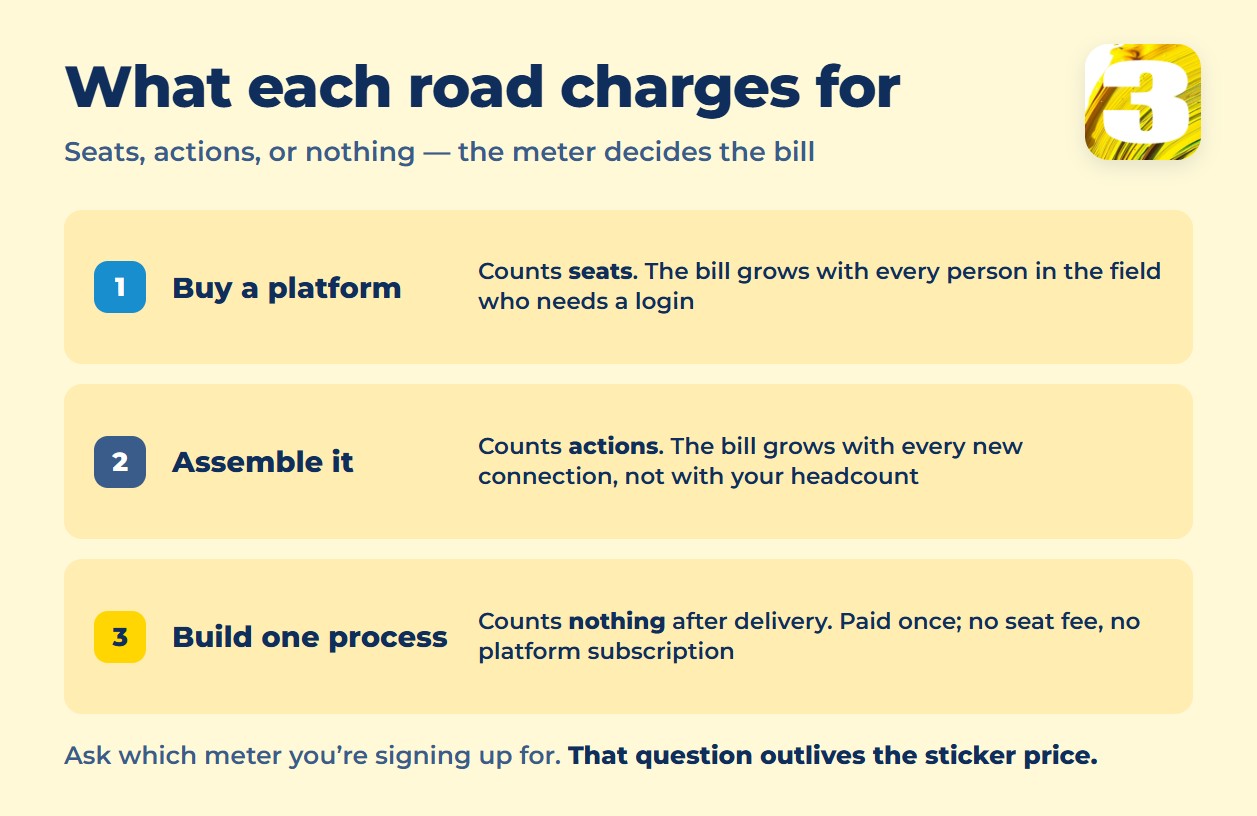
Read those as three different shapes of spending, not three price tags. The first two arrive every month and grow — with seats on Road 1, with connections on Road 2. The third is paid once and then stops. Which shape suits you depends less on your budget than on whether the thing eating your week is standard or specific to your shop.
Road 3: Build One Process Instead of Buying a Platform
Search for what a custom system costs, and what you’ll mostly find is hourly rates, not a real project total. Canadian agencies typically quote $50–130/hour for junior-to-mid developers and $120–200+ for seniors; in the US, senior rates run $125–250+, higher again in cities like San Francisco or New York. We couldn’t find an independently verified price for “what a Procore-sized platform costs a small contractor” — multiply those rates by the months a full build takes, with a team and a maintenance contract behind it, and you’ll see why agencies stay vague about a final number.
It’s also the wrong question for what most contractors need. Nobody with fifteen active job sites needs a new Procore. They need one process automated — the one that currently means retyping addresses from an inbox, or updating a whiteboard by hand every Monday.
That’s a different order to place, and it has a different price. We charge $800 for one workflow, built and handed over — usually one to two weeks, more often two; the exact timing depends on the project. $1,500 covers up to three workflows in the same sprint. The number is the same shape in either currency: CAD if you’re north of the border, USD if you’re south of it.
Be clear about what that does not buy. For $800 you don’t get a platform: no interface for fifty people, no mobile app, no three-year product roadmap. You get one process that is done by hand today and automatically tomorrow. So the number to compare it against isn’t a full platform build, whatever an agency finally quotes for one — it’s the $29–$149 a month from Road 1, before extra seats, which keeps arriving and keeps growing with every hard hat you add.
There’s no per-seat licence and no platform subscription on our side, because the workflow runs on infrastructure we host rather than a rented seat on someone else’s system. That means the bill doesn’t grow as your project list or your crew does. The full breakdown of what drives the price is here: How Much Does Workflow Automation Cost?
On ownership, the honest version: you can ask for the workflow exported and take it elsewhere. In practice, someone still has to maintain it, and that’s usually not a question your team has an answer to yet. We keep monitoring and alerts on our side for that reason, not because the code is locked.
One example from practice: a contractor running close to 100 active projects works with us on their project tracking. Job addresses arrive from emailed requests on their own — nobody retypes them. It’s a set of workflows wired into the email and calendar they already used, not a platform swap, and it’s live rather than a screenshot from a demo account. Read the full case
That kind of work sits inside our broader automation and AI practice — and sometimes a different road fits you better, which is the next section.
How to Tell Which Road Is Yours
Five questions do most of the work, in whatever order they hit hardest for you:
- How many people will actually log into the system — not how many you’d like to, how many truly will.
- Does your main process get fully covered by an off-the-shelf plan, or does part of it always spill back into a spreadsheet?
- How many times a week does someone retype the same data by hand between two tools?
- If the person who built your no-code setup left tomorrow, would it keep running?
- When you grow, what strains first — the number of projects, or the number of people who need access?
When Not to Call Us
One job site, one crew, and a process that already looks like everyone else’s — buy a box. Fieldwire’s free tier or Contractor Foreman’s $49/month plan cover plan viewing, tasks and checklists for less money and less waiting than any custom build, ours included. Automation earns its price when a process is specific to how you work. It doesn’t earn anything when a $49 plan already does the job.
FAQ
1. Is there free construction project tracking software?
Fieldwire has a free tier — up to 5 users, 3 projects and 100 sheets, with plan viewing, tasks and checklists. For one crew on one site that is often enough. Past those limits, the free tier stops being the answer, and everything else on Road 1 starts at a monthly fee.
2. Why don’t Procore and Raken publish a price?
Procore prices each product against your annual construction volume, so there’s no single number to publish — the figure depends on how much you build. Raken routes its pricing page to a demo request instead. In both cases you learn the number in a sales conversation, which is worth knowing before you budget.
3. Is $800 the price of a platform, or one process?
One process. It’s a single manual routine you run today — a weekly report someone assembles by hand, a status update copied between two systems — automated end to end. It’s not a Procore-sized system, and it isn’t priced like one. Timing is usually one to two weeks, more often two, depending on the project.
4. Do we still need a platform subscription once it’s built?
Not for the workflow itself — there’s no per-seat licence and no platform bill that grows with your project count. You keep paying for the tools you already use, like your inbox, CRM or storage; the automation doesn’t add a subscription on top of them. Anything ongoing on our side, such as hosting and monitoring, is spelled out in the quote before you agree to it, so there’s no surprise line later.
5. Can we take the workflow and run it somewhere else later?
You can ask for it exported. The caveat worth saying out loud: exporting is the easy part, maintaining it afterward is the part most teams don’t have staffed yet, which is why we keep monitoring on our side by default.
Where to Start
Send us the list of what you’re tracking right now and where it actually lives — spreadsheet, whiteboard, a folder of texts, all of it. We’ll tell you honestly which of the three roads is yours, including the option of buying a box instead of hiring us.
No call needed: the list in the form is enough, and we answer in writing. We take on no more than five new automation projects a month, so if the timing matters, say so.









