


Search “construction project management software cost” and every result quotes a monthly number: $29 here, $63 there, $99 somewhere else. None of them tell you what that number turns into by year three, once your crew grows, a promotional rate ends, or you decide to leave. That’s the number that actually matters for a budget, and it’s the one no vendor puts on the pricing page next to the dollar sign.
If you’re still deciding whether to buy a platform, assemble one from tools you already use, or pay for a single automated process, that decision — and the entry price for each road — is covered separately in Construction Project Tracking Software: Prices, 3 Ways. This article picks up after that decision: what a subscription actually costs once you own it for three years, not just the month you signed up for it.

Why the Sticker Price Isn’t Your Real Construction Project Management Software Cost
Three things move the number after year one, and none of them sit next to the price on the pricing page. Your crew grows, so you add seats or cross into a higher tier. A first-year promotional rate ends, and the renewal price is simply higher than what you signed up for. Or you decide to leave, and find out that exporting years of project history isn’t something any vendor prices in advance.
None of this is unique to construction software — it’s how most subscription pricing works. What’s specific to construction is the shape of the growth: crews expand mid-project, subcontractors need a login for a few weeks and then don’t, and the software has no idea any of that is temporary. Every login costs the same monthly fee, whether it lasts three years or three weeks.
Seat by Seat: What Growth Costs on a Per-User Plan
Some platforms price per seat, and the math is straightforward multiplication. CompanyCam’s Core plan starts at $63/mo for one user, with each additional user billed at $29/mo on top. A crew that grows from one user to four over three years — adding roughly one person a year, an ordinary pace for a small contractor — moves through $63/mo, then $121/mo, then $150/mo, using CompanyCam’s own published rates.
That’s before accounting for the feature most tracking-focused searches are actually looking for: CompanyCam’s live job map only exists on the $119/mo Crew plan or above. Core, the plan the per-seat math above assumes, doesn’t have it at all — so the “real” starting point for anyone who wants a map is already the second tier, not the first.
Tier by Tier: What Growth Costs on a Bracket Plan
Other platforms don’t charge per seat — they charge per bracket, and growth costs more in one jump than seat pricing ever does. Contractor Foreman prices Standard at $105/mo for up to three users and Plus at $166/mo for up to eight. Add a fourth person to a three-person Standard account and the bill doesn’t rise by a few dollars. It jumps the full $61/mo, whether that fourth person is your first hire of the year or your only one.
That’s what per-seat math hides and bracket math makes obvious: growth on a subscription platform rarely costs what you’d expect from counting heads. It costs whatever the nearest boundary on the pricing page happens to be, and boundaries don’t care how close you are to them.
Put the two growth patterns side by side over three years, plus a third case — a crew that never grows at all — and the shape of the bill becomes clear:
| Growth pattern | Year 1 | Year 2 | Year 3 | 3-year total |
| Per seat (CompanyCam, 1 to 4 users) | $756 | $1,452 | $1,800 | $4,008 |
| Per tier (Contractor Foreman, 2 to 6 users) | $1,260 | $1,992 | $1,992 | $5,244 |
| No growth, promo rate ends (Jobber Core) | $288 | $348 | $348 | $984 |
These totals come from multiplying each vendor’s own published monthly rate by twelve months a year — arithmetic on public numbers, not a figure any vendor publishes as a three-year total. None of the rows include setup time, training, or data migration. Every one of those adds to the real total, and none of them is on the pricing page either.
The Price That Rises Even When Your Crew Doesn’t
The third row above is the one worth sitting with, because it needs zero growth to happen. Jobber’s Core plan runs $24/mo for the first 12 months of an annual contract, then renews at $29/mo — an increase with the exact same crew, the exact same seats, nothing added. Stay on the platform for three years and that alone adds up to $984, without hiring a single extra person.
Multiply that pattern across a handful of tools — a project tracker, a scheduling app, a document tool — and a crew that “didn’t grow” can still be paying meaningfully more in year three than it budgeted for in year one. None of this shows up when you compare two platforms’ sticker prices side by side in a browser tab. It shows up in a renewal email eleven months after you sign.

What Leaving Costs (And Why No One Publishes It)
Every number above assumes you stay. The number nobody prices in advance is what it costs to leave — and public reviews suggest it isn’t small. In Capterra reviews of Procore, one owner writes that “the cost was not made for small businesses — when it came to renewal they weren’t very accommodating,” and another says flatly, “I did not [choose it] — I am forced to use it by other companies.” A Jobber reviewer, still using the platform, adds that “some key features feel locked behind higher-tier plans or add-ons.”
None of these are complaints about the software failing to work. They’re complaints about the shape of the bill and how hard it is to change your mind once three years of project history live inside someone else’s system. That’s not a line item a pricing page will ever show you — it’s worth asking about, in writing, before you sign a second year, not after you’ve decided you want out.
Three Roads, One Timeline
The buy-assemble-build decision has its own math at the entry price, covered in the article linked above. Stretched over three years, the roads separate even further, because two of them compound and one doesn’t:
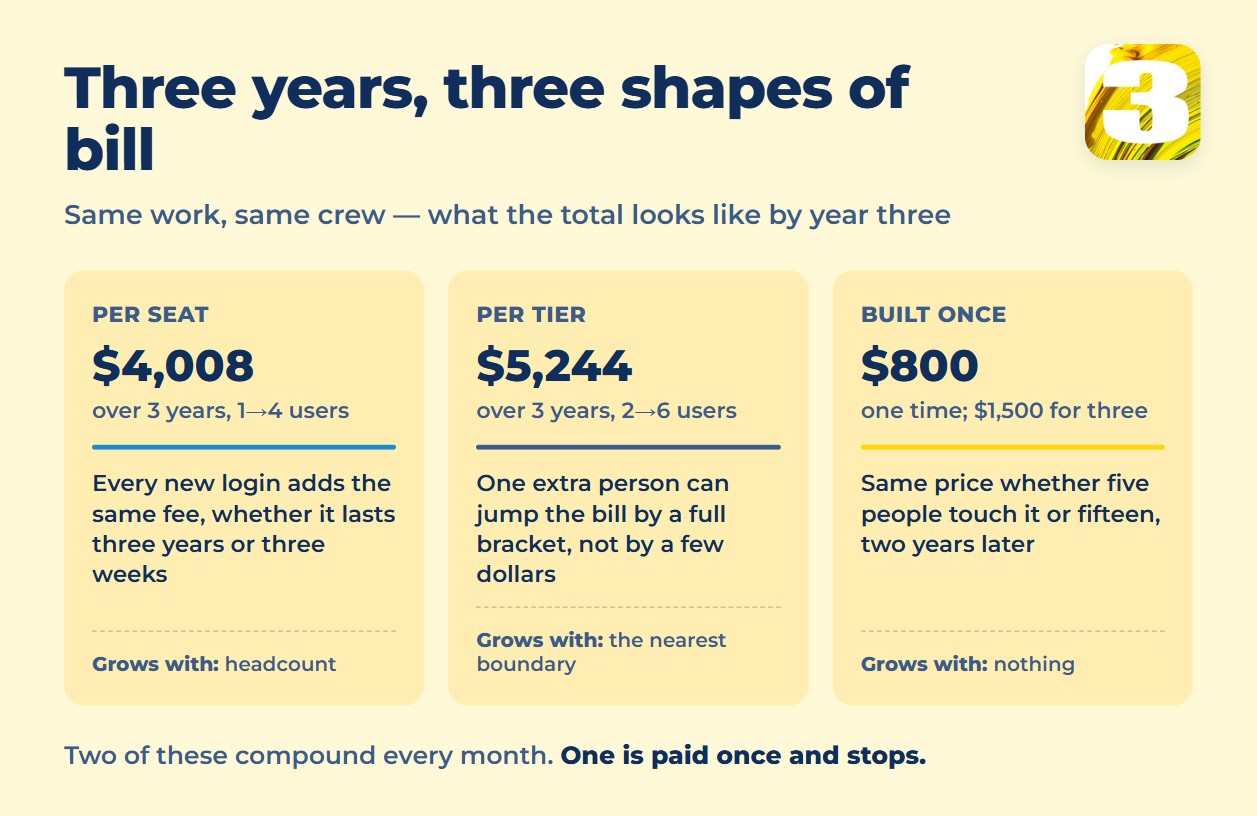
Road 1 and Road 2 both grow — one by seats and tiers, the other by automation actions and connections between tools. Road 3 is flat by design: the number you’re quoted is the number you pay, once, whether your crew has five people or fifteen by the time the workflow is still running two years later.
The Road 3 Math: One Payment, No Escalation
We charge $800 for one automated workflow, built and handed over — usually one to two weeks, more often two; the exact timing depends on the project. $1,500 covers up to three workflows in the same sprint. There’s no renewal price, no per-seat add-on, and no tier to cross if your crew doubles — the workflow does the same job whether one person touches it or ten. The full breakdown of what goes into that number is here: How Much Does Workflow Automation Cost?
One example from practice: a contractor running close to 100 active projects works with us on project tracking instead of a per-seat platform. Job addresses arrive from emailed requests automatically — nobody retypes them, and nobody pays $29 more a month when a new estimator joins the team. Read the full case, which covers what the workflow actually does day to day.
On ownership: you can ask for the workflow exported and take it elsewhere, the same as with any platform’s data. The honest difference is that there’s no subscription to cancel in the first place — nothing renews in month thirteen, nothing jumps in price when you cross from eight employees to nine. That kind of work sits inside our broader automation and AI practice.
How to Do This Math for Your Own Shop
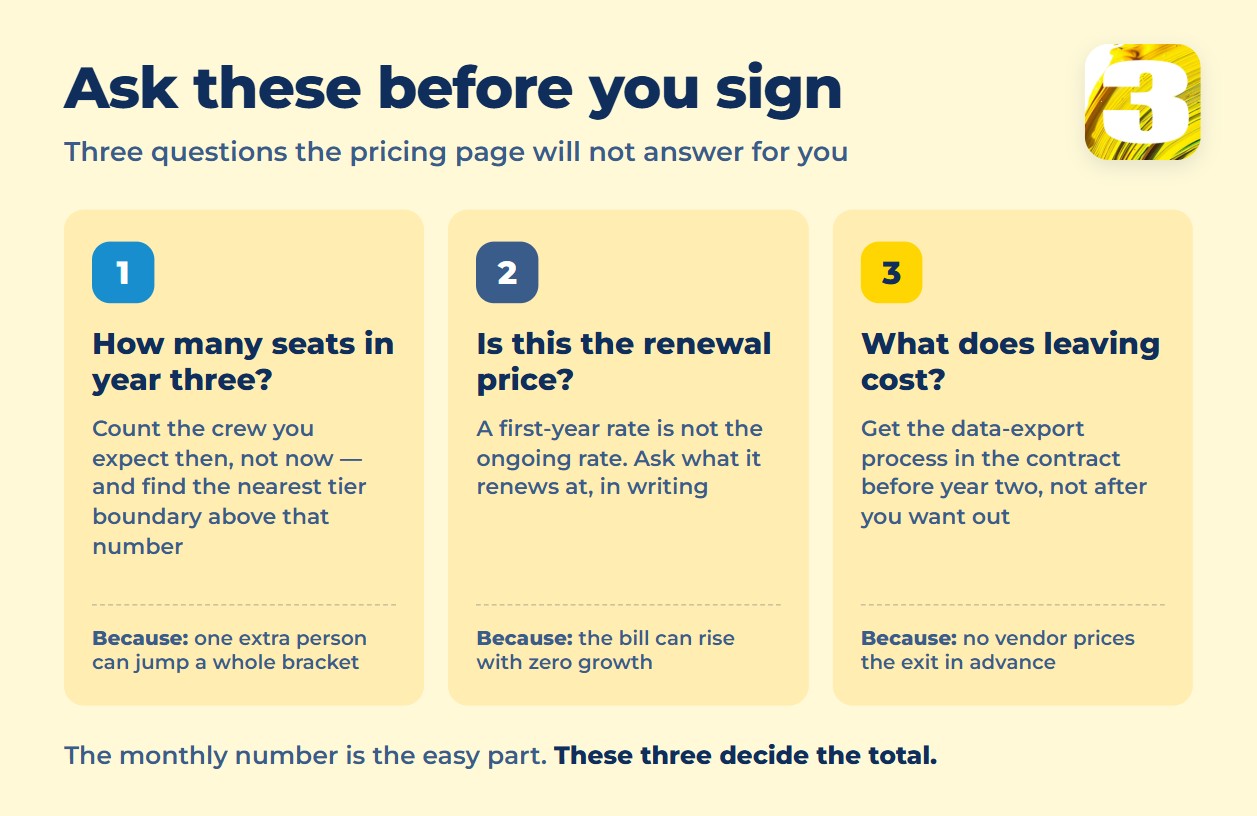
Before signing anything, run these questions against whatever pricing page you’re looking at:
- How many seats will you actually need in year three, not year one — and where’s the nearest tier boundary above that number?
- Is the quoted price a first-year rate or the ongoing one? Ask what it renews at, not just what it starts at.
- Does the plan you’re comparing include the feature you actually need — a live map, in CompanyCam’s case — or does that live on a higher tier?
- What does the vendor say, in writing, about exporting your data if you leave? If it isn’t in the contract, don’t assume it’s guaranteed.
When the Subscription Still Wins
None of this means a subscription is always the wrong math. A crew that’s genuinely stable at three or four people, with a workflow that matches what off-the-shelf software already does, can sit on a $49–$105/mo plan for three years without ever hitting a tier boundary or needing a custom process built. The arithmetic in this article only turns against a subscription when growth, a specific process, or an eventual exit are part of the picture. For a shop with none of those, the box on the shelf is still the cheaper answer.
FAQ
1. Does construction project management software get cheaper as a crew grows?
No — the opposite, on every pricing model checked here. Per-seat plans add a flat fee per new user; bracket plans jump to the next tier the moment you cross its ceiling, even by one person. Neither model discounts for scale the way volume pricing works in other industries.
2. How do I calculate the real three-year cost before I sign?
Take the quoted monthly price, check whether it’s a first-year promotional rate or the ongoing one, multiply by the seats or tier you expect to need by year three (not year one), then multiply by 36 months. Add setup and training time on top, since almost no vendor prices those separately from the subscription.
3. Is $800 a one-time cost, or does it renew like a subscription?
One time, per workflow. $800 covers one automated process built and handed over; $1,500 covers up to three in the same sprint. There’s no monthly bill afterward for the workflow itself — ongoing hosting or monitoring, if you want us to keep it running, is quoted separately and in writing before you agree to it.
4. What happens to project data if we switch platforms after year one?
That depends entirely on the vendor’s export tools, and it’s rarely spelled out on the pricing page itself. Public reviews of several major platforms describe manual, one-item-at-a-time exports for years of files and photos — ask for the export process in writing before signing, not after you’ve already decided to leave.
5. Does the price change if our team grows after the workflow is built?
No. The $800–$1,500 price covers building the workflow, and it keeps running the same way whether one person uses it or the whole crew does — there’s no per-seat add-on on our side. If growth means you need an additional, different process later, that’s priced as its own workflow, not a markup on the first one.
Where to Start
Send us what you’re tracking today and roughly how you expect your crew to grow over the next three years. We’ll tell you honestly whether the math favors a subscription, a DIY stack, or one workflow built once — including the option that isn’t us.









