


Google Ads sees the form submission. It has no idea whether that form turned into a signed contract, a paid invoice, or nothing at all. If you sell anything with a sales cycle — a quote, a consultation, a proposal — that gap is exactly why your cost-per-conversion looks fine in the ad account and makes no sense next to your actual revenue. Offline conversion import exists to close it: you take what happened after the click, inside your CRM, and hand it back to Google so bidding can optimize toward outcomes instead of form fills. The route for doing that changed on June 15, 2026, and almost nothing written about it since has caught up. The broader picture is in where to look when conversion tracking breaks.

What Changed for Offline Conversion Import on June 15, 2026
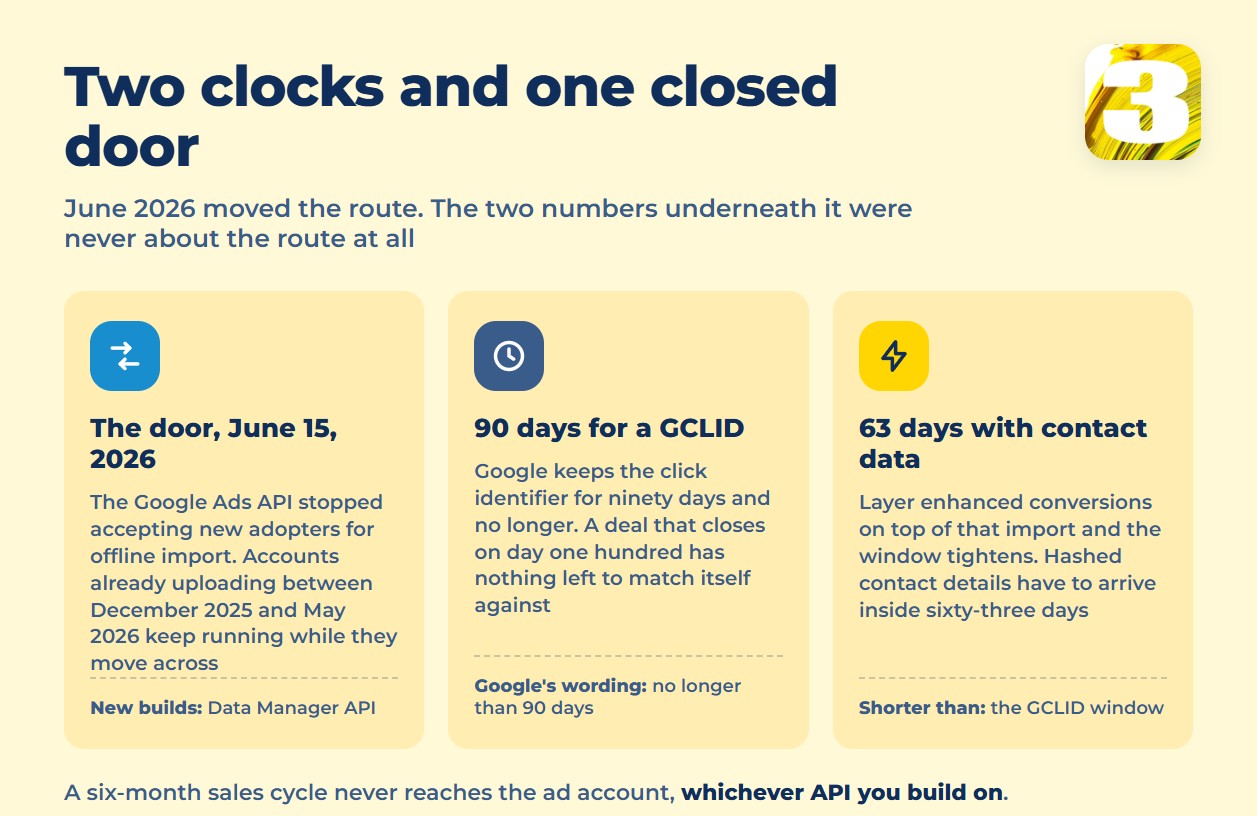
Whoever built your CRM-to-Google connection — an in-house developer, a freelancer, an agency — used to talk to the Google Ads API directly. Google’s own developer blog spells out what happened to that path: “Starting on June 15, 2026, the Google Ads API will no longer accept new adopters of offline conversion imports, including enhanced conversions for leads. As with our previous announcements for session attributes and IP address, and Customer Match, Data Manager API is now the primary API for importing offline conversions.”
If someone tries to build a new connection the old way, Google names the exact failure: “new adopters will receive the error `CUSTOMER_NOT_ALLOWLISTED_FOR_THIS_FEATURE` when attempting to use the `ConversionUploadService.UploadClickConversions` method.” That’s not a bug on your end. It’s the door being closed for anyone who wasn’t already through it. You don’t need to know what that method does — you just need to know that if your developer hits that error, the fix isn’t a retry, it’s a different API.
No, Google Didn’t Turn It Off
Here’s the part worth getting exactly right, because most of what’s floating around gets it wrong: Google did not shut down offline conversion import. It closed the door to new adopters. Google’s own wording draws the line by date: “Developers who have not adopted offline conversion imports or Enhanced conversion for leads, or have not imported offline conversions between December 2025 and May 2026, will receive an error if they attempt to import offline conversions. Developers who have already adopted offline conversions or Enhanced conversions for leads can continue importing using the Google Ads API while they integrate with the Data Manager API.”
So if your connection was already uploading conversions in that window, you’re grandfathered in — you can keep running on the old API while you move to Data Manager API on your own schedule. If you’re starting from zero today, you build on Data Manager API from the start. Either way, the destination is the same; only the door you walk through is different.
Two Clocks You Can’t Reset: 90 Days and 63 Days
Even on the right API, offline import has a hard ceiling that has nothing to do with which route you use. Every click Google Ads sends you carries a GCLID, and Google is explicit about how long that identifier stays usable: “You can upload any conversion with GCLID so long as it’s no longer than 90 days,” because “we retain the GCLID for only 90 days.” Past that, there’s nothing to match the conversion to.
If you’re layering enhanced conversions on top of that offline import — sending hashed contact details alongside the GCLID — the window is shorter still: “You can upload any conversion with personally identifiable information for enhanced conversions so long as it’s no longer than 63 days.”
That’s the number that matters more than the API migration. If your sales cycle runs 30 or 45 days, GCLID import will catch it fine. If it runs six months — which describes a lot of B2B sales, legal retainers, and anything sold through a proposal — GCLID import will never see the deal close, no matter how well the technical side is built. That’s not a setup problem. It’s a ceiling built into how long Google keeps the click’s identity.
A Form Submitted Is Not a Deal Won
This is where the gap between what Google counts and what your business counts gets concrete. Picture a legal practice running Search ads for “personal injury consultation.” The form gets submitted, Google Ads logs a conversion, the campaign looks like it’s converting well. But a submitted form isn’t a case the firm took on — most never become one. Or picture a clinic running ads for a paid program: someone books a free consultation, and that booking counts as a conversion, but booking a consultation and enrolling in a course of treatment are two different decisions, often weeks apart.
In both cases, the ad account is optimizing toward the wrong finish line. It’s rewarding the campaigns and keywords that generate consultations, not the ones that generate paying clients. Offline conversion import is the mechanism for correcting that — feeding the real outcome, recorded later in the CRM, back to the same click that started it.
What Has to Be Sitting There Before Any of This Works
None of the above works unless a few unglamorous pieces are already in place:
- Auto-tagging turned on, so every click carries a GCLID in the first place.
- A hidden `gclid` field on every form, capturing that identifier at the moment someone converts.
- A matching field in the CRM, so the identifier travels with the lead through every stage instead of getting dropped at intake.
- A conversion window set to match your real sales cycle — not the platform default — so a deal that closes on day 70 isn’t compared against a 30-day assumption that quietly wrote it off.
Skip any one of these and the rest of the migration is irrelevant. The API can be perfectly modern and still have nothing to import.
Two Different Things Wearing Similar Names
Offline conversion import and enhanced conversions for leads get talked about as if they’re the same feature. They’re not. Offline conversion import is the base mechanism: GCLID goes out, GCLID comes back with an outcome attached. Enhanced conversions for leads sits on top of it — Google’s own description calls it “an upgraded version of offline conversion import that uses user-provided data, such as email addresses, to supplement imported offline conversion data.” It fills in matches that GCLID alone would miss, using hashed contact details instead. You can run offline import without enhanced conversions. You can’t run enhanced conversions for leads without offline import underneath it — one is the foundation, the other is what you build on it once the foundation holds. The layer that sits on top is covered in enhanced conversions and the June switch.
The Gap Standard Tools Never Close
Even with all of this wired correctly, there’s a hole neither Google Ads nor GA4 fills on its own: a lead arrives, and neither platform can say where the person actually came from. We ran into that gap often enough that we built our own tracking layer to close it, and one thing it surfaces that standard reporting doesn’t is people who found their way to a form after asking ChatGPT — a source both Google Ads and GA4 quietly drop. Getting the CRM side of an import built and kept current — mapping fields, watching for connector failures, moving a build off a retired endpoint before it goes quiet — is exactly the kind of work we do under automation for clients whose deals live in a CRM and whose ad spend lives in Google Ads.
One more gap, briefly: calls behave differently again, and if leads come in over the phone, offline import alone won’t touch them — that’s covered separately at Why Google Ads Isn’t Tracking Your Phone Calls.
Where Offline Conversion Tracking Leaves You
If a sale is worth more than a form fill, the two systems that track it — your CRM and your ad account — need to agree on what a conversion actually means. Right now, for most accounts, they don’t.









