
Ask most developers to “block the AI crawler” and they reach for one line in robots.txt, as if OpenAI ran a single bot. It runs four, and they do different jobs. Disallow the wrong one and nothing breaks, no error shows up anywhere — your business just quietly stops being the answer ChatGPT gives, and you never find out why. That’s the whole practical core of SEO for ChatGPT: not new tricks, just knowing which of OpenAI’s four bots you’re actually influencing when you edit that file. For the wider picture — how ChatGPT stacks up against Google’s AI Overviews, Perplexity and the rest, with the numbers behind each — the full breakdown is here. This piece stays narrower, and more fixable: one setting, checked today.
OpenAI Runs Four Bots, and Only One Decides If You Show Up
OpenAI’s own developer documentation lists four separate user-agents, each with a distinct job:
- OAI-SearchBot — surfaces websites in ChatGPT’s search answers.
- GPTBot — crawls content to train the underlying model.
- ChatGPT-User — visits a page in response to something a person asked ChatGPT or a Custom GPT to do; OpenAI notes that “because these actions are initiated by a user, robots.txt rules may not apply.”
- OAI-AdsBot — checks the safety of pages submitted as ads inside ChatGPT.
OpenAI spells out the split in one sentence, and it’s worth quoting exactly: “a webmaster can allow OAI-SearchBot in order to appear in search results while disallowing GPTBot to indicate that crawled content should not be used for training.” Block GPTBot and you keep your content out of future model training — a legitimate choice with zero effect on whether ChatGPT cites you tomorrow. Block OAI-SearchBot and the effect runs the opposite way: OpenAI states plainly that sites opted out of OAI-SearchBot “will not be shown in ChatGPT search answers,” though they “can still appear as navigational links.” Most “block the AI bots” advice treats GPTBot as the whole story, because training is what people worry about. It’s also the one bot that has nothing to do with getting cited.
The Same Split Runs at Anthropic and Meta — Differently at Perplexity
This isn’t an OpenAI quirk. Anthropic runs three bots: ClaudeBot trains the model, Claude-User fetches a page in response to a live question, Claude-SearchBot handles indexing for search-style answers. Meta separates the same two jobs across Meta-WebIndexer, the bot it says lets Meta AI “cite and link to your content,” and Meta-ExternalAgent, which crawls for training foundation models.
Perplexity structures it differently, and the difference is telling. PerplexityBot surfaces and links your site in Perplexity’s answers; Perplexity-User fetches a page a person actually clicked on. There’s no third bot for training at all — the company says so directly: “Perplexity does not build foundation models, so your content will not be used for AI model pre-training.” Four companies, and only one — Perplexity — skips the training bot entirely. OpenAI, Anthropic and Meta all draw the same line: training and citation as two separately blockable bots.
Google keeps the same two questions apart on its own turf, for what it’s worth: Google-Extended governs training and grounding data for Gemini and Vertex AI, and has nothing to do with whether a page appears in AI Overviews. That one has its own control in Search Console, which Google rolled out to every site on August 31, 2026, and unlike the snippet tags it sits beside, that control doesn’t touch ordinary search results — our piece on what actually controls AI Overviews goes through both. Treat every bot with “AI” in its name as one line to disallow, and you’re answering both questions with a single rule, whether you meant to or not.

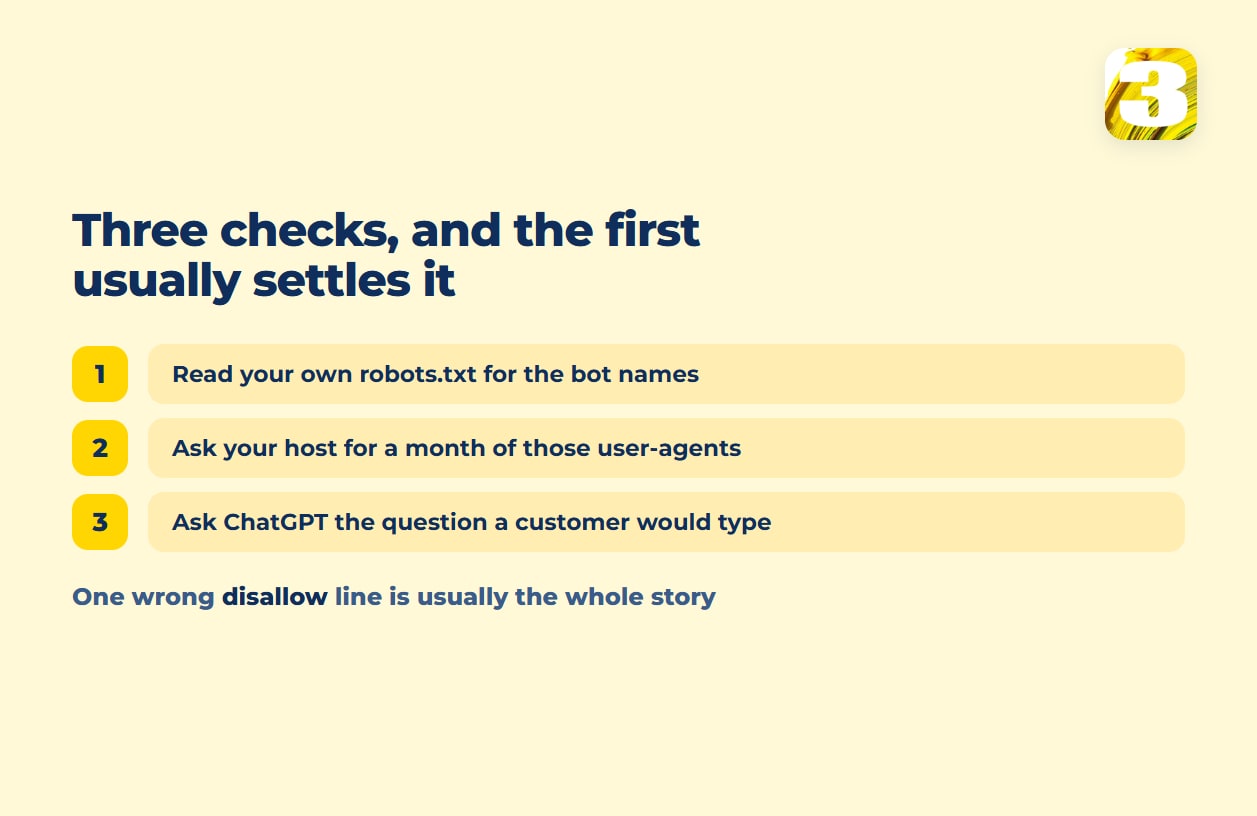
The Twenty-Minute ChatGPT SEO Check
The first and third steps need no tools and take a few minutes each. The middle one needs someone with server access, so it comes back when your host answers rather than while you sit there.
Open your own robots.txt (yoursite.com/robots.txt) and look for the exact strings — OAI-SearchBot, GPTBot, ChatGPT-User, and the equivalents for any other AI system you care about. Most sites have no lines for these at all, which means every one of these bots is already welcome by default. If a Disallow: / sits under one of the search-facing names — OAI-SearchBot, Claude-SearchBot, Meta-WebIndexer, PerplexityBot — that’s the one actually keeping you out. The split most site owners actually want looks like this:
User-agent: GPTBot
Disallow: /

User-agent: OAI-SearchBot
Allow: /
Out of training, still in the answers. If the file currently says the opposite, the fix is one line, and whoever deployed your site can make it — it’s a plain text file at the root, not a code change.
Ask whoever runs your server for hits from those same user-agents over the last month — a hosting support ticket is usually enough, and the question fits in one sentence. A site with any traffic normally gets crawled, so a month with nothing is worth explaining. Often it means something upstream of robots.txt is blocking silently — a security plugin or a hosting-level firewall that refuses the request before the file is ever read. It can also mean something duller: logs that don’t record user-agents, or a retention window shorter than the period you asked about.
Open ChatGPT and ask it the three questions a real customer would type — the actual service question, not your brand name — and write down who it names. If the answer isn’t you, that’s not a robots.txt problem. It’s the same underlying question our local SEO work is built to answer, because a service question answered by ChatGPT and the same question answered by a local map pack draw on largely the same set of facts about a business — what you do, where, what you charge, what past customers said.
Why You Can’t Read Your ChatGPT SEO Off a Dashboard
Where AI traffic does and doesn’t show up in analytics is a longer story, and the pillar piece tells it in full. Two pieces of it are newer than that article and worth having straight, because they get mixed together constantly.
A click from an AI Overview isn’t lost — it lands in Search’s overall performance report along with every other click, just not labeled apart from the rest. What Google doesn’t give you is a separate read on it: the Search Console report built specifically for generative AI features hands you impressions only, no click-through rate, and it doesn’t isolate AI Overviews from AI Mode — the two are counted together.
None of that means the traffic isn’t real. It means any channel label will undercount it. That’s why we don’t work from the label alone: our own lead-tracking plugin runs on sites we build, and inquiries that came by way of ChatGPT show up there as a visible line rather than a guess buried inside “Direct.” It isn’t a number we can publish, and we won’t pretend otherwise — but it’s the difference between knowing the channel exists and assuming it doesn’t.