


Squarespace is a website builder: their templates, their editor in the browser, their servers. You install nothing and you buy no hosting separately — you pay one monthly subscription, and the site stays online for as long as that payment keeps going through.
Squarespace publishes four monthly plans: Basic $19, Core $29, Plus $49, and Advanced $99 (checked on Squarespace’s pricing page on August 18, 2026). What you’re buying at that price is a website you rent — their design, their editor, their servers, and a bill that arrives every month for as long as the site is online. What it doesn’t buy is the content: every page, every line of text, every photo — and the order they go in — are yours to invent, gather and structure. The platform hands you an empty template and starts billing.
So the number that decides your budget isn’t $19. It’s what the whole thing costs across three years, what the cheapest plan won’t let you do, and what it costs to leave when you outgrow it.
What $19 a Month Becomes Over Three Years
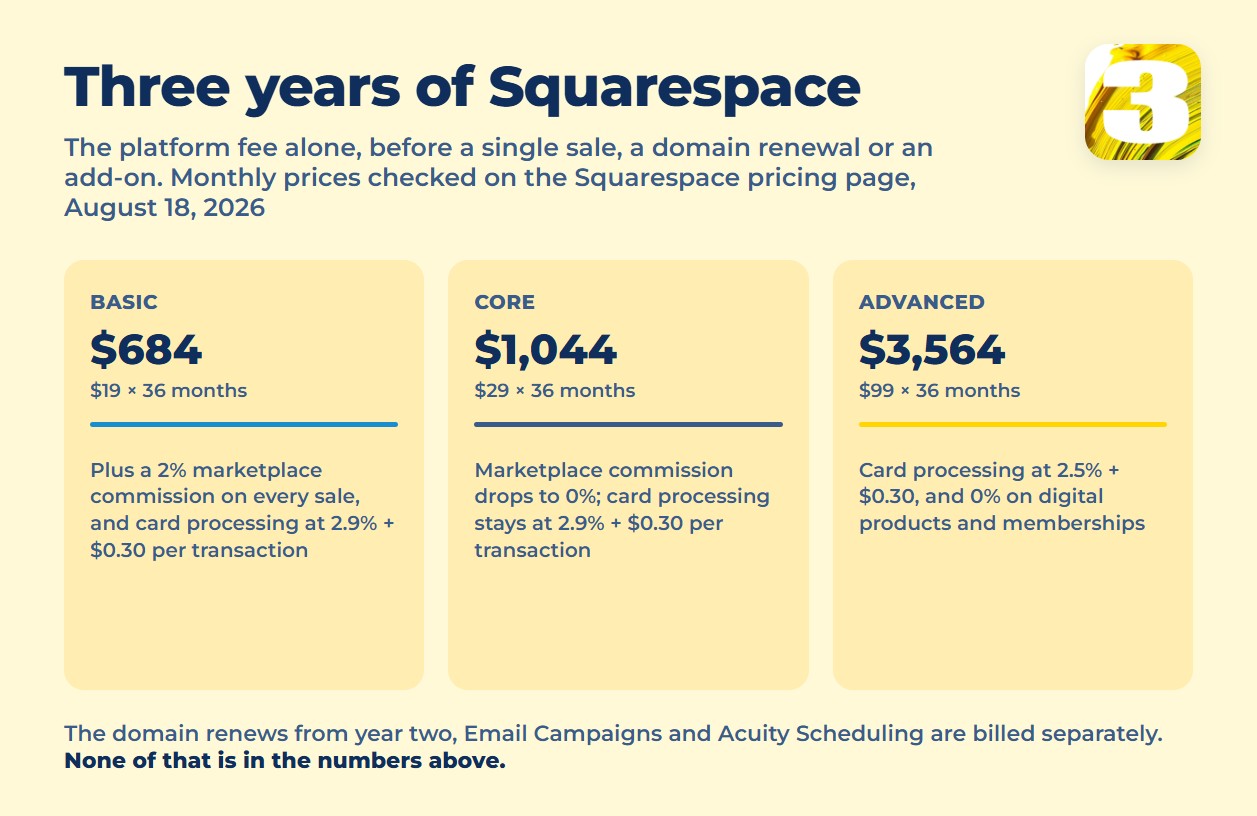
Squarespace’s own pricing page offers “Pay annually to save up to 36%” — but it doesn’t show what each plan actually costs at that discounted rate. Without a published per-plan number, the only honest baseline is the monthly price, multiplied out:
| Plan | Monthly price | × 36 months |
| Basic | $19 | $684 |
| Core | $29 | $1,044 |
| Plus | $49 | $1,764 |
| Advanced | $99 | $3,564 |
That’s the platform fee alone, before a single sale, a domain renewal, or an add-on touches the invoice. Prices above were taken from the vendor’s pricing page on August 18, 2026.
What Else Lands on the Bill
The domain. Free for the first year, then it renews at its “listed price” from year two — Squarespace’s own domain renewal terms confirm the renewal happens but never publish what it costs. We won’t guess a number the vendor won’t give you; just know it lands in year two, when you’re already committed.
Selling anything. On Squarespace’s Basic, Core, Plus, and Advanced plans, Basic charges a 2% marketplace commission on top of card processing; the plans above it drop that to 0%. Card processing through Squarespace Payments runs 2.9% + $0.30 per transaction on Basic and Core, 2.7% + $0.30 on Plus, 2.5% + $0.30 on Advanced. Digital products and memberships carry their own scale — 7% on Basic, down to 0% on Advanced.
On a conditional example, not a real store: a Basic-plan shop sells $3,000 across ten orders of $300. The 2% commission takes $60; card processing adds $9 an order, or $90. That’s $150 in fees on $3,000 of sales — 5% gone before the monthly fee is counted. And the arithmetic quietly pushes you up a tier: the gap between Basic and the plan above is $10 a month, or $120 a year, which a 2% commission matches at just $6,000 of annual sales. Sell more than roughly $500 a month and the cheap plan is the expensive one.
Two products that aren’t in the plan at all. Email Campaigns and Acuity Scheduling are billed separately from the website plan. Neither publishes a flat number you can quote here, so treat both as unknown line items until you’re inside your own account.
What the Cheapest Plan Won’t Let You Do
Past the money there’s a ceiling, and it’s the part people discover late. On Basic you cannot put anything of your own onto the page — Squarespace words it as “custom CSS and JavaScript,” available one plan up. In plain language: no outside code goes on your site. What that costs you:
- No tracking of your own. When the phone rings, you won’t know which ad, which search or which campaign sent that person. You’ll see that visits happened, and that’s the end of it.
- No advertising pixel — the piece of code Google or Facebook gives you so their systems can see which clicks became customers. Without it, retargeting the people who visited and didn’t buy, and letting the platform learn who to show your ads to, both stop working properly.
- No outside tools. A booking calendar, a live chat, a reviews feed, a calculator built for your trade — if Squarespace doesn’t offer it, it doesn’t go on the page.
- No design change the template doesn’t allow. Your designer can move what the template exposes, and nothing else.
- Two logins, total. A third person — an accountant, a marketer — doesn’t get their own access. Detailed analytics and business email at your domain also start a tier up.
To be fair about the things people ask first: pages aren’t rationed (up to 1,000 on every current plan), and both spam protection and a cookie-consent banner are built in at no extra cost.
What Doesn’t Leave With You
This is the part almost nobody selling or reviewing Squarespace bothers to check, and it’s the one that turns “cheap” into “expensive” three years later.
According to Squarespace’s own export documentation, what comes with you is: regular pages, one blog with its posts, text and image blocks, galleries, physical products and services. What stays behind: the design, the CSS and any custom code, store pages, album, cover, index, info, calendar and portfolio pages, a second blog, audio and video blocks, product blocks, drafts, page-level headers and footers, and digital products. Squarespace states it plainly: “It’s not possible to import all types of Squarespace content.”

Which is the blunt way of saying the thing this whole article circles: the site isn’t yours. Your words and your photos are — those you can take. The site around them is not: not the design, not the code that runs it, not the address it lives at on their servers. Leaving means rebuilding, not moving. (For what it’s worth, that’s exactly the line we hold on the other side: when a client of ours moves on to someone else, they leave with what they paid for.) If ownership, and not price, is what you’re weighing, Wix vs WordPress: who fixes it and who owns what is the comparison to read next.
And If a Payment Ever Fails
One line in the billing terms is worth reading before you commit. If a renewal charge fails, Squarespace keeps the site live for 15 days while it retries; after that the site is “marked as expired, and will no longer be visible to visitors and search engines.” Nothing is deleted, and you can reactivate at any time — but for as long as it lasts, your site is off the web and out of the index it spent months earning.
That isn’t a flaw in Squarespace. It’s what renting means: the site is live for exactly as long as the invoice is paid. A site you own stays online because the hosting bill is paid, and if that ever lapses, the files are still yours to move elsewhere. If you’re weighing the whole picture rather than one platform, our cost breakdown by route sets the four options side by side.
Who Actually Does the Work
Here’s the cost that never appears on any pricing page. The subscription buys you the tools. It does not buy you the work, and the work is most of the project:
- The structure — which pages exist, what goes on each one, how someone gets from a search to a request
- The text for every page: services, prices, answers to the questions people actually ask
- SEO: deciding which searches each page has to win, then writing that page around them — the platform gives you fields to fill, not a strategy
- Photos chosen, cropped, compressed, and given alt text
- Meta titles and descriptions for every page
- An XML sitemap, ownership verified in Search Console, Analytics connected
- Form fields, where submissions land, and a thank-you page that lets you count them
- The cookie banner, the privacy policy, the terms
- Redirects from the old site so years of accumulated links don’t die
- A pass on a real phone, and a check of everything before launch
Support won’t do any of that, and Squarespace is upfront about it: their support page lists what they don’t help with — custom code, SEO strategy, and third-party services beyond connecting an extension. Help exists for the platform, not for your project.
And the meter doesn’t wait for you. Billing starts the day you subscribe, not the day the site is finished. Every week the writing sits half-done is a paid week of an unfinished site — and the version that finally goes live is the version you had time for, not the version that sells.
$1,900 Once, With the Work Included
That’s the comparison worth making, and it isn’t about $684 versus $1,900. It’s about what each number contains.
Ours is $1,900, once — a site up to 8 pages, and every item on that list above is inside it. The text of every page is written on our side, and written to be found: each one is built as a serious SEO page — aimed at what your customers actually type into Google, with the titles, headings and internal links that make the search engine read it that way.
The structure, the images, the meta titles, the sitemap, Analytics and Search Console, the form, Google Maps, a logo if you need one, the domain for a year and six months of hosting — all in, not billed back to you as extras afterwards. Most quotes you’ll see for a website leave the writing to you; ours doesn’t, and that’s usually the part that stalls a project for months.
It also has a date on it: the site we build ships in 10 working days or less, on the condition that materials and approvals come back promptly. And when it’s done, the site is yours — code, files and all — with your own tracking on it, your pixel, and whatever outside tool your marketing actually needs.
So — Should You Just Take Squarespace?
Sometimes, yes. For a short campaign, a first test of an idea, or a one-person portfolio that will never outgrow a template, $19 a month is the faster and cheaper answer, and we’d tell you so plainly.
It stops being the cheaper answer the moment the site has to sell, book, track or grow — because that’s when you’re paying rent on something you can’t fully take with you, and doing the work yourself on top of it.
If that’s where you’ve landed, send us the address of your site and we’ll tell you exactly what would move across, what would have to be rebuilt from zero, and what that rebuild costs as a one-time fixed price.









