


Wix and WordPress will both get a small business online, and neither choice is a mistake on day one. The comparison that actually matters isn’t which one loads faster or looks nicer out of the box — it’s what happens in year two, when something needs fixing, when the site outgrows the plan it started on, or when you want to leave. If the sticker price is what’s actually on your mind right now, we’ve broken down what a website costs elsewhere. This is about what you get and what you give up on either road.
Who Fixes It When It Breaks
On Wix, support is Wix’s: a shared queue, their hours, their priorities, and a fix that ships when their engineers get to it. That works fine for most of what can go wrong on a builder, because Wix also controls the entire stack — there’s no third-party plugin or theme for anyone to misconfigure. On a self-hosted WordPress site, the arrangement flips. Nobody polices your build, which means nobody’s outage schedule applies to you either — but the plugin conflict that shows up at 11 p.m. is your contractor’s problem to solve, and only if you have one on retainer. A WordPress site with no one maintaining it is worse off than either builder, because updates, backups and security patches don’t apply themselves.
Self-hosted WordPress isn’t free once it’s live, either. Hosting, a domain and a certificate keep the lights on, and none of that shows up on a builder’s pricing page because it’s already folded into the subscription — self-hosted, those become separate monthly bills, on top of whatever a contractor charges to keep them current.
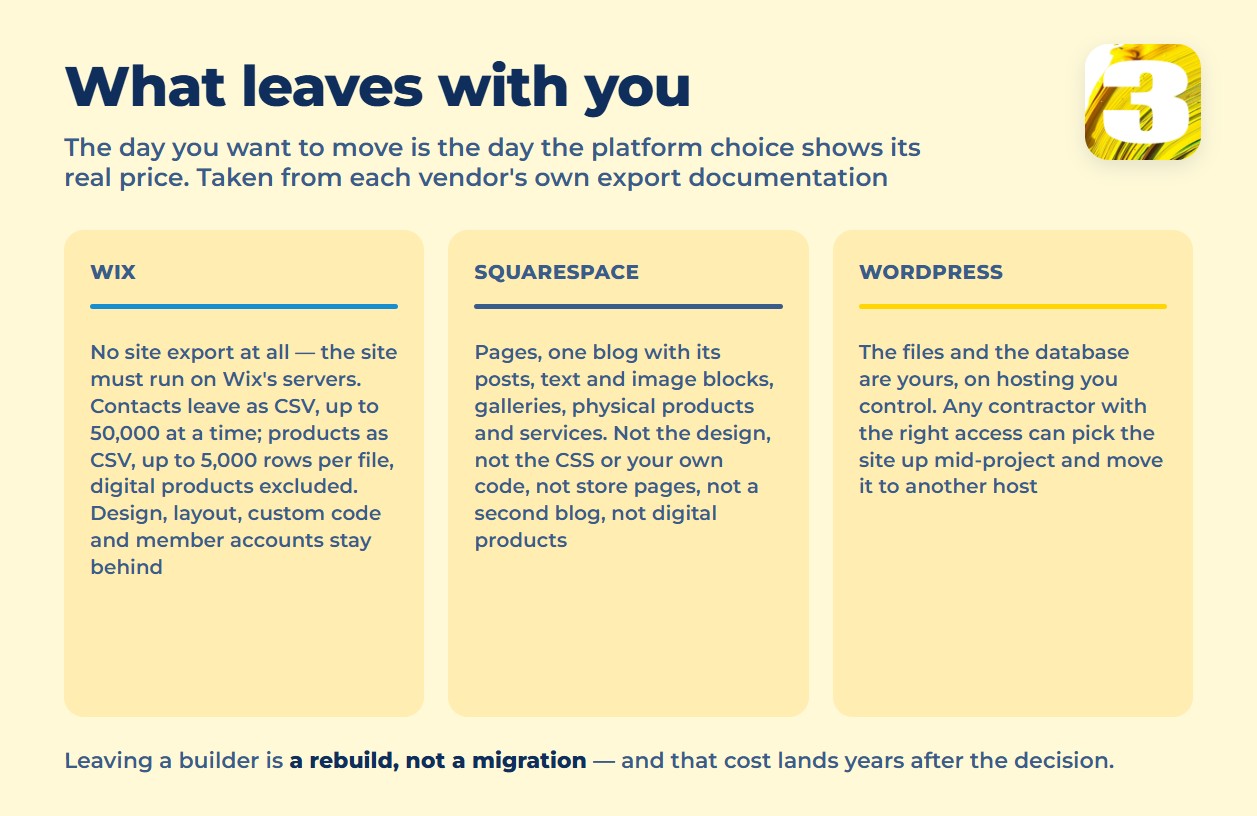
What Leaves With You — Wix, Squarespace, WordPress
The clearest difference between a builder and WordPress isn’t a feature list — it’s what happens the day you want to move.
Wix’s own help center says it plainly: your site “must run on Wix’s servers.” There is no site export. What you can take out is data, not the site itself: contacts as a CSV, up to 50,000 at a time, and a product list as a CSV, capped at 5,000 rows per file — with digital products excluded from export entirely. The design, the layout, any custom code, and the member accounts people signed up with all stay behind. Moving off Wix means rebuilding the site, not migrating it — closer to starting from scratch than to a transfer.
Squarespace goes a step further: its export tool does carry out pages, one blog with its posts, and your text and image content — but not your design, not your own code, and not digital products. We walked through what that actually costs over three years in a separate breakdown, export gap included.
WordPress is the opposite arrangement by design. The files and the database are yours, sitting on hosting you control, and any contractor with the right access can pick the site up mid-project. That cuts both ways for us, and we think it should: when a client of ours moves on to someone else, they leave with what they paid for. That portability isn’t a feature Wix or Squarespace can bolt on later — offering it would mean giving up the thing that keeps a site on their servers in the first place.
The Ceiling on Your Marketing
The other place the difference shows up is anything past a contact form. Builders let you add tracking scripts, but only inside the sandbox they allow — server-side event tracking, a direct CRM integration, or markup written for a specific ad platform usually needs more control than a builder’s code panel gives you. On a self-hosted site, that ceiling doesn’t exist. We run our own lead-tracking code on client sites, and it surfaces something Google Analytics and Search Console both miss on their own: requests that came in after someone asked ChatGPT, not Google. That’s not something you license and drop into a builder’s panel — it only works where you’re allowed to put your own code on the page. If a plan like that is already part of your marketing, it’s worth talking through what a custom build supports before locking in a platform that won’t.

When a Builder Is Actually the Right Call
None of this makes a builder the wrong choice — it makes it the wrong choice for some situations and the right one for others. A single landing page for an event. A site built just to test whether an idea has demand before real money goes into it. A business with no budget for hosting or a contractor, or nobody on staff who’ll ever log in to fix a typo. A builder handles all of that better than a custom build would, because someone else owns the fixing. The trouble starts when a site that began as “just testing this” is still the whole business two years later, and by then the lock-in above is the price of changing your mind.
The honest way to settle “Wix or WordPress” for your own business is to describe what the site needs to do a year from now, not just at launch. If a custom build is on the table, ours is a fixed $1,900 for a site up to 8 pages, delivered in 10 working days or less — no hourly guesswork either way.









