
Run a free scanner — WAVE or the accessibility pass built into Chrome’s Lighthouse — against your homepage, and you’ll have a report in under a minute: a score, a list of failed rules, maybe a red banner across the top. That’s not the answer — it’s the first step. A scanner is good at catching what lives in the code: a missing alt attribute, a contrast ratio that falls short, a heading level that skips from H2 to H4. It can’t tell you whether any of that makes sense to the person actually using it. The Web Accessibility Initiative, the part of the W3C that writes the standard these tools are checking against, says so directly: “Tools cannot check all accessibility aspects automatically. Human judgement is required.” A second line from the same organization is more blunt about what a report actually is — evaluation tools “can not determine accessibility, they can only assist in doing so.”
That distinction matters most right after you’ve just run one, because a clean report reads like a verdict and isn’t one. what ADA compliance actually asks of your pages goes into what ADA and WCAG actually require of a site; here, the question is narrower — what to check with your own hands once the automated pass is done, and why. It’s also the same question we ask about every site we build, before the page ships rather than after.
The Defects a Scanner Reads as Fine
A handful of problems show up on real sites over and over, and none of them trip a rule in an automated tool, because none of them are missing code — they’re code that’s technically present and practically useless.
An image can have an alt attribute and still fail completely: “image1.jpg” or “photo” satisfies the rule that checks whether the attribute exists, and tells a screen reader user nothing about what’s in the picture. A page can have a full set of heading tags and still have no real structure, because the headings were chosen for how big the text looked, not for what belongs under what — a scanner sees <h2>, <h3>, <h4> and calls it done, it doesn’t know the H3 should have been an H2.
Keyboard order breaks in places a scanner never visits, because scanners mostly read the page as it loads, not as it’s used. Open a dropdown menu and the next Tab press can jump back to the top of the page instead of into the menu that just appeared. Open a modal window and the opposite problem shows up: focus gets stuck inside it, cycling between the same two or three elements with no way to Tab back out — a keyboard trap, and one of the more common single reasons someone abandons a page.
A form can flag an error the moment you submit it and still fail: a red outline with no text next to it tells a sighted mouse user something’s wrong and tells a screen reader user nothing at all, because color alone carries no information once you can’t see it. The same form can also skip labels entirely and rely on placeholder text sitting inside the field — it looks like a label, reads like one, and disappears the instant someone starts typing, which is exactly the moment a screen reader needed it.
Beyond the form: video without captions, a cart count or a search-results count that updates on screen without anything announcing the change out loud, PDFs that were never built with tags in the first place, and third-party embeds — a booking widget, a chat bubble, a map — running code that isn’t yours to fix directly, only to request from whoever built it or replace.
A scanner such as WAVE or Lighthouse is still worth running first — both are free, both are honest about their own limits, and Lighthouse’s own documentation carries a separate “manual checks” section for exactly the parts its score doesn’t cover. Running one isn’t the mistake. Stopping there is.
How to Test Your Website’s Accessibility Yourself, in Twenty Minutes
None of this needs new software. It needs the mouse put aside for a while.
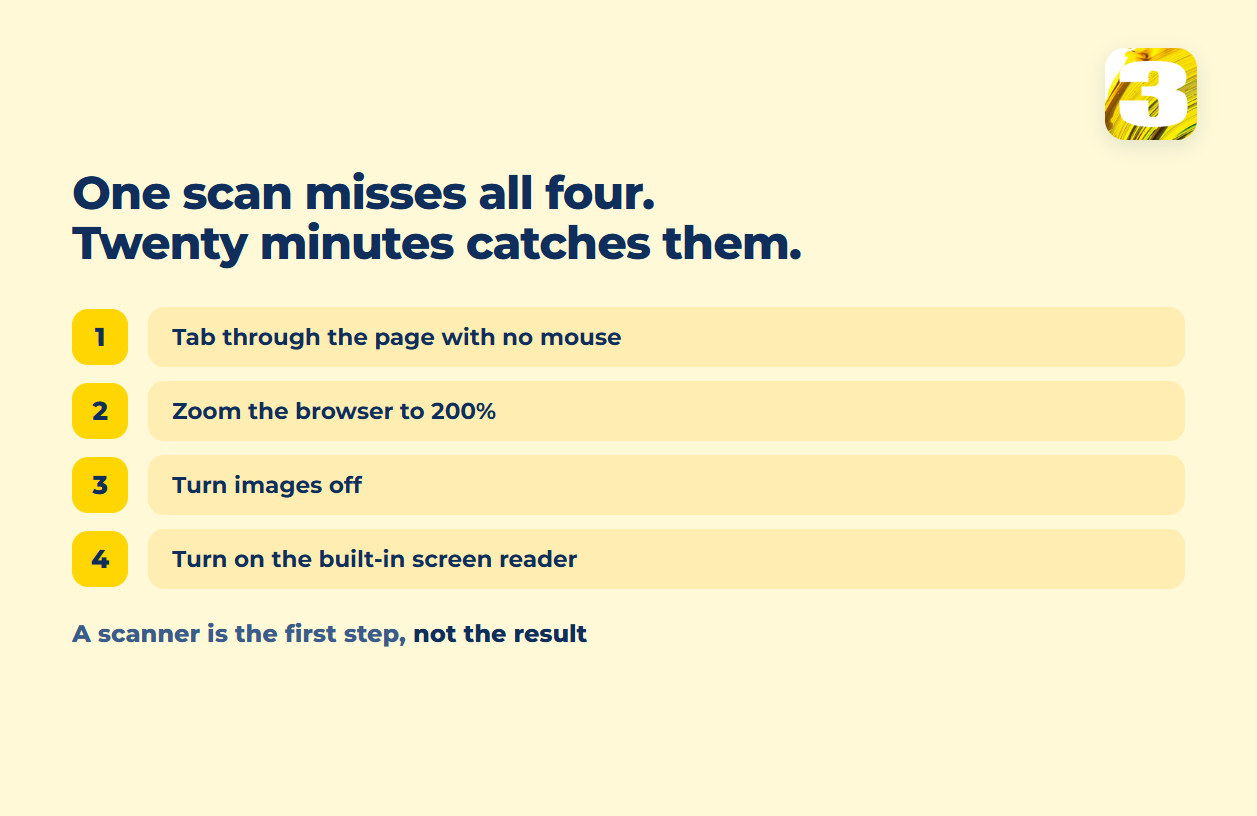
Tab through the homepage and your inquiry form with no mouse. This is the same preliminary check the W3C itself recommends: click into the address bar, put the mouse aside, and press Tab to move through the page. Watch whether every link, button, and form field gets reached in an order that makes sense, whether you can always tell where focus is, and whether anything — a menu, a popup, a cookie banner — ever traps you inside it with no way out.
Zoom the browser to 200%. No plugin, just the browser’s own zoom. Text that overlaps, buttons that vanish off the edge of the screen, or a form field that gets cut in half are all things a scanner running at a fixed viewport never notices.
Turn images off. Most browsers have this buried in settings. What’s left on the page is exactly what a screen reader announces first — if the page still makes sense with nothing but text and alt text, that’s a good sign; if it turns into blank boxes and unlabeled buttons, that’s the same thing a screen reader user is dealing with.
Turn on the screen reader your device already has — VoiceOver on a Mac, Narrator on Windows, TalkBack on Android — for a few minutes on the homepage and the form. You don’t need to learn it properly to notice the obvious: a button that reads as “button,” a heading that never gets announced as a heading, a field with no name at all.
A Test Isn’t an Audit
Twenty minutes on your own homepage and your own form tells you whether the biggest, most common problems are there. It doesn’t cover every template on the site, every state a form can be in once real errors happen, or a PDF nobody’s opened in two years — that’s the difference between a self-check and what an accessibility audit actually covers. It’s also a different exercise from a technical SEO audit: that one checks how a page is structured for search, not whether someone using a keyboard can get through it.

The Form That Fails Silently
An inaccessible form doesn’t throw an error. It doesn’t return a 404, it doesn’t crash, it doesn’t show up in your analytics as anything unusual — it just quietly stops taking submissions from whoever can’t complete it, and nothing about the page tells you that happened. The traffic number looks the same either way. The submission count is the only thing that’s different, and most sites never look closely enough to notice it dropped for a reason that has nothing to do with interest.
That is also why we count submissions ourselves rather than reading them off a dashboard — our own lead-tracking plugin sits on the sites we build and records what actually arrived, so a quiet drop is at least visible as a number rather than as nothing. Whether a page is losing enquiries for reasons that have nothing to do with accessibility is a broader question, and it starts here. On a site we build, accessibility is not a separate line item — contrast, visible focus states, a real heading order, labels instead of placeholder text, alt text that describes the picture come with the copy and the layout. Run one. Then spend the twenty minutes yourself before you decide either answer is the whole picture.