


There’s no single answer, because “SEO” isn’t one task with one clock. A broken redirect, a new landing page, a hundred new product listings, and a new blog post all move through Google on different schedules — and none of those schedules is the same as the one your inbox runs on. Here’s the honest version, in Google’s terms rather than ours: a technical fix counts once Google recrawls the page — which, by Google’s own documentation, can take anywhere from a few days to a few weeks; for a brand-new page, Google says it can take a week or so just to start crawling and indexing it. Turning any of that into leads isn’t a timeline Google publishes at all.
How Long Each Type of SEO Work Takes to Show Up
Different work shows up in different places, and checking the wrong one at the wrong time is how a project gets declared “not working” too early.
| Type of work | When to check | What should move |
| Indexing errors (404s, redirects, noindex) | After you click Validate fix — validation “typically takes up to about two weeks” | The issue shows “Passed” in the Page indexing report |
| Page speed | Google’s Core Web Vitals report is built from real-user visits over the previous 28 days, and validating a fix starts “a 28-day monitoring session” | The issue clears in the Core Web Vitals report, which lags behind the fix itself |
| Titles and meta descriptions | Any time after Google recrawls the page | Check the live page with URL Inspection — Search Console has no report that flags these |
| New landing pages | Google says it “can take a week or so” before crawling and indexing start | URL Inspection shows the page as indexed |
| Store catalog additions | Google publishes no clock for large batches; for large numbers of URLs, its advice is to submit a sitemap | Product URLs appear as indexed gradually, not all at once |
| New articles | A week or so before Google starts crawling and indexing it, then it competes for a ranking like anything else already in the index | New queries tied to the article start showing impressions in the Performance report |
The pattern across all six: indexing comes first, and indexing is not ranking. A page can be fully indexed and still sit on page four. That’s the gap most timelines skip over.
If the technical side is where you’re stuck, our technical SEO audit checklist is a place to see what “fixed” looks like before you wait on it. And if the new page in question is part of a brand-new site rather than an addition to an existing one, the build has its own timeline, and every clock in this table starts only once the site is live.
What Google Says About the Timeline
Worth reading directly, because the numbers get rounded up in every direction once they leave the source:
- Requesting a recrawl: “Crawling can take anywhere from a few days to a few weeks,” and, just as directly, “Requesting a crawl does not guarantee that inclusion in search results will happen instantly or even at all.” (Google Search Central)
- A brand-new page: “It can take a week or so for Google to start crawling and indexing a new page or site.” And once Google knows a URL: “After a page URL is known, it can take some time (up to a few weeks) before Google crawls some or all of your site.” (Google’s guide to the Page indexing report)
- A fix you’ve made: “Validation typically takes up to about two weeks, but in some cases can take much longer,” and “indexing is never instant, even when you submit a crawl request directly.” (same source)
Those are the timelines Google publishes — all of them about crawling and indexing, none about traffic or leads.
How Long Does SEO Take to Work and Show Results?
When people ask how long SEO takes to work, they usually mean leads, not indexing — and that splits into two questions Google doesn’t answer: how long an indexed page takes to earn a visitor, and how long a visitor takes to fill out a form. Both depend on your competitors, your content, your offer and your market, none of which shows up in a Google report.
What you pay for this work is a separate question — our piece on how much SEO costs breaks SEO into four separate purchases, each with its own price.
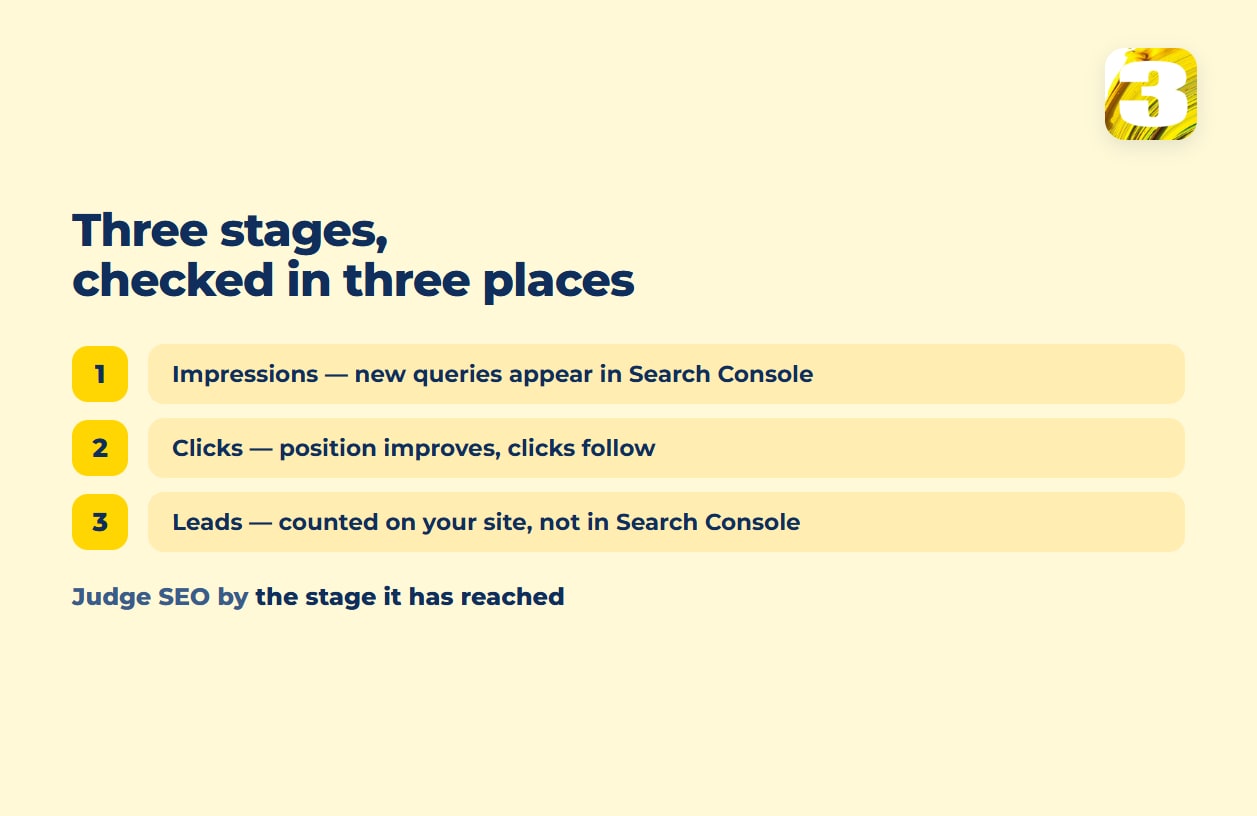
The Sequence That Predicts a Result: Impressions → Clicks → Leads
Before a page produces a lead, it goes through a sequence, and the first two stages each have a place to check inside Search Console.
Impressions first. Once a page is indexed, it can start showing up in search results for relevant queries — even in a low position. Open the Performance report, filter by page or query, and look for new queries appearing at all. This is the earliest real signal, and it’s the one people check least, because an impression with no click still feels like nothing happened.
Clicks follow. As the average position for those queries improves, some of those impressions turn into clicks. Same report, same filters — watch clicks and average position move together, not clicks in isolation. A page can gain impressions for months before its position is good enough to earn a click at all.

Leads last, and outside Search Console entirely. Once a visitor lands, whether they fill out a form depends on the page, the offer, and the form itself — none of which Search Console measures. That’s why we track submissions with our own plugin instead of reading them off a dashboard — it’s also where we see inquiries that started with a ChatGPT answer rather than a search result, a channel standard analytics only partly catches.
One client in home services shows how tangled that attribution gets even with good tracking: this season their CRM logged more inquiries than the same stretch last year, and it now separates which came from ads and which from the site. But the CRM and the site both changed around the same time, ads were running, and demand in that trade is seasonal — so none of that increase gets filed as a clean SEO result.
The mistake that stalls projects early is checking only the last stage. If impressions and clicks are both climbing and leads aren’t yet, that’s a page or an offer problem to fix — or the page is ranking, just for the wrong queries — not proof the SEO stopped working. If impressions themselves haven’t moved, check indexing first, then whether the page targets a query anyone searches; only after that is it worth asking whether the content is built the way AI search now reads it, not just how a classic ranking algorithm reads it.
If what you want to know is which of these stages your own site is stuck on, a free audit is a reasonable first look at where it stalls. Our SEO services and prices start with exactly that.