


If your Shopify store isn’t showing up the way it should, the problem usually isn’t a forgotten meta tag. Per Shopify’s own SEO overview, the platform already auto-generates canonical tags, an XML sitemap, a robots.txt file, and SSL; you’re left to edit titles, meta descriptions, URL handles, alt text, and redirects yourself. What’s left after that short list is a handful of things built into Shopify itself — some fixable, some you can only work around, and one Shopify hasn’t documented. We build stores on both Shopify and WooCommerce, so here’s that list from the build side — each item marked by how firmly Shopify itself documents it.
Shopify URL Structure: The Prefix You Can’t Touch
Every product on Shopify lives at /products/product-handle. Every collection sits at /collections/collection-handle, every page at /pages/page-handle, every blog post at /blogs/blog-handle/post-handle. You can rename the handle — the part after the last slash — but the admin has no setting for the folder in front of it, and we haven’t seen a theme-based store where it can be changed. Shopify doesn’t state this as a rule — it’s how the platform behaves. Its theme docs point the same way indirectly: developers are advised to use the routes object “instead of hardcoding URLs” so a theme supports multiple languages and survives “any possible changes in URL format” — the format belongs to Shopify, not the theme. Product links specifically run through product.url rather than a routes property, but the result is the same fixed prefix. Headless storefronts (Hydrogen) set their own routes, but that’s a separate build, not a setting you flip in a theme. For rankings, the prefix matters less than it looks; where it really bites is a migration, when every old URL needs a redirect.
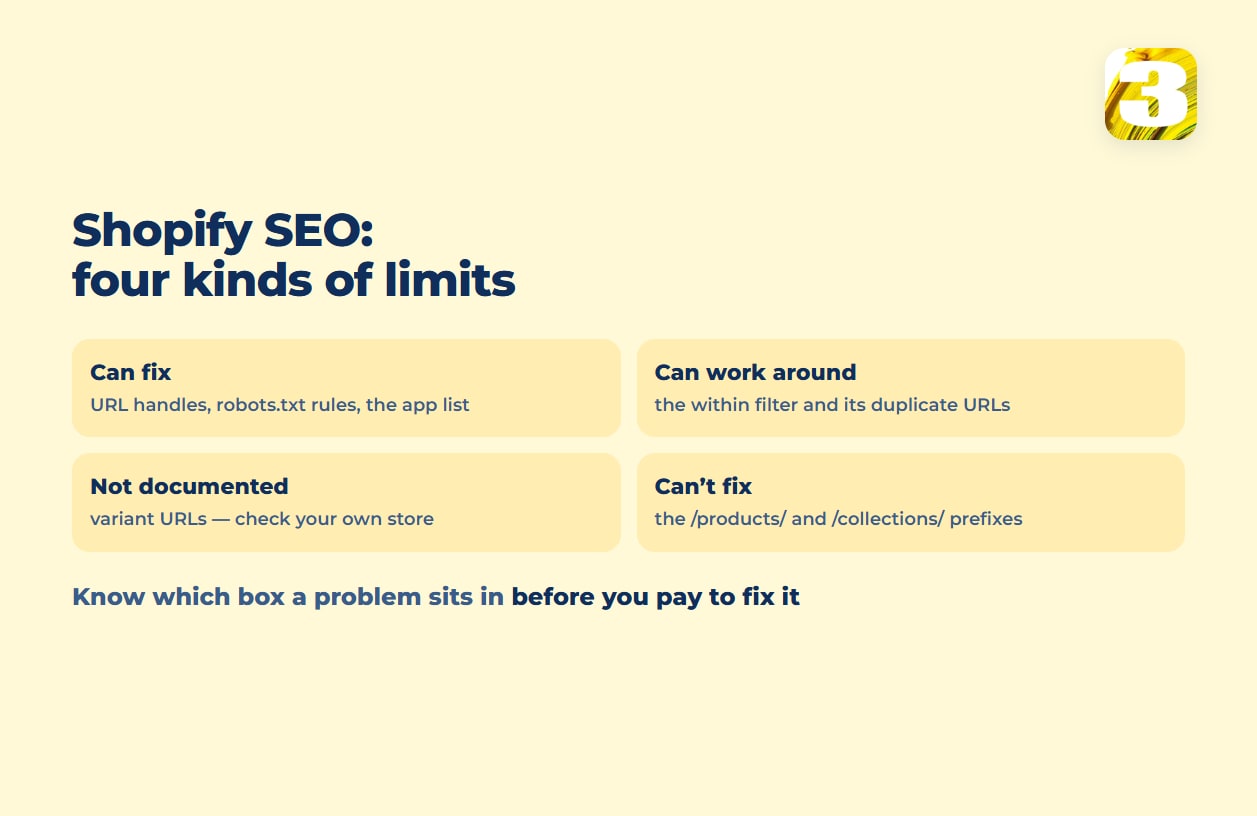
Can fix: the handle. Can’t fix: the prefix in front of it.
The Duplicate Product Pages Shopify Warns You About
The clearest SEO warning in Shopify’s developer docs is about what happens when a product is reached through a collection. Theme code that uses the within filter links to a product in the context of a specific collection, something like /collections/summer-sale/products/canvas-tote. That URL sits next to the product’s standard address, /products/canvas-tote, with identical content on both. Shopify’s own filter reference says plainly: “Because a standard product page and a product page in the context of a collection have the same content on separate URLs, you should consider the SEO implications of using the within filter.” It doesn’t offer a fix for this specific case. What Shopify does supply, platform-wide, is automatic canonical tags — per its SEO overview, they’re added “to prevent duplicate content from appearing in search results.” Shopify’s documentation doesn’t connect that general mechanism to the within duplicates, so treat the two as separate facts, not cause and effect.
Can work around: limit where theme code uses the within filter. Can’t fully remove: in our experience the collection-context URL still opens even when nothing links to it.
What You Can Fix, and the One Thing Shopify Hasn’t Documented
Three more items sit on this list, and they don’t all rest on the same kind of evidence.
robots.txt has been editable since June 21, 2021, when Shopify shipped robots.txt.liquid. Through it, merchants can allow or disallow certain URLs from being crawled, add crawl-delay rules for specific crawlers, add extra sitemap URLs, and block specific crawlers. Shopify is equally direct about the risk: this is “an unsupported customization. Shopify Support can’t help with edits to the robots.txt.liquid file,” and “incorrect use of the feature can result in loss of all traffic.” Shopify’s developer docs add that it’s “strongly recommended to use the provided Liquid objects whenever possible,” and that “the default rules are updated regularly to ensure that SEO best practices are always applied.” One thing robots.txt can’t do, on any platform: keep a page out of Google’s results. Google says so directly — robots.txt “is not a mechanism for keeping a web page out of Google,” and a page that’s disallowed “can still be indexed if linked to from other sites.” Keeping a page out of results takes a noindex tag on the page itself, not a robots.txt line — and, per Google, that page “must not be blocked by a robots.txt file,” or Google never sees the tag.
Product variant URLs (?variant=123456) are the one item on this list with no documented answer. We haven’t found Shopify documentation on how ?variant= URLs are canonicalized or indexed. You can check your own store instead: open a product URL with ?variant=, view the page source and read the rel="canonical" line, or run the URL through URL Inspection in Search Console.
Installed apps are the quieter SEO cost, because the damage shows up as speed, not as a missing tag. Shopify’s own performance guidance lists apps among “the biggest factors that impact web performance”: “Too many apps loading assets on your storefront can slow performance. Review your installed apps and remove any that aren’t essential for sales.” Slow pages feed straight into Core Web Vitals, which is its own speed problem to solve separately from anything above.
Can fix: robots.txt rules, with care — and noindex on a page robots.txt doesn’t block, for keeping pages out of results. Can fix, and often overlooked: the app list. Not documented — check it yourself: variant URLs.

Shopify vs WooCommerce SEO: Where You Get More Room, and What It Costs
WooCommerce runs on a WordPress install you control, so URL structure, robots.txt, and canonical logic are yours to set directly — no unsupported-customization warning, no platform-level prefix standing between you and the folder name you want. WordPress outputs basic canonical tags and a sitemap on its own too, but most stores add an SEO plugin for real control — and that plugin, core updates, and security patches are on you or whoever maintains the site. Neither platform is the wrong choice; they’re two different maintenance arrangements. If you’re weighing one against the other, what Shopify’s fees add up to and what a move between them involves cover the parts of that decision that have nothing to do with search, and what either build costs to run lays out the rest.
If what’s holding your store back is the theme or the build underneath it — not the routing rules above — that’s a different job, and e-commerce site work is where we’d look at that instead.
For everything on this list, the starting point is the same: someone reading your store’s actual URLs, robots.txt, and app list before deciding what’s worth touching. A free audit is the first step — where the store stands, what’s broken, which searches it’s missing, and what to fix first. The work itself is a paid project: our SEO services and prices list SEO for a Shopify or WooCommerce store at $2,489 for up to 6 categories and 30 products, or $4,489 for up to 15 categories and 150 products — one-time, for one language, not a monthly fee. Above the larger package, each extra category is $150 and each extra product $6, and a second language adds 30%. If you’re weighing that one-time fee against an ongoing retainer, our piece on how much SEO costs covers the trade-off directly.