
Most guides to ecommerce conversion rate optimization hand you the same sixteen tactics: shorten the checkout, add trust badges, offer guest checkout, show shipping costs earlier. Several of those tactics live on pages your plan may not let you touch, and the lists rarely mention it up front. Before you chase a tactic, you need two answers: which of these fixes your platform will actually let you make, and where in your funnel — product page, cart, checkout, or payment — people are actually leaving. Neither question gets a clean number. Both change what you do next.
Ecommerce Conversion Rate Optimization Starts With a Platform Boundary
On Shopify, deep checkout edits used to run through a file called checkout.liquid — and even then, only Shopify Plus merchants had it. That file is now unsupported for everyone, Plus included, as of August 13, 2024, per Shopify’s own architecture documentation; the Thank You and Order Status pages followed, with the last of those sunsets passing in August 2026.
What replaced it is Checkout Extensibility, available on every plan — but with a line through the middle that most “16 tactics” articles never mention. Shopify states plainly that checkout UI extensions rendering on the information, shipping, and payment steps are “available only to stores on a Shopify Plus plan,” while extensions that appear after the purchase is complete are open to every plan except Starter. So the split isn’t “Plus can customize, nobody else can.” It’s narrower and more specific: anyone can restyle the checkout and add something to the post-purchase screen; changing what happens during the information, shipping and payment steps is the part that costs a plan upgrade.
That’s worth knowing before you read a tactic that says “add a custom field on the shipping step.” On most Shopify stores, that sentence describes a plan upgrade, not an afternoon of work — while “add an upsell after checkout,” which sounds harder, is available to almost everyone.

We build stores on WooCommerce, which draws the boundary in a different place. WooCommerce’s own documentation is direct about it: “No customization is required for the block cart and checkout to function,” and on a block theme “you can get right to customizing the templates to fit your needs” (WooCommerce docs). Combined with an open hooks system, the fields, upsells and shipping logic that sit behind a plan upgrade elsewhere are changed on your own side here — through a template, a hook or code, depending on the change. We’ve written more on what that ownership difference means in practice in Shopify or WooCommerce? What Actually Owns Your Store.
Why a Single Ecommerce Conversion Rate Hides the Problem
“Our store converts at 1.2%” doesn’t tell you what to fix, because that one number blends four different failures: a product page that doesn’t answer the buyer’s question, a cart that surprises people with costs, a checkout that asks too much, or a payment method the shopper doesn’t trust. Each breaks for a different reason and gets fixed in a different place. Treating conversion as one number is how “add trust badges” ends up applied to a store whose real problem is that the product photos don’t show scale.
Before touching anything, it’s worth sorting fixes by what they cost — a text change, a layout change, or a rebuild — as set out in what to fix first when traffic is high but leads aren’t; and since every source calculates its overall rate differently, the mismatch between benchmarks is unpacked in why published conversion benchmarks disagree.
What Baymard’s Research Says About Cart Abandonment
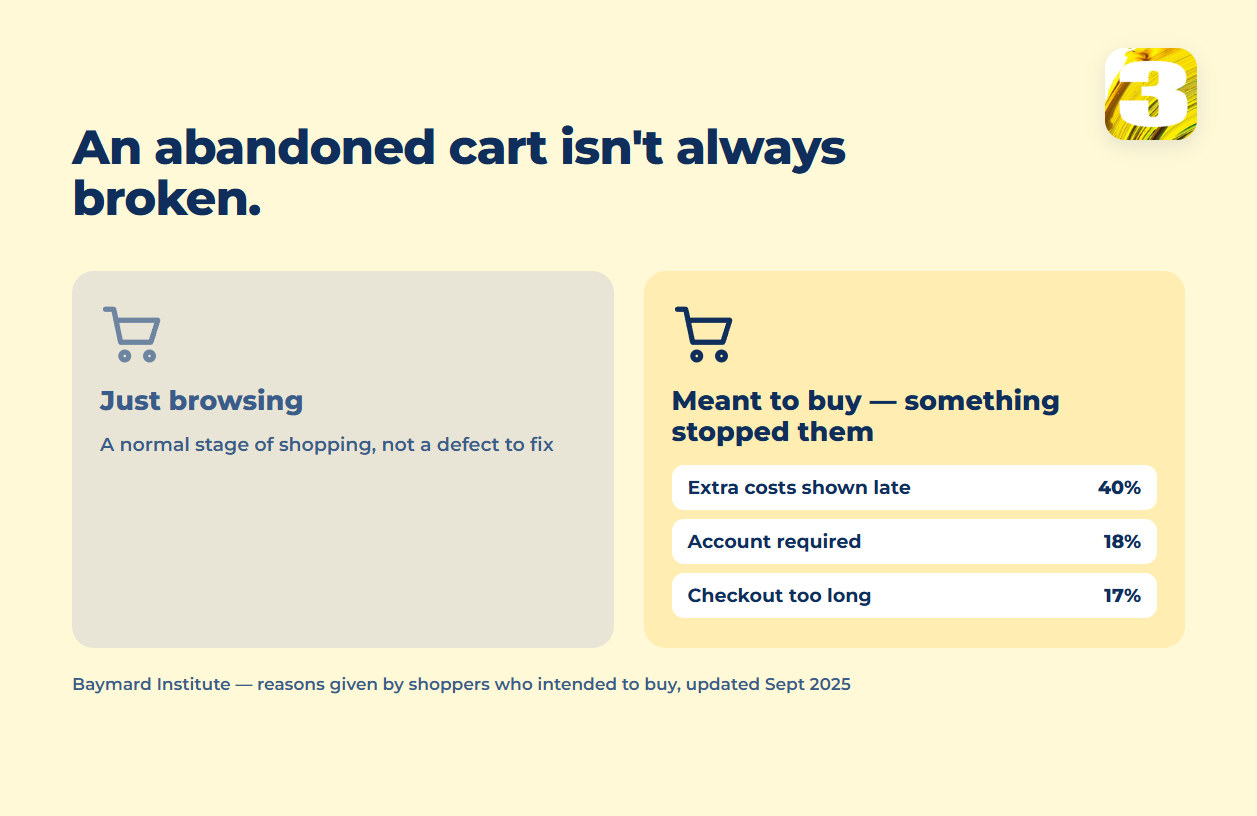
The most-cited number here comes from the Baymard Institute, which aggregates 50 separate studies into an average cart abandonment rate of 70.22%, last updated September 22, 2025 (Baymard). Its underlying checkout research is unusually deep for this subject: 344 top US and EU stores, over 30,000 checkout elements scored by hand, more than 4,400 recorded usability sessions, 14 years. Among shoppers who intended to buy, the leading reasons they didn’t: unexpected costs like shipping and taxes (40%), delivery taking too long (20%), distrust in handing over card details (19%), a forced account (18%), and a checkout too long or confusing (17%).
Here’s the part most conversion articles leave out. Baymard also found that 42% of US shoppers have abandoned a cart simply because they were browsing and weren’t ready to buy — note what that figure counts: the share of shoppers who have done this at least once, not the share of your abandoned carts. It doesn’t tell you how much of your own 70% is browsing rather than breakage. What it does tell you is that some fraction of every store’s abandonment is a normal stage of shopping, not a defect waiting to be fixed, and a rate treated as a single alarm bell will send you hunting for a problem that may not be there.
How to Tell Which Step Is Losing People
Before any of that, you need to know which step is failing, and that rarely requires a new tool. The funnel exploration in Google Analytics 4, and the sales reports built into store platforms, will show how many sessions reached the product page, the cart, the checkout and the confirmation screen — provided your store is actually sending its ecommerce events. That’s the first thing to check, for the reasons set out in what to fix first when traffic is high but leads aren’t. Line those four counts up and the shape of the problem is usually obvious.
What you’re looking for is the largest single drop between two adjacent steps, not the smallest number overall. A store where most product-page visitors never reach the cart has a product-page problem — photos, description, price, stock — and no amount of checkout work will touch it. A store where people reach the checkout and stop there has a checkout problem, and that’s where the platform boundary above starts to matter. Fix the biggest gap first, then re-measure before deciding there’s a second one.
Fixing an Ecommerce Conversion Rate on WooCommerce
The practical upside of an editable checkout is that fixes match causes instead of matching what a plugin happens to offer. A checkout flagged as too long gets shorter because a field was removed — not because a widget was installed to hide that field behind a click. A cart that reveals shipping cost too late shows the subtotal earlier, because the template allows it.
One product-page factor worth naming separately: image weight moves conversion on its own, apart from anything checkout-related, and that’s covered in Optimizing Images Without Slowing Down the Store.
Where to Start Fixing Your Store’s Funnel
Name the step, then check what your platform will let you change at that step before committing to a fix. If the honest answer is “not on this plan,” that’s worth knowing before you spend a week testing something you can’t fully implement. A store built on WooCommerce starts without that particular wall; if the open question is fixing what exists versus building new, how ecommerce site cost breaks down covers that decision.
One habit from opening other people’s stores: before touching the checkout, we read the product page as a first-time buyer and look for the question it doesn’t answer — size, materials, what arrives in the box, what happens if it’s wrong. More often than the checkout deserves the blame, that’s where the hesitation starts.
If you want a second read on where your funnel is losing people, tell us where you’re stuck and we’ll look at it with you.