


Search “Shopify or WooCommerce,” “Shopify vs WooCommerce,” or “WordPress vs Shopify” and most results promise a neutral comparison. This one isn’t neutral, and we’ll say so upfront: we build stores on WooCommerce by default. Not because Shopify is bad software — it isn’t — but because of what happens to the store once it’s built. One platform charges you rent for as long as the store exists. The other hands you the keys. That difference costs real money, and it shows up on the invoice long before it shows up anywhere else.
What You’re Actually Choosing Between
Shopify is a hosted platform: you rent space on their servers, their checkout, and their rules, and you pay for that rental every month the store is open. WooCommerce is a free plugin that turns a WordPress site into a store — which makes “WordPress vs Shopify” really the same question asked a different way. Install WooCommerce and you’re running store software on hosting you choose and control, not software Shopify runs for you.
The Real Shopify Bill
Shopify’s published plans run Basic at $39, Grow at $105, and Advanced at $399, with Plus starting at $2,300. Pay through Shopify’s own payment system and that’s most of what you owe.
Pay through anyone else — a payment provider you already use, or one your accountant prefers — and Shopify adds a surcharge on top of the card fee: 2% on Basic, 1% on Grow, 0.6% on Advanced, and 0.2% on Plus. Shopify’s own documentation is direct about the alternative: use Shopify Payments and “you only pay the credit card rate without additional third-party transaction fees.” That’s the real shape of the bill — it doesn’t just charge you to sell, it charges you extra for choosing who processes the sale. There’s a separate piece on what a Shopify store actually costs.
What WooCommerce Costs Instead
WooCommerce’s pricing page states the difference plainly: the plugin is “Free, with no monthly subscription,” and there are “no platform fees, no revenue share.” You do pay for hosting — WooCommerce itself names a range of $25 to $350 a month, scaling with traffic — and for payment processing, which through the official WooPayments gateway runs 2.9% + $0.30 per online transaction in both the US and Canada. There’s no penalty for using a different processor, because there’s no built-in one you’re expected to prefer.
| Shopify | WooCommerce | |
| Platform fee | $39–$399+/month by tier (Plus from $2,300) | None — the plugin itself is free |
| Card processing, own gateway | Built into the plan, rate improves on higher tiers | 2.9% + $0.30 per online transaction |
| Surcharge for using another processor | 2% down to 0.2%, depending on tier | None |
| Hosting | Included in the plan | $25–$350/month, based on traffic |
| Add-ons | Priced per app individually | Official extensions from $84 to $396/year |
Who Actually Owns the Store
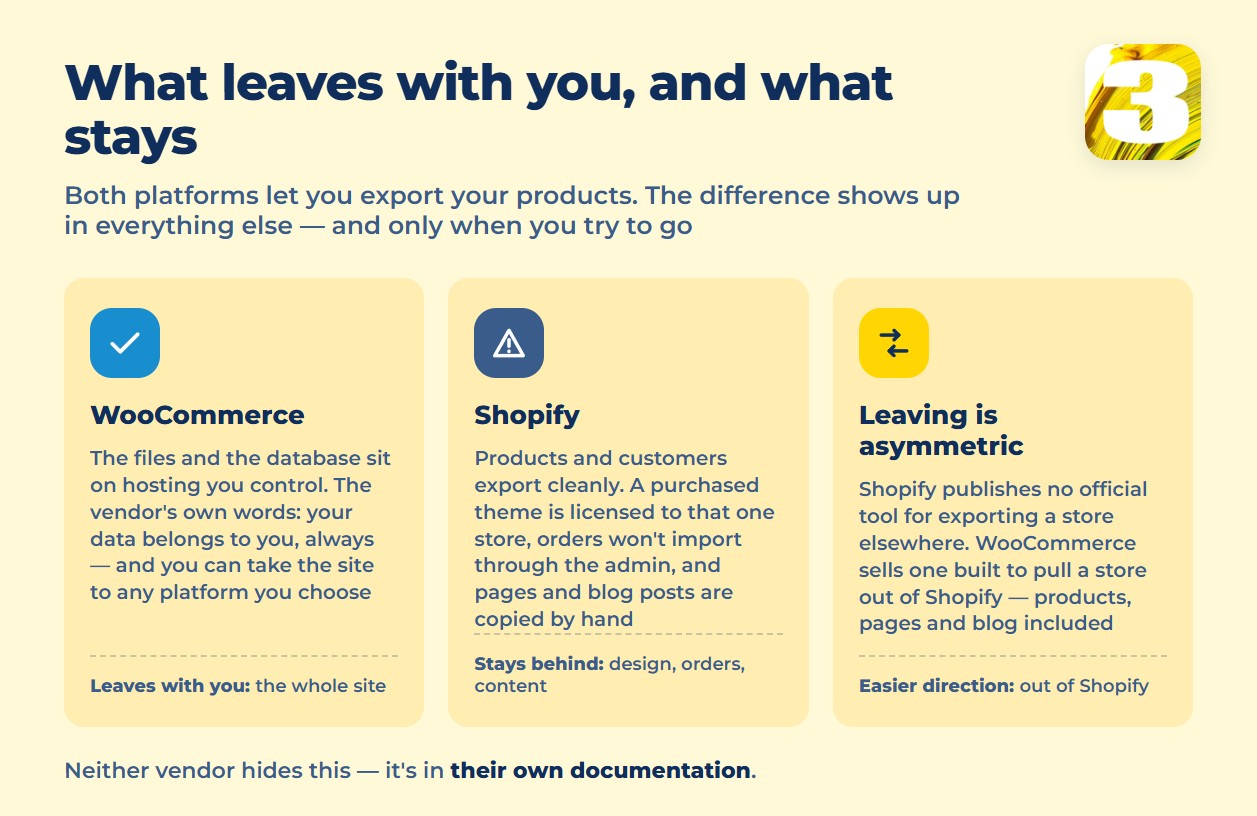
This is the part most comparisons skip, and it’s the one that matters most once the store is live. WooCommerce is explicit about it: “your data belongs to you. Always… you’re free to export all your content and take your site to any platform you choose.” The files and the database sit on hosting you control. Nothing about that changes if you switch developers, switch hosts, or switch your mind.
Shopify’s own documentation on duplicating a store tells a different story. A theme you bought is licensed to the specific store you bought it for — “that theme is licensed only to the store that you originally bought it for,” in Shopify’s words — so it doesn’t travel with you. Orders can’t be imported through the admin — that takes a third-party app instead. And your pages and blog posts, the content you spent time writing, don’t come across on their own either: Shopify’s guide lists them as an optional manual step, “copy and paste your blog posts and online store pages.”
None of that is a criticism of Shopify’s engineering. It’s just what renting means: the space is yours to decorate, not to keep. If ownership rather than price is the real question for your business, we’ve gone through the same comparison for Wix and WordPress, and the pattern holds there too.

Search, Extensions, and the Things You’ll Add Later
Neither platform hands you a finished store on day one. Shopify’s built-in search is decent out of the box — it’s tolerant of typos and searches products, blog posts, and pages — and Shopify’s own free Search & Discovery app adds filters and synonyms if you need them.
WooCommerce’s stock search is narrower: it looks at titles and content, not the custom fields and attributes that hold your SKUs, sizes, and colors, so a catalog of any real size usually needs a dedicated search extension. It’s a small detail with a real effect on whether customers find what you’re selling — enough of one that we’ve written it up on its own. Worth reading next: why a store search misses products that are in stock.
If You Ever Need to Switch
Worth knowing before you build, not after: Shopify’s own migration guide from WooCommerce admits real limits going in — “Shopify only allows for 3 product options,” and reviews don’t come with you at all (“You can’t export or migrate reviews from WooCommerce to Shopify”).
Going the other direction, Shopify offers no official tool, though WooCommerce sells a paid extension that pulls products, customers, orders, pages, and blog posts out of a Shopify store by API. Put those two facts side by side and a pattern shows up: leaving Shopify is easier, institutionally, than joining it. That’s not our opinion — it’s what each platform’s own documentation does and doesn’t offer. If a move is already on your mind, here’s what actually happens during the switch. More on what a migration really carries over.
When We Recommend Each and Why
We’ve built and run stores on both platforms, so this isn’t a hedge — it’s a real split.
Choose Shopify if you need to be selling within days, you don’t have a developer on staff, and your product line is simple enough that Shopify’s defaults cover most of it. That’s a real business need, and Shopify is genuinely good at meeting it. If that’s your situation, we’ll build there — we take on Shopify projects too, and if your product or customer data already lives somewhere else, we’ll keep it synced rather than asking you to start over.
Choose WooCommerce if you expect the store to grow, you rely on content or search traffic to bring people in, or you just don’t want a platform deciding what your checkout, your theme, or your data are allowed to do next year. That’s the majority of the stores we build, and it’s why WooCommerce is where we start by default.
What It Costs to Build, Either Way
Everything above is the running cost — what the store charges you every month for existing. Building it in the first place is a separate number, and it varies with how many products you’re listing, what you need the checkout to do, and how much of the writing and setup you’re doing yourself versus paying someone for. Covered separately: what an online store costs to build.
Our own builds start at $3,900, paid once — not a monthly platform fee, not a revenue share. What that buys is the system rather than the typing: the store itself, product templates for every kind of item you sell (serial numbers, bundles, whatever your catalog actually needs), payment setup on the gateways that ship with the platform, and multilingual product handling through WPML if you sell in more than one language — the single most tedious piece of any store build, and the one most quotes leave out. Then we show you how to run it.
Loading the catalog is deliberately left in your hands, because nobody knows your products better and it’s the part you’ll be doing forever anyway. If the catalog is small we’ll load it as part of the build; if it runs to hundreds of items, or you want the descriptions written for you, that’s quoted separately rather than buried in the price.
Tell Us What You’re Selling
The honest answer to “Shopify or WooCommerce” depends on specifics we don’t have yet: how many products you’re listing, how you currently take payment, and whether you already have a WordPress site we’d be building on top of.









