
A slow site is rarely one problem. It is several small ones stacked on top of each other, and most guides to site speed optimization answer that with a checklist long enough that nobody finishes it. What actually moves the needle is fixing the right ones, in the right order, and knowing when the honest answer is “rebuild it” instead of “optimize it again.”
This is that order, and the point where it stops being worth chasing.
What Really Causes Slow Loading Web Pages
In the sites we open, slow loading web pages come back to the same handful of root causes, whatever platform runs underneath them:
- Server response time. The server takes too long to send back the first byte, usually because the hosting tier is undersized or there is no caching layer between the visitor and the database.
- Render-blocking resources. CSS and JavaScript that the browser must download and run before it can draw anything, including the headline the visitor came to read.
- Third-party scripts. Chat widgets, ad pixels, and analytics snippets added one at a time over a few years, until a dozen of them run on every single page.
- Fonts loaded late. The text is invisible, or swapped in visibly, because the font file arrives after the layout is already built.
Notice what is missing from that list: image weight. It matters, often more than anything above it, but it is its own fix with its own steps — covered in Optimizing Images Without Slowing Down the Store, not repeated here.

How to Improve Website Speed: The Order That Works
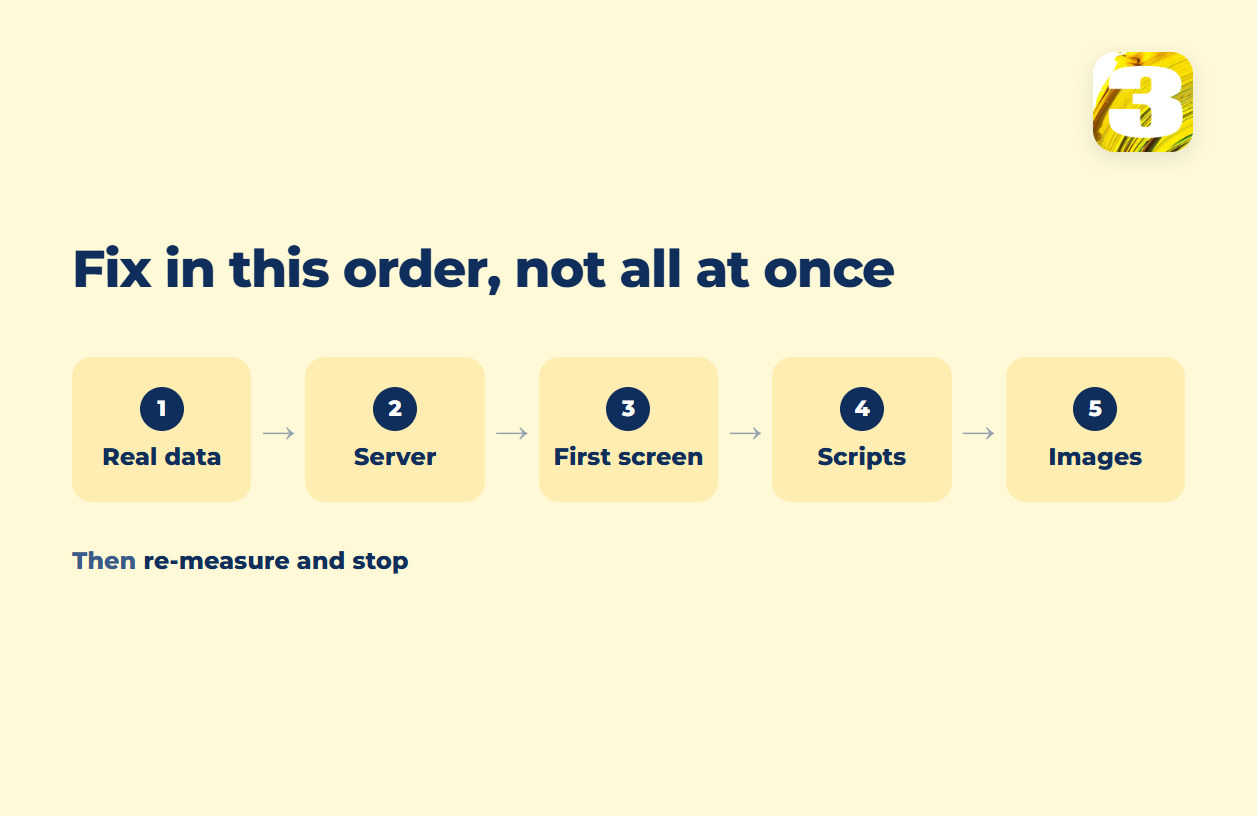
The question is never “what could I fix.” It is what to fix first. This is the sequence that produces results without months of tinkering — and the label on each step is what decides the bill, because changing a setting is a short job and changing how a page is built is a project:
- Look at real visitor data before touching anything — costs nothing. A single lab score can hide or invent a problem that does not exist for actual users. the Core Web Vitals thresholds covers how to read that data and where lab scores mislead.
- Fix the server layer — a hosting decision. If response time is the bottleneck, this is the cheapest single change available, and every later fix depends on it.
- Clear the first screen — settings, sometimes structure. Defer or remove anything that blocks the browser from showing the top of the page — sliders, autoplay video, scripts that do not need to run yet. If the first screen was designed around a slider, this stops being a setting and becomes a rebuild of that section.
- Cut third-party scripts down to the ones earning their place — settings. Audit what is actually installed; sites often run tools nobody remembers adding.
- Handle images as their own project — settings, using the process linked above.
- Re-measure, then stop — costs nothing. There is a point past which more work buys nothing a visitor will notice. Chasing it past that point is spend without return.
For a store, the same order applies, with one addition: pages that show different content to every visitor — a cart, a checkout — cannot be cached the same way a product page can. That changes what “fast” means for an online store, and it is worth planning for at build time rather than patching later.
The Point Where Page Speed Optimization Costs More Than Rebuilding
Page speed optimization has a ceiling. If the causes above are one or two settings, fixing them is a few hours of work. If the causes are structural — a builder that loads its full library on every page, years of plugins nobody has audited, a template that was never built with a first screen in mind — every fix is a workaround on top of a design that resists it. At some point the honest number is: this costs more to patch than to rebuild.
That is the comparison worth running before signing up for another round of tuning. A site built to fewer than eight pages, with the copywriting done as part of the build rather than billed separately, runs $1,900. A store runs $3,900. Both are typically delivered in 10 business days, on the condition that materials arrive on time and feedback rounds get answered promptly — a build sits idle when a client goes quiet for two weeks, and that time is not on us. See how site cost breaks down for what is included at each size.
The “90+ in PageSpeed” Promise, and Why It’s Empty
A lab score can be pushed up without the site getting any faster for a real visitor, which is why a guaranteed number is worth less than it sounds. The figure that counts comes from what real Chrome users actually experienced on your pages, not from a single test run on a clean machine — the Core Web Vitals thresholds covers where those two numbers part ways, and which one Google reads.
It also does not buy rankings by itself. Google is explicit that there is no single signal driving search results — speed is one input among many, not a switch that gets flipped at a target number.
Everything above applies to any platform. WordPress carries its own set of causes on top of it — theme weight, plugin sprawl, hosting tier — and those are covered in WordPress speed optimization.
Doing It Yourself vs. Hiring Website Speed Optimization Services
There is a real incentive gap worth naming. A business that sells audits earns more from a longer list of problems — more line items, more billable hours, more follow-up reports. A business that builds the site earns more from there being nothing left to list. That is the whole difference between paying for a diagnosis and paying for a fix.
We build sites ourselves, which means we see these causes at the point where they get created — a heavy first screen, a script added without checking what it costs, a template built once and never revisited — rather than in a report handed over afterward. Ongoing upkeep, including watching for the plugins and scripts that creep back in, is covered by what maintenance actually includes; there is no flat price for it, because a five-page site and a store with weekly updates cost different amounts to keep fast.
If you want a straight answer on your own site — send the address. We will tell you which of it is a setting and which of it is a rebuild.