


Clicks mean nothing if you’re not attracting the right audience. That’s why analyzing search terms is one of the most powerful things you can do inside Google Ads. It shows you not just what people clicked — but what they were actually looking for when they did.
Understanding real search intent lets you cut wasted budget, tighten your targeting, and write better ads. This isn’t optional optimization — it’s foundational work. It also decides whether search is the right place for your budget at all, which is a separate question from choosing between Google Ads and Facebook Ads in the first place.
Let’s walk through how to use the Search Terms Report and what to look for.
What Is the Google Ads Search Terms Report?
This report shows you the exact queries users typed into Google that triggered your ads. Not just the keywords you bid on — the actual phrases people searched.
In the current Google Ads layout it sits under Campaigns → Insights and reports → Search terms. In the older interface it lived under Keywords → Search terms, which is where most guides still send you.
What you see:
- Search query
- Match type
- Associated keyword
- Clicks, impressions, CTR
- Conversions and cost metrics
This report bridges the gap between your keywords and user reality.
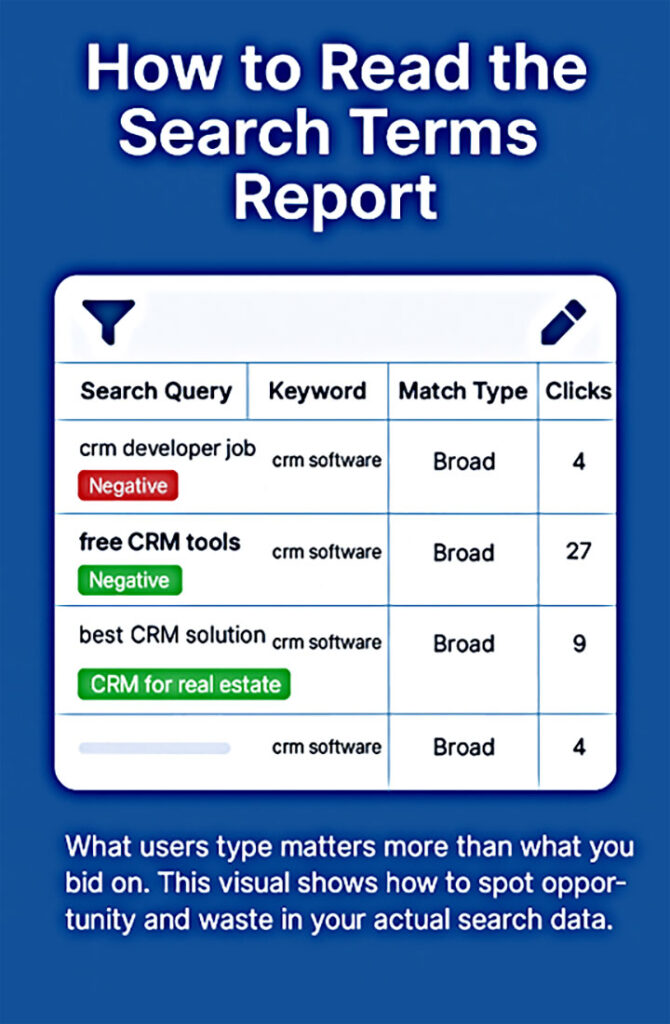
How to Read the Search Terms Report: Spotting Intent and Wasted Spend
Use the Search Terms Report to uncover what users are actually searching. Highlight and exclude irrelevant traffic (“free tools”, “jobs”) and double down on high-intent queries (“CRM for real estate”) that drive real results.
Why This Report Matters
- It exposes waste
You’ll often find irrelevant terms costing you money. Think: “free CRM software” when you sell enterprise tools. - It reveals gaps
You may discover high-converting terms you didn’t even target directly — new keyword ideas that outperform your planned strategy. - It validates intent
The best way to know if your campaign is attracting buyers or browsers is to look at the actual language they use.
How to Use the Search Terms Report Effectively
1. Identify Irrelevant Traffic
Look for terms that clearly don’t match your business model.
Examples:
- Job seekers: “CRM developer jobs”
- Researchers: “how CRM works”
- Price hunters: “free email tools”
Action:
- Add these as negative keywords
- Consider tightening match types (e.g., phrase over broad)
2. Find High-Intent Queries
Spot queries that consistently bring conversions or strong engagement.
Examples:
- “Best CRM for real estate teams”
- “Email marketing automation for dentists”
Action:
- Add them as exact match keywords
- Tailor ad copy to reflect those terms
3. Group by Theme or Funnel Stage
Some queries reflect early research, others show clear buying intent.
Example Funnel:
- Awareness: “What does a CRM do?”
- Consideration: “Compare CRMs for small business”
- Purchase: “Buy HubSpot CRM monthly plan”
Action:
- Create new ad groups for specific themes
- Align ads and landing pages to match user stage
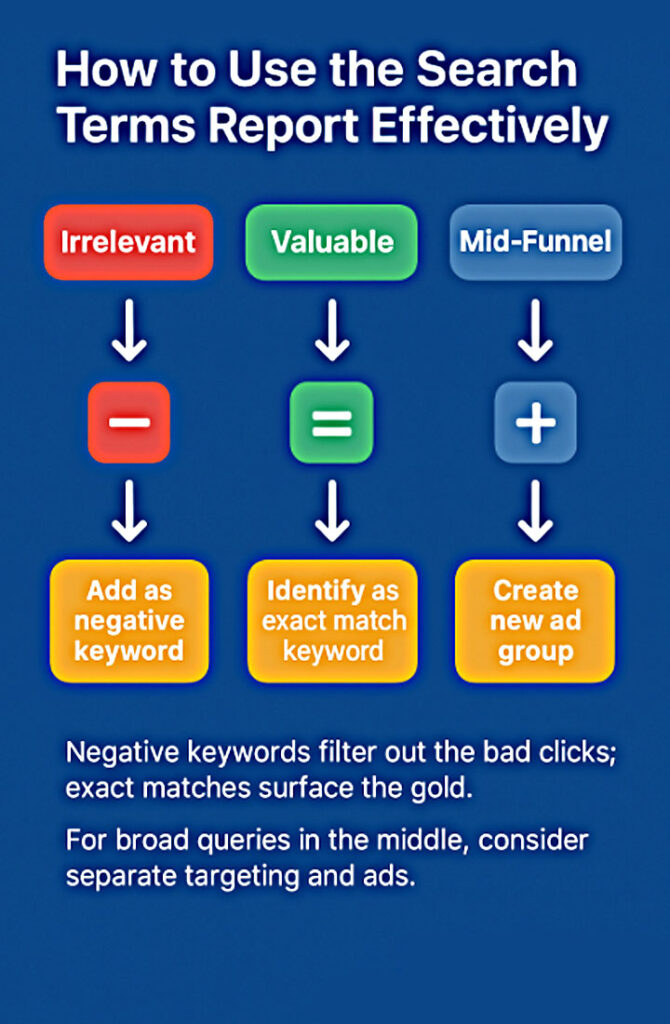
How to Use the Search Terms Report Effectively
This visual breaks down three critical actions: remove irrelevant queries, promote high-intent terms, and group search behavior by funnel stage. The goal isn’t just cleanup – it’s smarter structure and stronger performance.
Pro Tips for Deeper Insights
To go beyond surface-level optimization, use the Search Terms Report strategically. Here’s how advanced advertisers squeeze more value out of it:
Segment by device
Search behavior differs significantly across devices. A keyword that performs well on desktop may fail on mobile due to intent, context, or landing page usability.
→ Action: Split performance reports by device and adjust bids or create mobile-specific ad experiences.
Analyze time-of-day and day-of-week patterns
The same search can mean something different at 10 AM vs. 10 PM. Weekday searches may come from professionals; weekend queries might come from consumers.
→ Action: Use ad scheduling to prioritize your budget during peak intent windows.
Filter by conversion metrics, not just clicks
Don’t chase volume. Focus on what actually converts. A keyword might bring 100 clicks but zero leads, while another drives consistent ROI with just 10.
→ Action: Sort terms by cost-per-conversion or ROAS to find the true winners.
Label for action
Manually tagging search terms helps teams move faster. Use simple, standardized labels like:
- “Add as Exact Match”
- “Negative — Irrelevant”
- “Monitor — Low Volume, High Value”
→ Action: Review and apply label-based filters during optimization sprints.

How Often Should You Analyze Search Terms?
At 3MY, we analyze Search Terms weekly — without exception. Here’s why that cadence matters:
- Search trends shift quickly. What worked last month may be irrelevant today.
- Google’s match types evolve. Broad match, in particular, can creep into areas you didn’t expect.
- User intent changes. Seasonal shifts, market news, and even time of day can influence queries.
- Data decay is real. If you don’t revisit your terms, you’re basing decisions on outdated behavior.
Weekly reviews allow you to stay sharp, trim waste, and discover new opportunity without adding a cent to your budget.
Think of it like brushing your teeth — not exciting, but absolutely essential.
What We Do at 3MY
Search term analysis isn’t a side task. For us, it’s the foundation of profitable Google Ads campaigns.
Here’s how we apply it:
- Conversion-first thinking. We measure value by what turns into leads or revenue – not just volume or clicks.
- Keyword lists built from real language. We don’t rely on guesswork or outdated tools. Our campaigns speak the way customers do.
- Relentless negative keyword refinement. We actively block wasteful terms before they burn your budget.
- Campaign structures that mirror search behavior. Each ad group, keyword, and message is matched to intent, not just category.
The result? Tighter targeting, better Quality Scores, and campaigns whose results build on each other over time.
Want Us to Audit Your Search Terms?
Chances are, your Google Ads account is paying for clicks that never had a chance to convert. Most businesses don’t realize how much budget slips through irrelevant or low-intent queries.
Here’s what we’ll do in a Search Term Audit:
- Identify what to pause. We’ll flag terms that waste money with zero return.
- Highlight what to promote. We’ll show you high-performing queries you may have overlooked.
- Reveal what to rewrite. If your ads or landing pages don’t match top-performing terms, we’ll show you how to align them.
It’s not about spending more. It’s about spending smarter with search term data as your compass. If you want to run the first pass yourself, we wrote down the 20-minute version of that audit, and what Google Ads actually costs for the numbers it puts in front of you.









